My imessage isnt working. I just changed the password of my apple id then it suddenly stopped working. What should i do?
Mg imessage suddenly stopped working when i tried to change the password of my apple id. What should i do?
iPhone 6s, iOS 10.1
Mg imessage suddenly stopped working when i tried to change the password of my apple id. What should i do?
iPhone 6s, iOS 10.1
Thank you for using Apple Support Communities.If you can't see or select your number in Messages or FaceTime
- Make sure that you're using the latest software for your Mac or iOS device.
- Make sure that you correctly followed the iPhone steps to set up your phone number. You should be using the same Apple ID on all of your devices.
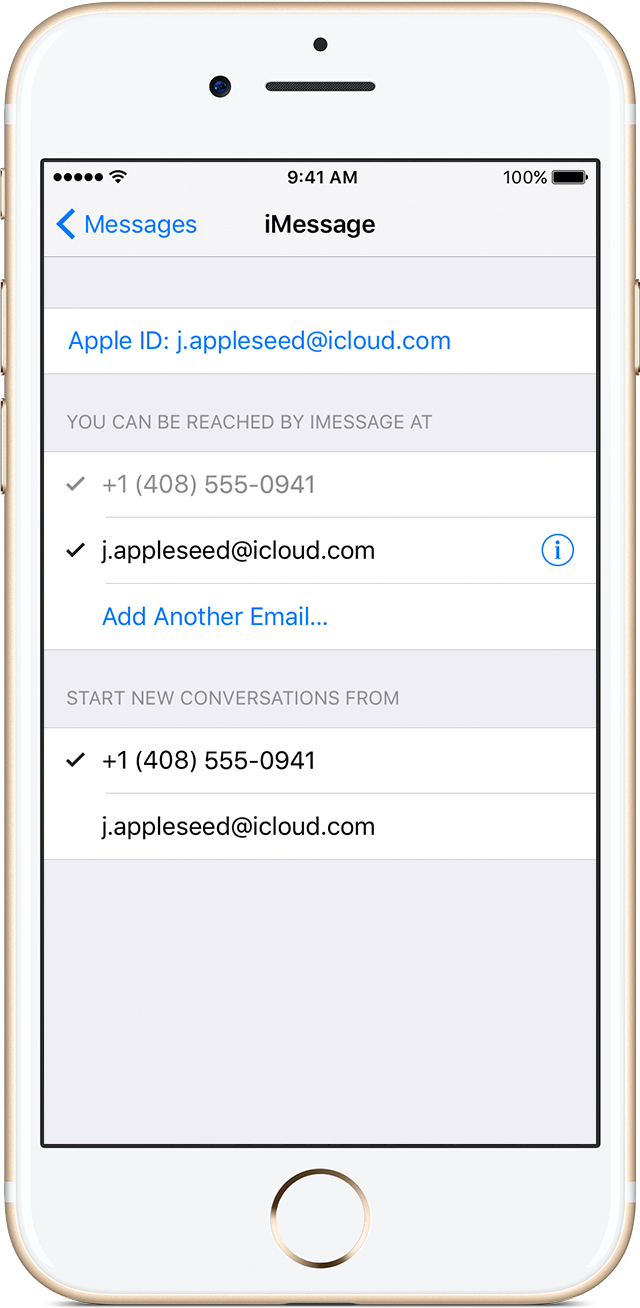
- In the “You can be reached” section of Messages and FaceTime settings, make sure that there are checkmarks beside your phone number and Apple ID:
If your phone number is unchecked and you can't select it, or you have some other issue, follow these steps:
- On your Mac:
- In Messages, choose Messages > Preferences, then click Accounts and select your iMessage account. Click Sign Out.
- In FaceTime, choose FaceTime > Preferences, then click Sign Out.
- On your iPhone, iPad, and iPod:
- Go to Settings > Messages > Send & Receive. Tap your Apple ID, then tap Sign Out.
- Go to Settings > FaceTime. Tap your Apple ID, then tap Sign Out.
- On your iPhone:
- Go back to Settings > Messages and make sure that iMessage is turned on.
- Tap Send & Receive, then choose “Use your Apple ID for iMessage” and sign in with your Apple ID.
- Using the same Apple ID, sign back in to Messages and FaceTime on your other devices.
If you still need help, change your Apple ID password and repeat the setup steps. If that doesn't work, contact Apple Support.
Hi Matthew.S81
I really appreciate you for replying and answering my question.
Just to clarify, yes it was successful. I already updated it through icloud and on the app store. But my imessage is not working anymore. But I tried to change the send and receive to my apple id, it worked. But i dont want to use my apple id. I want to use my number.
Do you think it's an icloud issue?
Hi again, Matthew.S81
Thank you so much for your help. I followed the steps that you've provided me, and its now working. I really appreciate your time.
Cheers!
My imessage isnt working. I just changed the password of my apple id then it suddenly stopped working. What should i do?