Hello and welcome to Apple Support Communities, Kristelbell.
Thanks for the details about what you're experiencing with your iPhone. If I’m understanding you right, when you open an app other than Phone while you're currently on an active phone call, you no longer see a green flashing bar at the top of your iPhone screen indicating the call is still on-going. Also, your Pokemon Go app is no longer running in the background. I can certainly understand why it would be important to know which apps are still running while you're using other apps. You’re in the right place for help with this.
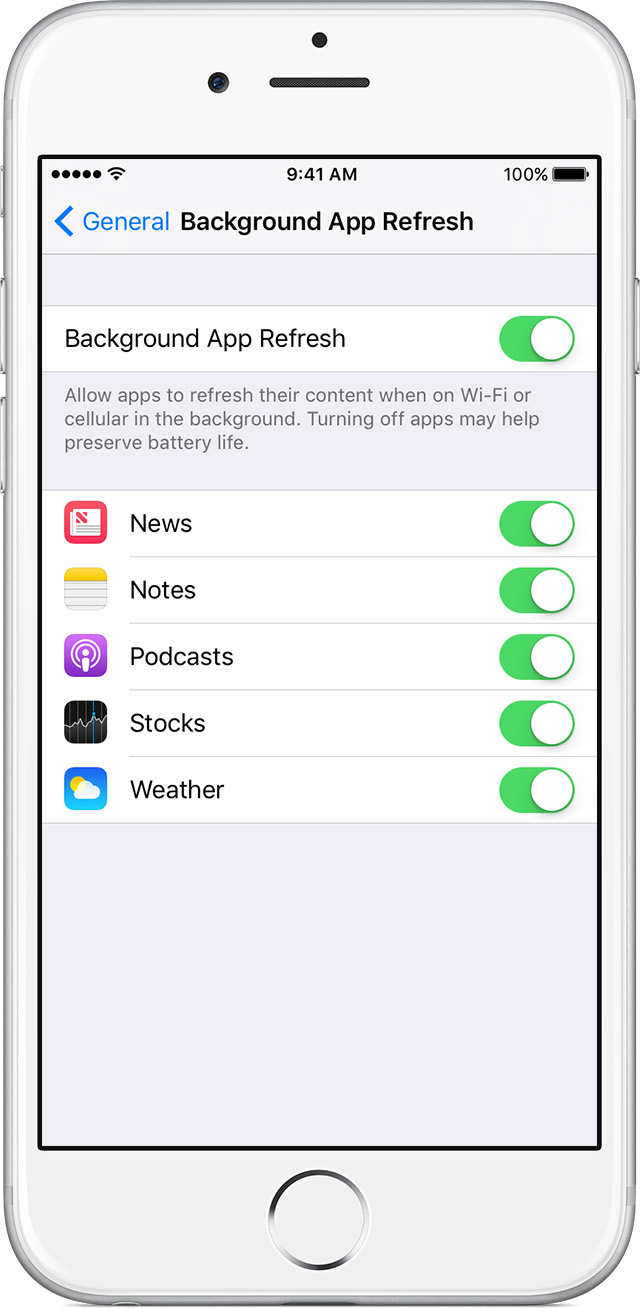
Not all applications are designed to run in the background on your iPhone, and sometimes certain settings and functions can change with specific applications as new software updates to your iPhone and/or apps are released. With that being said, it may not be possible to have Pokemon Go running in the background of your iPhone. If that is still an option for that particular app, you should see it listed in your Settings app with the option to enable/disable Background App Refresh. You can view more about this in
About Multitasking on your iPhone, iPad, and iPod touch
, specifically this section:
After you switch to a different app, some apps run for a short period of time before they're set to a suspended state. Apps that are in a suspended state aren’t actively in use, open, or taking up system resources. With Background App Refresh, suspended apps can check for updates and new content.
If you want suspended apps to check for new content, go to Settings > General > Background App Refresh and turn on Background App Refresh. If you quit an app from the app switcher, it might not be able to run or check for new content before you open it again.
As far as you not seeing the green flashing bar at the top of your iPhone screen when you open another app while on an active call, that is not something you can disable/enable in Settings-it's a normal function of your iPhone. Since it's no longer working after updating to iOS 10.2, you may be experiencing an issue with your software. To troubleshoot this issue, force close your phone app:
Force an app to close on your iPhone, iPad, or iPod touch
. After that, restart your iPhone:
Restart your iPhone, iPad, or iPod touch
. Test out your iPhone by starting a phone call and opening an app other than Phone while the call is still on-going.
While on a call - iPhone User Guide
Thanks for using Apple Support Communities.
Take care!


