Hi ddooski,
I see from your post that after updating your iPhone to iOS 10.2, you've noticed that the wallpaper and background elements are shaking. I'd like to help you get to a solution!
As a first step, try restarting your iPhone before testing to see if the issue persists. Take a look at this website for more information:
Restart your iPhone, iPad, or iPod touch - Apple Support
If the issue persists after you restart, I'd next suggest that you back up your device using the information found here:
How to back up your iPhone, iPad, and iPod touch - Apple Support
Once the process is complete, I'd next suggest that you reinstall iOS as a next step. Please follow these steps to reinstall iOS on your iPhone:
- Connect your device to a computer and open iTunes. If you don't have a computer, you can borrow one, or go to an Apple Retail Store or Apple Authorized Service Provider for help.
- While your device is connected, force it to restart.
- On an iPhone 7 or iPhone 7 Plus: Press and hold the Sleep/Wake and Volume Down buttons at the same time.
- On an iPhone 6s and earlier, iPad, or iPod touch: Press and hold the Sleep/Wake and Home buttons at the same time.
- Don't release when you see the Apple logo. Keep holding until you see the recovery mode screen.
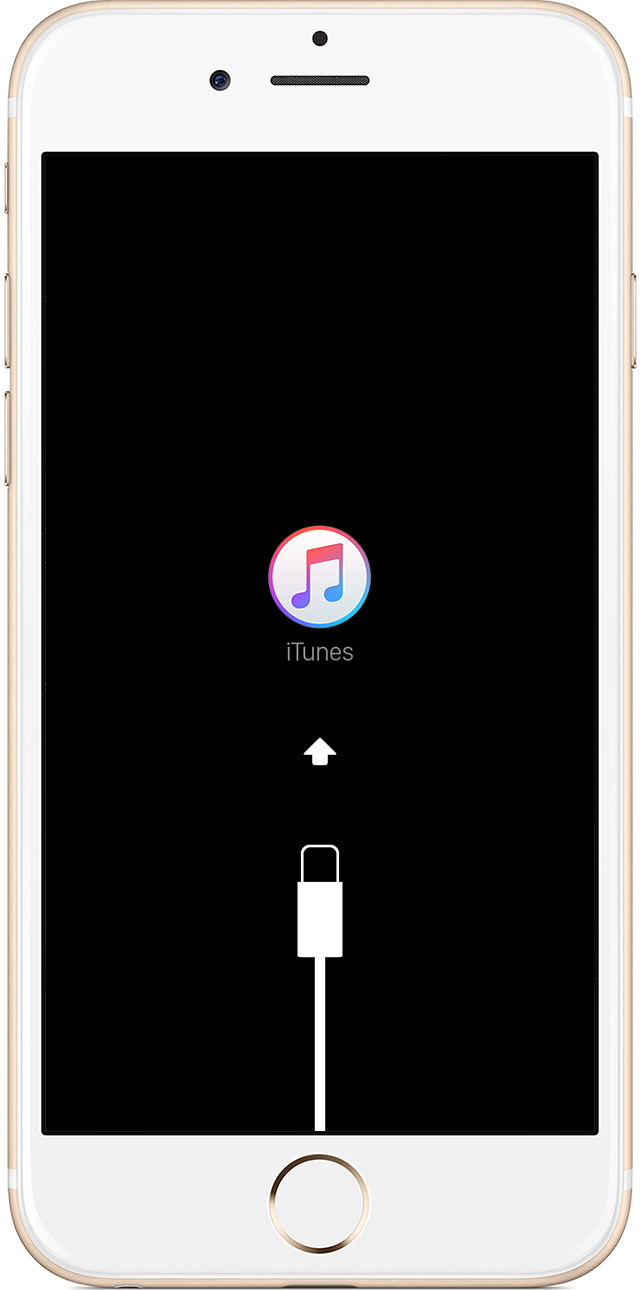
- When you get the option to restore or update, choose Update. iTunes will try to reinstall iOS without erasing your data.

iTunes will download the software for your device. If it takes more than 15 minutes, your device will exit recovery mode and you'll need to repeat steps 2 and 3.
If your iPhone, iPad, or iPod touch won't turn on - Apple Support
Although the title of the above article doesn't match your issue, these steps will still be effective in allowing you to reinstall iOS.
Take care!


