No Message Notifications on iPhone 7+

I am getting no notifications for messages on my iPhone 7+. I have it set to give me sounds, badge, and banners. I get nothing but the app icon. No sound, no banner. If I am in another app on the phone, I don't get the banner at the top telling me I have a message. It is also doing it on my FB Messenger app as well. All I get are the app badge icon. I have bluetooth turned off, DND is not on and I double checked that it is not on for any contacts either. It happens both when my phone is locked and when it is unlocked. I have iMessaged enabled and the only contact I regularly get them from is my son. I get no notifications from him either. Every now and then I get a sound notification, but it is rare. My sound is on and turned up 100%. It is frustrating to say the least that I only know I have messages if I am looking at my phone with the app open, or happen to see the app badge icon.

iPhone 7 Plus, iOS 10.2

Posted on Jan 3, 2017 3:09 PM

Reply
4 replies

Jan 4, 2017 6:23 PM in response to TexasPeach

Hi TexasPeach,

I understand that you are not receiving all of the notifications that you are expecting to receive on your iPhone. I know that it's important to be kept up to date with what's happening on your iPhone, so I'm happy to help.

It sounds like you've already checked a lot of great settings for this issue. Based on the troubleshooting you've already done, I would recommend reinstalling iOS. Before you do, be sure to backup your iPhone:

How to back up your iPhone, iPad, and iPod touch - Apple Support

Once you've got a backup, use the steps in the following article to reinstall iOS in a non-destructive way. Be sure to pay close attention to step 4 and Update instead of Restore when prompted:

If your iPhone, iPad, or iPod touch won't turn on - Apple Support
  1. Connect your device to a computer and open iTunes. If you don't have a computer, you can borrow one, or go to an Apple Retail Store or Apple Authorized Service Provider for help.
  2. While your device is connected, force it to restart.
    • On an iPhone 7 or iPhone 7 Plus: Press and hold the Sleep/Wake and Volume Down buttons at the same time.
    • On an iPhone 6s and earlier, iPad, or iPod touch: Press and hold the Sleep/Wake and Home buttons at the same time.
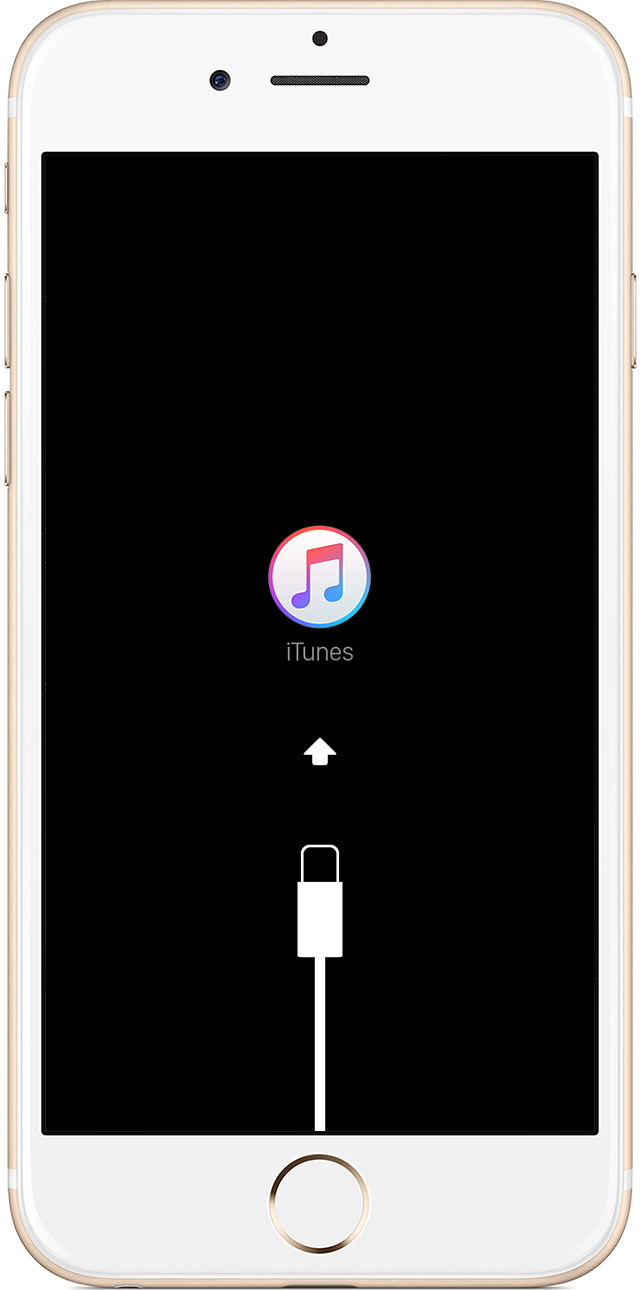
  3. Don't release when you see the Apple logo. Keep holding until you see the recovery mode screen.
    User uploaded file
  4. When you get the option to restore or update, choose Update. iTunes will try to reinstall iOS without erasing your data.
    User uploaded file

iTunes will download the software for your device. If it takes more than 15 minutes, your device will exit recovery mode and you'll need to repeat steps 2 and 3.


Thanks for using the Apple Support Communities. Cheers!

Jan 5, 2017 10:43 AM in response to TexasPeach

OK it apparently was the DND that was doing it. If I turn that on and even with it set to allowing calls and alerts from anyone on my contacts list, it still silenced all notifications other than the badge app icon. Guess I need to leave the DND off for now. I used it to keep from getting disturbed by calls from people I don't know and don't care to talk to. I will just continue to block numbers that keep calling me.

Jan 5, 2017 10:28 AM in response to chris_g1

Thank you for your reply. Not sure what I did, but yesterday I began getting the sound notifications as well as the banners. I had seen a response on another thread about it saying to uncheck showing them in the notification center and had done that also so not sure if it was that or the turning off my DND that did it. I am going to try turning the one on and see if it stops, then will turn that back off and turn the other on and see what happens. Hopfully it doesn't stop doing it again. I will reply back to see if either of those things makes a difference. 😀

Aug 22, 2017 9:02 PM in response to TexasPeach

Hi guys, I've been having same problems since I got my iPhone 7. No noises when the phone is in lock mode. (I have tried all the fixes I have read about, turning off dnd, re-booting phone, doing a system restore, all with no effect, and no, I haven't got my phone on silent).

I know this won't help everyone but I have an Apple Watch and if I turn off blue tooth on my phone, so the watch isn't connected, my phone now makes noises with messages and calls while on lock mode. Totally ridiculous fix, as now my watch is just a watch... Apple really needs to fix this, it's totally unacceptable that both have to work independent of each other, especially when my iPhone 6 didn't have these problems.

Hope this helps.

(Not a happy Apple customer)

This thread has been closed by the system or the community team. You may vote for any posts you find helpful, or search the Community for additional answers.

No Message Notifications on iPhone 7+

Welcome to Apple Support Community
A forum where Apple customers help each other with their products. Get started with your Apple Account.