Highlight Weekend Row

I am running Numbers 3.6.2 on an iMac using Mac OS X 10.11.6.


Is there a way to use Conditional Highlighting on an entire row to highlight weekends?

I have the date in the first row and I'm using the WEEKDAY function in the last row to assign the day of the week (Monday is 1). I just need the entire row highlighted automatically and I can't seem to figure a way to do it.


DateTime InTime OutLunchHours WorkedDay
1/1/2017=WEEKDAY(A2,2)
1/2/2017=WEEKDAY(A3,2)
1/3/2017=WEEKDAY(A4,2)
1/4/2017=WEEKDAY(A5,2)
1/5/2017=WEEKDAY(A6,2)
1/6/2017=WEEKDAY(A7,2)
1/7/2017=WEEKDAY(A8,2)
1/8/2017=WEEKDAY(A9,2)

iMac (27-inch Mid 2011), OS X Mountain Lion (10.8.4)

Posted on Jan 4, 2017 9:46 AM

Reply
3 replies

Jan 4, 2017 8:54 PM in response to Vasean

Hi Vasean,


In Numbers, conditional highlighting can be applied only to an individual cell, and the rule controlling the highlighting must compare the value in that cell with a fixed value of with the value in another cell. A long-standing technique for the type of highlighting you want is to create a second table whose rows match the main table in height, with a single column whose width matches the width of the main table.


Cells on this table contain a formula that references the value in one of the cells on the same row of the main table, and return a value used to trigger (or not trigger) the highlighting rule.


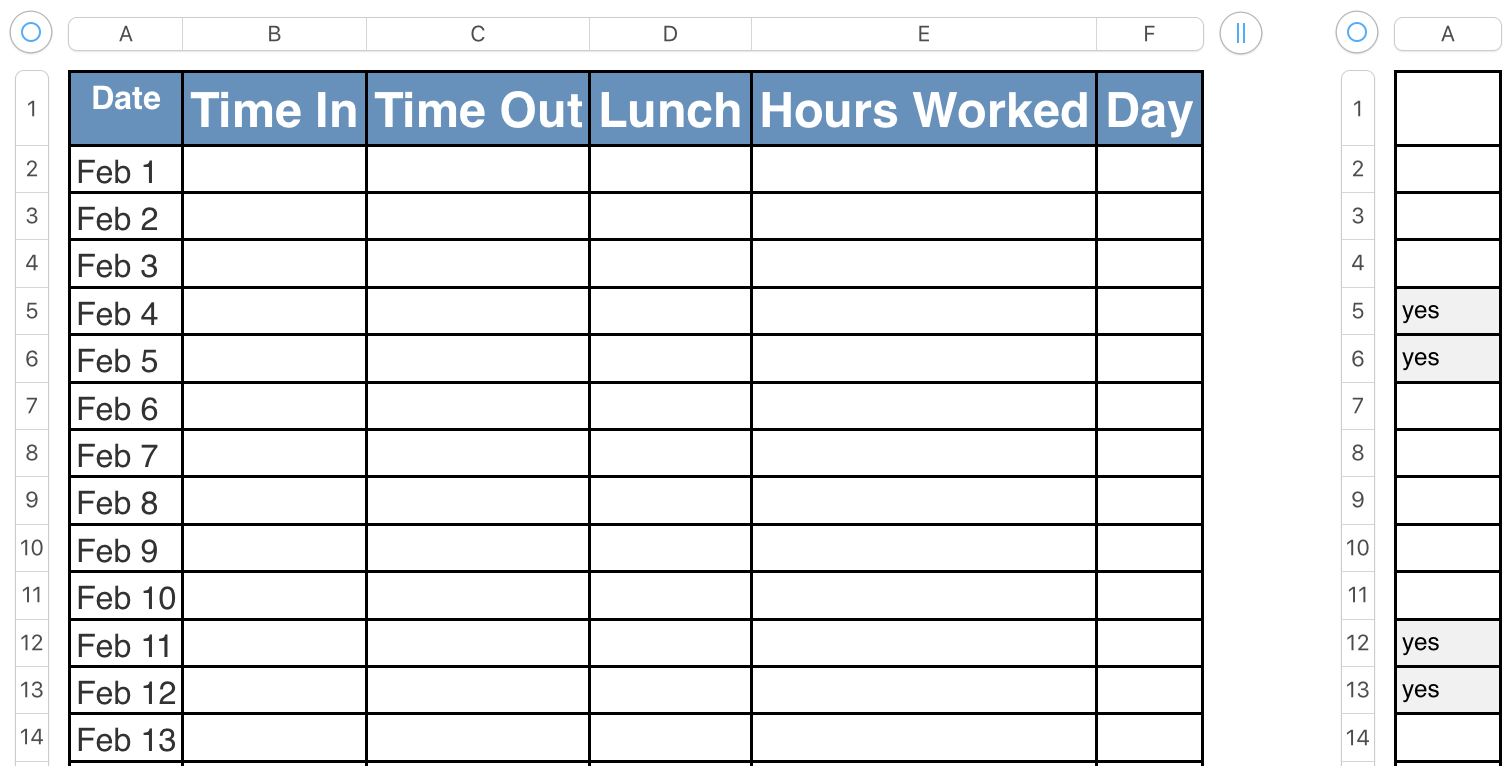
Here's an example, using the table in my previous post.


The original table on the left, and the 'format' table on the right.


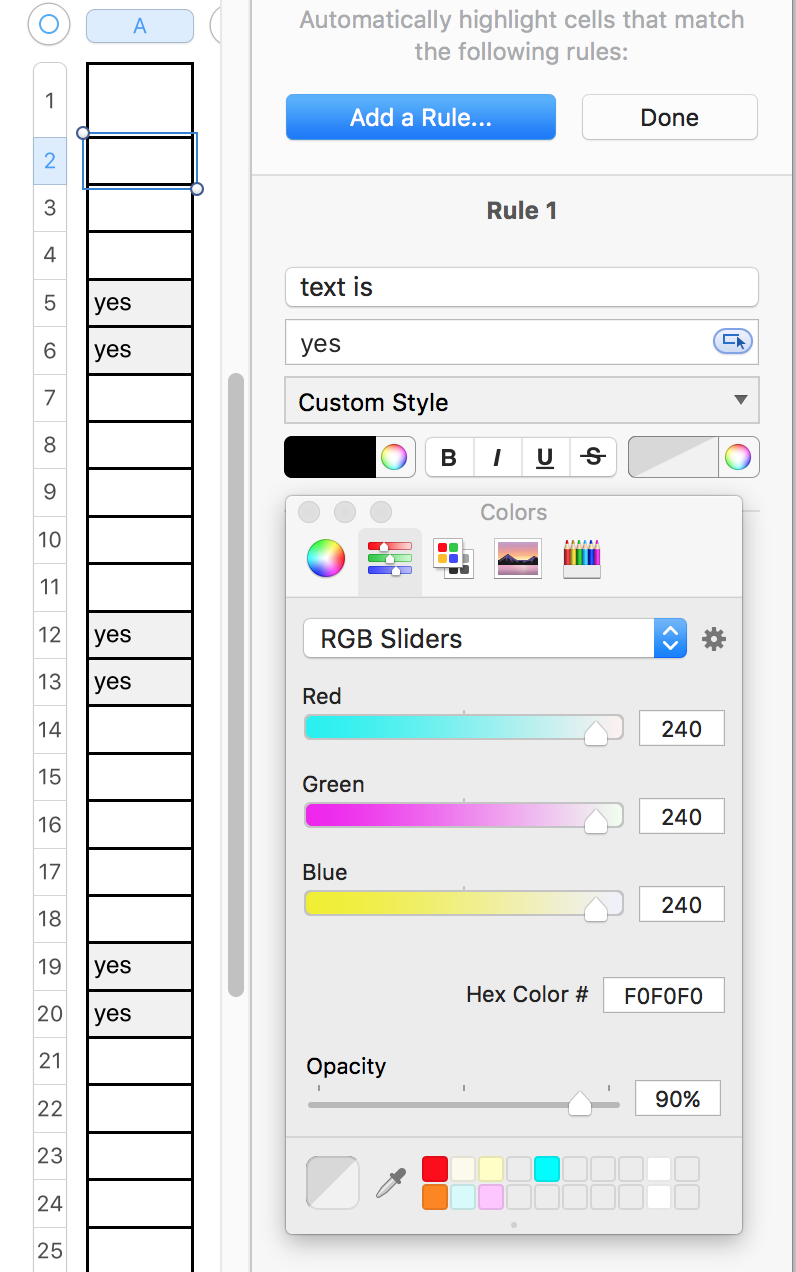
The 'format' table has had part of its 'custom formatting applied—a 240-240-240 coloured fill in the cell. The full format uses the same RGB values for the conditional colour of the text ( "yes" ). The 'format' was created by adding a column to the right side of the main table, then dragging that column away up and right until it split from the original table. The full column was then selected and the cell fill set to No fill. Then the rule described below was set for cells in rows 2 through the end of the table.
User uploaded file


Conditional Highlighting rule for above:
User uploaded file

To produce the effect wanted, these changes were made.

The 'format table was widened to match the width of the main table.

The custom format used for highlight was revised to include the text. making it the same grey as the fill.

The format table was moved back (Arrange > Send backward), and slid behind the main table.

The format table was locked in position (Arrange > Lock)


Result:

User uploaded file


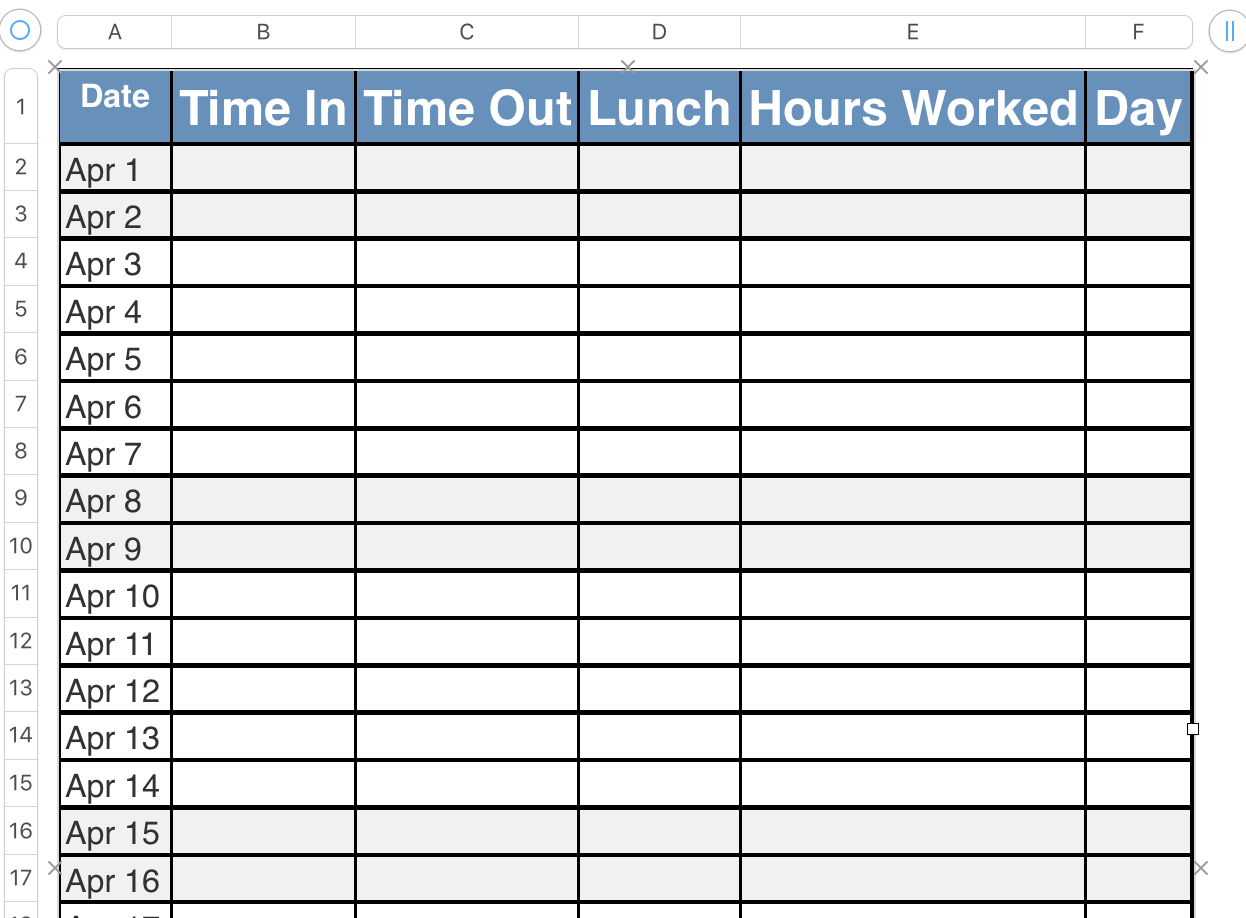
I have added a formula to column A, starting in row 3, and filled down to the end of the table (row 33, allowing for a full month of dates in any month).

A3: A2+1

Fill down.


The initial date (Feb 1 above) is entered in A2. The rest are filled in automatically, and the weekend dates automatically receive the apparent formatting, as seen below:
User uploaded file

Regards,

Barry

Jan 4, 2017 11:10 AM in response to Vasean

Hi Vasean,


Format the two weekend rows in the first seven days of the table. (I started with rows ro Jan 7 and 8, then remembered that Jan 1 was also a weekend day.)


Select the first seven rows (not including the Header row)

User uploaded file

Press option-command-C to copy the styles of the seven rows.

Extend the selection to the rest of the rows in the table (mine went to Feb 1)

Press option-command-V to Paste the copied styles into the selected rows.

Result for the example shown below.

User uploaded file

Regards,

Barry

Jan 4, 2017 12:04 PM in response to Barry

Barry,


Thanks for the reply, however, this is not what I'm looking for. The reason I am looking to use Conditional Highlighting is that it would allow me to more easily change the dates to the next month or even the same month in a different year by simply entering the first date in column one and filling down the column to the end of the month. With the last column automatically updating the day of the week, Conditional Highlighting would then automatically update the highlighted rows without my having to re-arrange/reformat manually.


To illustrate here is a link to the capability I am trying to replicate as it functions in Excel.

This thread has been closed by the system or the community team. You may vote for any posts you find helpful, or search the Community for additional answers.

Highlight Weekend Row

Welcome to Apple Support Community
A forum where Apple customers help each other with their products. Get started with your Apple Account.
