Hi wheel43,
I understand that you would like to install apps on your iPhone, without others in your family group being able to see that purchase. I know it's important to have privacy in these situations, so I'm happy to help.
Check out the suggestion for this provided here:
Hide and unhide iTunes Store, App Store, or iBooks Store purchases - Apple Support
Thanks for using the Apple Support Communities. Cheers!
I understand that you would like to install apps on your iPhone, without others in your family group being able to see that purchase. I know it's important to have privacy in these situations, so I'm happy to help.
Check out the suggestion for this provided here:
Hide and unhide iTunes Store, App Store, or iBooks Store purchases - Apple Support
In the App Store app
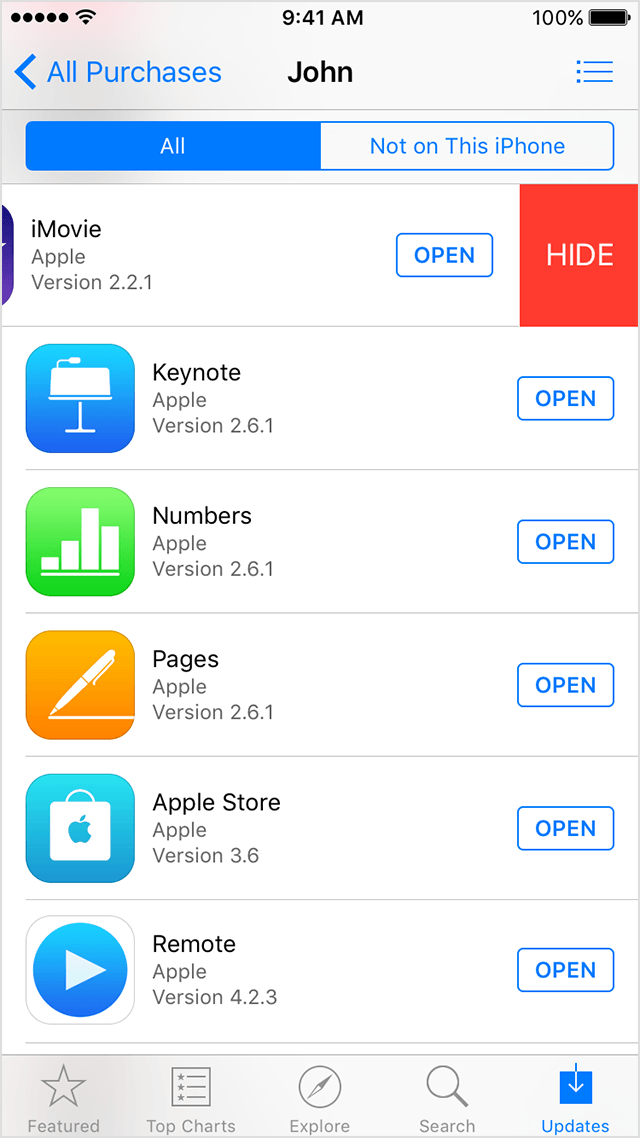
If you use Family Sharing, you can hide apps in the App Store on an iPhone, iPad, or iPod touch:
- Open the App Store app.
- Tap Updates > Purchased > My Purchases.
- Find the app that you want to hide, then swipe left on it.
- Tap Hide.
Any items that you hide will also be hidden from the other users in your family group. To unhide apps, use iTunes on a Mac or PC.
Thanks for using the Apple Support Communities. Cheers!