to add my cell number, when i add I am unable to receive a verification code when i enter my cell number in apple id .

Hi I'm facing this issue since the past 1 week. when i send an Imessage to some one or facetime with them, instead of seeing my number they see my Email address. and also to get back to me through Imessage and facetime they have to use my email address instead of my number. In messages send/receive option i don't have an option to add or select my number, only add another Email option is present. I asked my friend about this and he told me to go to settings>icloud>click on apple id name>contact information>add Phone number. But here is the problem. when i add my phone number it says that verification code sent through please enter code. and i never receive a verification code. it has been a week.

i have tried everything, restarting, reseting, talked to apple support, talked to network provider, signout of icloud, sign back in. i have tried everything and nothing works. i do not get a text message from apple.

Please help me if any one has had this experience.

iPhone 7, iOS 10.2

Posted on Jan 11, 2017 3:49 AM

Reply
9 replies

Jan 12, 2017 11:23 AM in response to salman144

Hi salman144,


I understand that you are not able to select your phone number for iMessage on your iPhone, and in trying to set it up, you are not receiving your verification code for your Apple ID. I know it's important to have your devices and accounts set up correctly, so I'm happy to help.

Regarding your verification code, do you have two-step verification or two-factor authentication set up? Depending on which option you have, you can receive the verification code through a text message or by generating one on your device:

Get a verification code and sign in with two-factor authentication - Apple Support

Get a text or phone call

If you don’t have a trusted device handy, you can have a verification code sent to your trusted phone number as a text message or phone call.

  1. Click Didn't get a verification code on the sign in screen.
  2. Choose to have the code sent to your trusted phone number.
  3. You'll get a text message or phone call from Apple with your verification code.
  4. Enter the code on your other device to complete sign in.

User uploaded file

User uploaded file

Get a code from Settings on your trusted device

If you can’t receive a verification code on your trusted devices automatically, you can get one from Settings, even if your device is offline.

From your iPhone, iPad, or iPod touch with iOS 9 and later:

  1. Go to Settings > iCloud.
  2. Tap your Apple ID username.
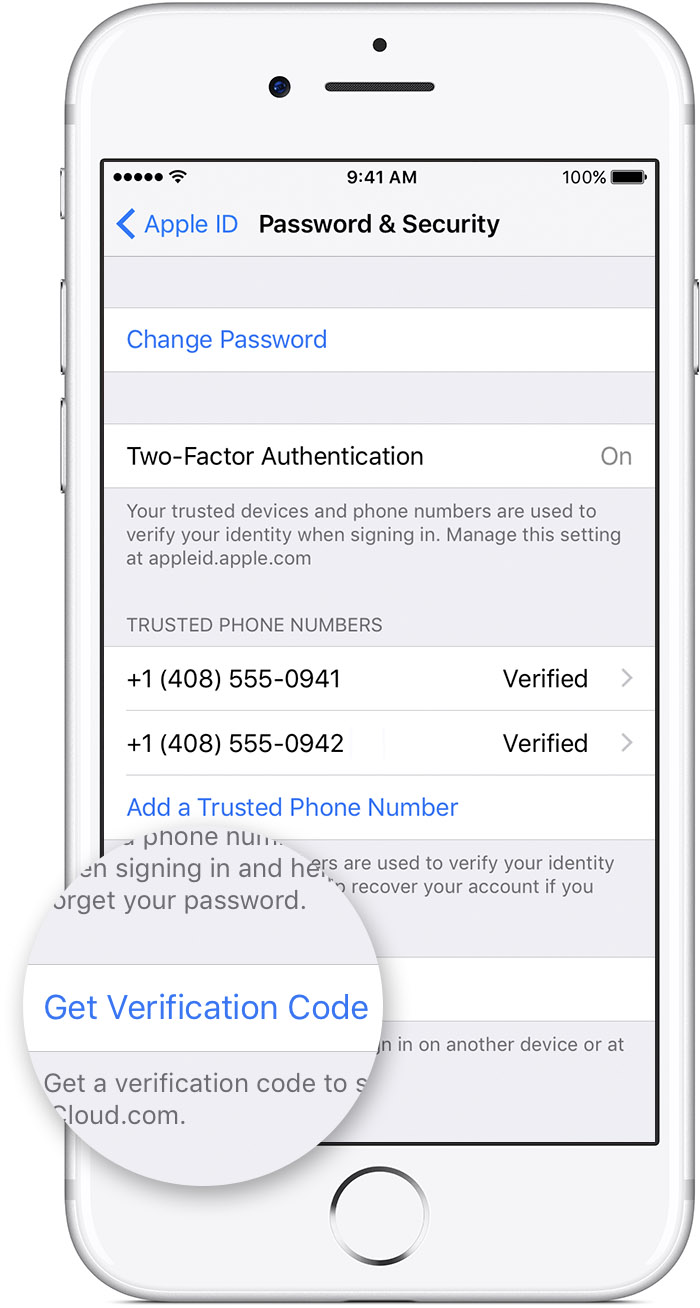
  3. If your device is offline, tap Get Verification Code.
  4. If your device is online, tap Password & Security > Get Verification Code.

From your Mac with OS X El Capitan and later:

  1. Go to Apple Menu > System Preferences > iCloud.
  2. Click Account Details.
  3. If your device is offline, click Get Verification Code.
  4. If your device is online, click Password & Security > Get Verification Code.


Two-step verification for Apple ID - Apple Support

What if I no longer have access to any of my trusted devices?

If you can't access any of your trusted devices, you can still access your account using your password and Recovery Key. You should then verify a new trusted device as soon as possible.


Once you've resolved that this article will help you with the correct steps to get your phone number set up for use with iMessage:

Add or remove your phone number in Messages or FaceTime - Apple Support

Thanks for using the Apple Support Communities. Cheers!

Jan 12, 2017 12:40 PM in response to sterling r

hi thanks for the reply. i have tried all the above given steps but of no use. the issue is that two way verification is active and i have my number verified through call. but i need to add my number in my contact information under the heading reachable at. over here when i add my cell number there is no option for a call and it says that a code for verification through text message. but i never receive a text. i have also generated a code and put it there but it says that the code has expired please try later. this is the issue.

Sep 20, 2017 5:16 AM in response to davidantoine

Hi. I struggled to solve this issue since I came back from my trip to UAE. I read and tried everything. Finally I came to this conclusion that something was interfering with the Apple ID and withheld sms from being sent to my phone.

I backed up my phone and then;

1-Reset all settings. ( again tried adding my phone number but did not receive the verification code)

2-Signed out of all the devices connected to my Apple ID. ( again tried adding my phone number but did not receive the verification code)

3-Open Apple ID page on my phone, at bottom delete all the verified devices ( I had MacBook Pro).

4-Reset all settings.

5-Checked iMessages and FaceTime, found my mobile number on both the apps.

6-Press “use Apple ID for ...” both iMessage and FaceTime.

7-Now check Apple ID page”name, phone number and emails “ everything is in order.


I hope it will work for all you guys too.

Best of Luck.

Mohsin Wazir Malik

Sent from my iPhone

This thread has been closed by the system or the community team. You may vote for any posts you find helpful, or search the Community for additional answers.

to add my cell number, when i add I am unable to receive a verification code when i enter my cell number in apple id .

Welcome to Apple Support Community
A forum where Apple customers help each other with their products. Get started with your Apple Account.