How do I tell if I did not receive an iMessage sent to me

When I don't have cellular nor wireless connection and someone sends me an iMessage, neither the sender nor me can tell that I didn't receive the iMessage. Is there any way for either party to know that the imessage failed to go through besides turning on "send verification message read"? How about an option for sending all messages via both SMS/MMS and iMessage? I need to know if I'm not receiving messages and The sender does too, but I don't want to turn on message read notifications. Any advice ?

iPhone 6, iOS 10.1.1

Posted on Jan 17, 2017 10:47 AM

Reply
Question marked as Top-ranking reply

Posted on Jan 17, 2017 11:24 AM

Hello,


With iMessage it will say "delivered" if it was delivered. The only way to know that the receiver has looked at you message is if they have "Send Read Reciepts" enabled or they have responded. If it doesn't say "delivered" it is waiting for a internet connection to be delivered. Their iPhone may be off as well.


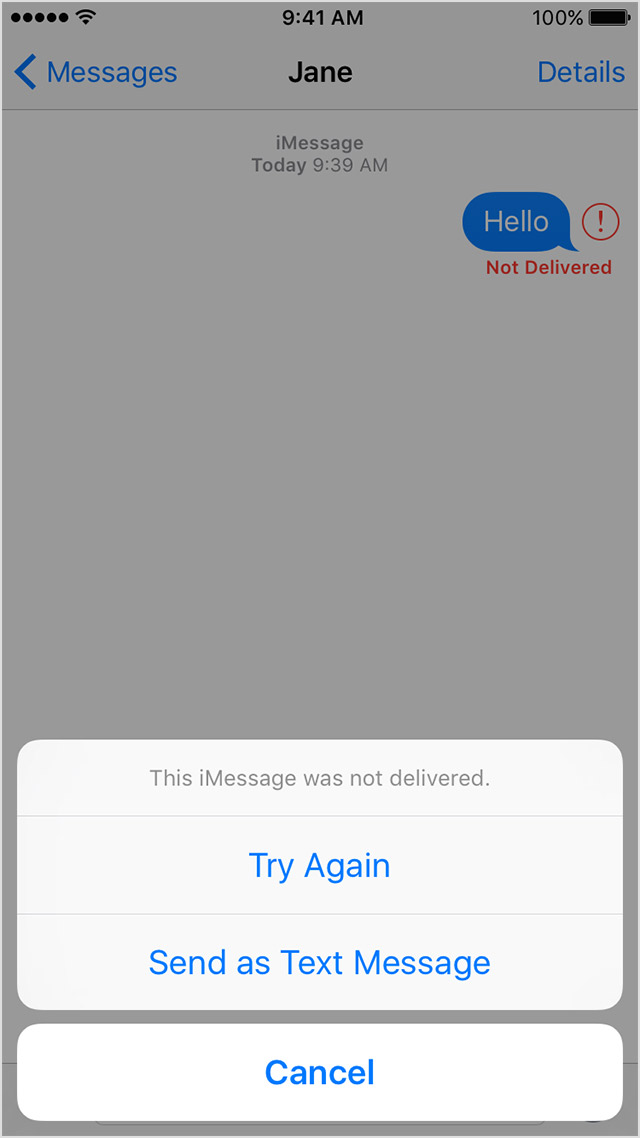
If the message wasn't delivered it will show this:

User uploaded fileUser uploaded file

User uploaded file

User uploaded file

If you see a red exclamation point

If you try to send a message and you see User uploaded file with an alert saying Not Delivered, follow these steps:

  1. Tap User uploaded file, then tap Try Again.
  2. If you still can’t send the message, tap User uploaded file, then tap Send as Text Message. Messaging rates might apply. Contact your carrier for more information.

User uploaded file

Taken from this article:

If you can't send or receive messages on your iPhone, iPad, or iPod touch - Apple Support

2 replies
Question marked as Top-ranking reply

Jan 17, 2017 11:24 AM in response to FalconRon

Hello,


With iMessage it will say "delivered" if it was delivered. The only way to know that the receiver has looked at you message is if they have "Send Read Reciepts" enabled or they have responded. If it doesn't say "delivered" it is waiting for a internet connection to be delivered. Their iPhone may be off as well.


If the message wasn't delivered it will show this:

User uploaded fileUser uploaded file

User uploaded file

User uploaded file

If you see a red exclamation point

If you try to send a message and you see User uploaded file with an alert saying Not Delivered, follow these steps:

  1. Tap User uploaded file, then tap Try Again.
  2. If you still can’t send the message, tap User uploaded file, then tap Send as Text Message. Messaging rates might apply. Contact your carrier for more information.

User uploaded file

Taken from this article:

If you can't send or receive messages on your iPhone, iPad, or iPod touch - Apple Support

Jan 17, 2017 11:23 AM in response to FalconRon

FalconRon wrote:


When I don't have cellular nor wireless connection and someone sends me an iMessage, neither the sender nor me can tell that I didn't receive the iMessage. Is there any way for either party to know that the imessage failed to go through besides turning on "send verification message read"? How about an option for sending all messages via both SMS/MMS and iMessage? I need to know if I'm not receiving messages and The sender does too, but I don't want to turn on message read notifications. Any advice ?

If the sender enables Settings>Messages>Send as SMS, that should, in theory, resend any failed iMessage as an SMS. In practice, it doesn't work that well. iMessage simply doesn't work very well if you regularly don't have a data connection. If you are frequently without data, you may want to consider signing out of iMessage and not using it at all.


Best of luck.

This thread has been closed by the system or the community team. You may vote for any posts you find helpful, or search the Community for additional answers.

How do I tell if I did not receive an iMessage sent to me

Welcome to Apple Support Community
A forum where Apple customers help each other with their products. Get started with your Apple Account.