
Power Ink Flush?? Epson ET-2550

Pages are not printing completely with colors streaked etc. I have tied several times to clean print heads with no improvement. Epson recommends doing a power in flush but that option is not available. Any ideas how I can achieve this??


    • Windows: Access the Windows Desktop and right-click the product icon in the Windows taskbar and select Printer Settings. Then click the Maintenance tab.
    • OS X: In the Apple menu or the Dock, select System Preferences. Select Print & Fax, Print & Scan, or Printers & Scanners, select your product, and select Options & Supplies. Select Utility and select Open Printer Utility.
  1. Click the Power Ink Flushing button. You see a window like this:
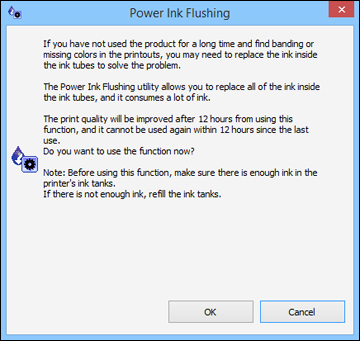
    User uploaded file
  2. Follow the on-screen instructions.
  3. When you finish the Power Ink Flushing, turn off the product and wait at least 12 hours before printing.
  4. Print a document and check the print quality. If the print quality did not improve, contact Epson for support.

MacBook Pro (15-inch, Late 2016), macOS Sierra (10.12.2)

Posted on Jan 21, 2017 1:12 PM

Reply
9 replies

Jan 7, 2018 8:20 AM in response to LucyLou2

I was having the same issue and found this discussion when searching for a solution.


After a bit of trial and error, I figured out that the printer utility is only accessible if you use the IP printer driver instead of bonjour (not sure if I've got the technical phrasing correct here). When I added the additional driver, there were a number of printer specific options exactly where it was indicated.


I hope that helps someone.

Jan 21, 2017 2:58 PM in response to uk1bigblue

uk1bigblue wrote:


Epson recommends doing a power in flush but that option is not available.

We are left to assume a whole lot about "that option is not available".


Did you mean:


"I selected my product as the instructions indicate, then selected 'Options & Supplies', then 'Utility', followed by 'Open Printer Utility'. I saw assorted options there, but 'Power Ink Flushing' was not one of these options. Here are the options I did see ..."

This thread has been closed by the system or the community team. You may vote for any posts you find helpful, or search the Community for additional answers.

Power Ink Flush?? Epson ET-2550

Welcome to Apple Support Community
A forum where Apple customers help each other with their products. Get started with your Apple Account.
