What if I loose my iPhone...verification code

I have turned on two step verifaction for my iCloud account. That means I get a code to my iPhone. What will happen if I loose my iPhone? Can I still get access to my iCloud account? How? I just thought of this and started to think...should I cancel this verification, just in case.
Could I buy a new phone and use the same phone number, and get my verification in the new phone? I guess this is a silly question, but I don´t know how this works. Is the number in the sim-card or can I still have the same number with a new sim-card? And, is the verication code connected to my cell phone number, or what?


Please, somebody... let me know if I should worry or not and how this works :-)

iPhone 6

Posted on Jan 28, 2017 11:00 AM

Reply
8 replies

Jan 28, 2017 11:10 AM in response to Ulrika Bremberg

Hello,


I would highly suggest using two-factor authentication as it's newer:

Two-factor authentication for Apple ID - Apple Support

For your question:

How does it work?

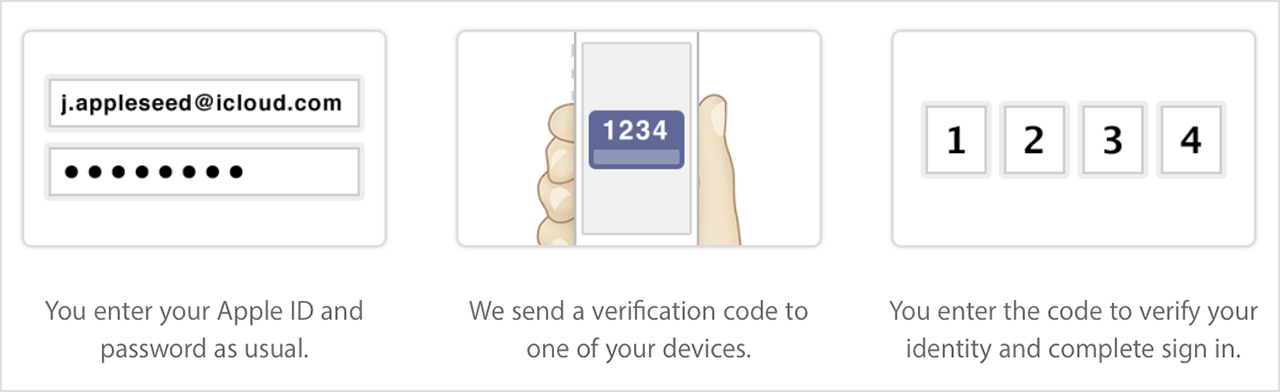
When you set up two-step verification, you register one or more trusted devices. A trusted device is a device you control that can receive 4-digit verification codes using either SMS or Find My iPhone. You're required to provide at least one SMS capable phone number.

Then, any time you sign in to manage your Apple ID, sign in to iCloud, or make an iTunes, iBooks, or App Store purchase from a new device, you need to verify your identity by entering both your password and a 4-digit verification code.

User uploaded file

After you sign in, you can securely access your account or make purchases as usual. Without both your password and the verification code, access to your account is denied.

You'll also get a 14-character Recovery Key to print and keep in a safe place. Use your Recovery Key to regain access to your account if you ever lose access to your trusted devices or forget your password.

What if I lose my Recovery Key?

You can sign in to your Apple ID account pageand create a new Recovery Key using your Apple ID password and one of your trusted devices.


More info here:

Two-step verification for Apple ID - Apple Support

Jan 28, 2017 11:57 AM in response to Ulrika Bremberg

I don't believe it has to do with anything with the sim card. It has to do with trusted devices.


You should have got a 14-character Recovery Key.


This is taken from Apple's website:


"You'll also get a 14-character Recovery Key to print and keep in a safe place. Use your Recovery Key to regain access to your account if you ever lose access to your trusted devices or forget your password."


So if you were to lose your iPhone you will use the 14-character Recovery Key to regain access to your account.


Try following these steps to get a recovery key here:


If you ever need a new Recovery Key, you can create one from your Apple ID account page. Just sign in with your password and trusted device, go to the Security section and click Edit, then click Replace Lost Key.


Two-step is an older system. I would suggest switching over and use two-factor authentication:


Two-factor authentication for Apple ID - Apple Support

Jan 29, 2017 9:56 AM in response to Ulrika Bremberg

Okay I was confused.


Let me clarify some more.


With two-factor authentication there is not a 14 Digit Code. Having a close friends number trusted is a good idea. A trusted device is an iPhone, iPad, iPod touch with iOS 9 and later, or Mac with OS X El Capitan and later that you've already signed in to using two-factor authentication.


What if I don’t have access to a trusted device or didn't receive a verification code?

If you're signing in and don’t have a trusted device handy that can display verification codes, you can have a code sent to your trusted phone number via text or a phone call instead. Click Didn't Get a Code on the sign in screen and choose to send a code to your trusted phone number. You can also get a code directly from Settings on a trusted device. Learn how to get a verification code.

Trusted phone numbers

A trusted phone number is a number that can be used to receive verification codes by text or phone call. You must verify at least one trusted phone number to enroll in two-factor authentication. You should also consider verifying other phone numbers you can access, such as a home phone, or a number used by a family member or close friend. You can use these numbers if you temporarily can't access your own devices.


Since you have your friend you won't need to buy a new iPhone.


Please let let me know if this makes sense or you have any other questions. Sorry it is a bit to read.

Jan 28, 2017 11:32 AM in response to Gus

I am using two-step verification. I still don´t get it, if i loose my iPhone, how do I get into iCloud again. I have a laptop and ONE iPhone. Can I open Apple ID from the laptop and get in, not using a second iphone (which I dont have)? Or, do I first need to buy a new phone?

When the code is sent to my iPhone, is it my cell phone number that is the "connection point"? If I loose my phone, could I still use the same number in a new phone? I dont know if the number is physically in the sim-card, or if the sim card it self has nothing to do with it, that the number exists without any physcial materia, if you understand what I mean.


I can´t find a 14-caharcter recovery key. Was I supposed to get that when I registred the two-step verification?

This thread has been closed by the system or the community team. You may vote for any posts you find helpful, or search the Community for additional answers.

What if I loose my iPhone...verification code

Welcome to Apple Support Community
A forum where Apple customers help each other with their products. Get started with your Apple Account.