I have music creation but can't delete it?

Hello,

I have Music Creation" but I don't have Garage Band on my iMac,

User uploaded file


There isn't the usual option shown.

The amount of memory used corresponds with the amount of memory which is "Purgeable"

Can anyone help?

Posted on Feb 9, 2017 9:46 AM

Reply
9 replies

Feb 11, 2017 6:30 AM in response to doverrog

I can't help with the Safari problem, sorry. You may want to ask this in the Safari forum: Safari


Try again to reveal your User Library folder in the Home folder. It should look like this:

Select the Home folder in the sidebar as sown, then enter command-J. ( ⌘J).

In the View options panel set the checkmark for Show Library Folder. This option is only available, if you are currently viewing your Home folder, not for any other Finder window.

User uploaded file

Feb 11, 2017 5:25 AM in response to léonie

I've deleted loops and now arrived at 813mb in GarageBand,

I guess that will be ok as I can't find anything else after searching "Application Support" and I can't find an "Audio".

I also can't get the -

  • With that Finder window as the front window, press the key combination ⌘J to bring up the View options.
  • In the View options panel enable ’Show Library Folder’. That will make your user library folder visible in your Home folder, if it is still hidden.

to work.
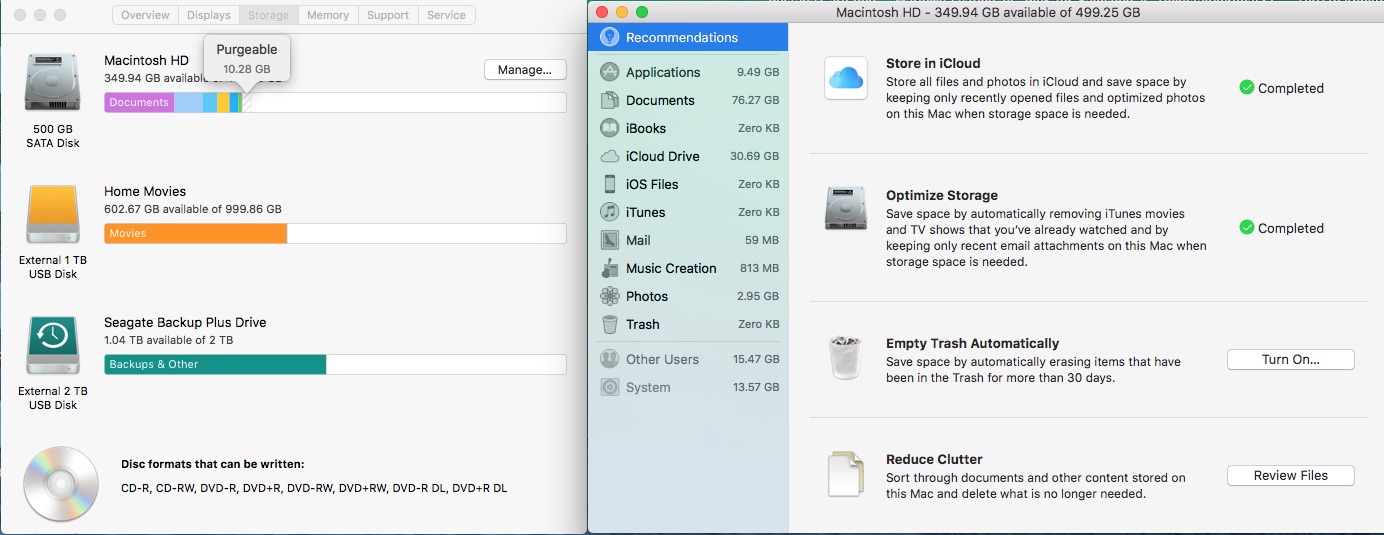

User uploaded file

So things seem be running better now.

Except that I'm now having problems with Safari. It won't quit unless I use "Force Quit" all I get is the colour wheel.

Looking through the forum I see other fairly old posts/threads referring to this.

However I wonder if you had any ideas?

As an idea I've just completely re-installed Sierra V 10.12.3 from the App Store, but that didn't change the problem.

The screen shot above was taken after I'd downloaded Safari.

Feb 10, 2017 3:21 AM in response to léonie

Many thanks leonie.

I've deleted the folder from /Library/Application Support/Garage Band/

It included various sub folders.

I don't have Logic or MainStage (as far as I can tell) but I'm still showing some in the Applications - 1.21User uploaded file

So a great improvement but still a little more to find.

Did I do wrong by deleting the whole folder in one go rather than sub folder by sub folder?

Feb 10, 2017 10:23 AM in response to doverrog

There may be GarageBand items installed in your User Library as well.


Check the folders

~/Library/Application Support/GarageBand/

~/Library/Audio/Apple Loops/

in the Library folder in your Home folder as well.


Your user library may still be hidden.

To reveal the hidden User Library:

  • Bring the Finder forward by clicking on the Desktop or the Finder icon in the Dock.
  • Select your user/home folder (with the house icon in the Finder sidebar)
  • With that Finder window as the front window, press the key combination ⌘J to bring up the View options.
  • In the View options panel enable ’Show Library Folder’. That will make your user library folder visible in your Home folder, if it is still hidden.
  • Open your Home folder, then the Library folder, then "Application Support" or "Audio" and look for the GrarageBand folder.

Feb 10, 2017 9:45 AM in response to doverrog

Are there any other folder left in /Library/Application Support/GarageBand/ ?

You can delete them all, if you are not planning to use GarageBand at all.

GarageBand is also keeping loops installed in /Library/Audio/Apple Loops/


But some of the loops, the iLife Sound Effects, will also be used by iMovie. Otherwise you could remove the loops as well.

Feb 12, 2017 5:27 AM in response to léonie

Well done and so many thanks Leonie🙂🙂

I hadn't realised that my Home Folder had disappeared,

I followed your instructions and low and behold there were the suspicious files (stuff from Mac Cleaner etc). I deleted al them and removed some other rubbish and now my iMac is back on form.

I still can't find that 813 in Music Creation but I will keep looking and perhaps it will go when I reboot.

I had given up with Safari and had switched over to Chrome which worked ok. I also tried Firefox and that worked as well.

So the virus was hidden in Safari and thanks to you it's now gone.

I'll let you know if I do ever clear the 813MB.

I'm really grateful and I wish you a very very happy rest of your day🙂

This thread has been closed by the system or the community team. You may vote for any posts you find helpful, or search the Community for additional answers.

I have music creation but can't delete it?

Welcome to Apple Support Community
A forum where Apple customers help each other with their products. Get started with your Apple Account.
