How to retrieve lost photos after back up?

My friend purchased a new iPhone 6 to take pictures in an event that's very important to her. However, she backed up her stuff from her old iPhone 5s to her new phone before backing up her newly taken photos in the iPhone6. Now, all the newly taken photos are gone. She is now very upset, and I don't know how to help her... Does anyone know what to do? Thanks!


Posted on Feb 25, 2017 6:02 AM

Reply
3 replies

Feb 25, 2017 6:09 AM in response to cyws

Try the steps below from Apple Support document HT204184.


Restore your iPhone, iPad, or iPod touch from a backup

Learn how to restore your device from a backup in iCloud or iTunes.

User uploaded fileRestore from an iCloud backup

User uploaded fileRestore from an iTunes backup

Restore your device from an iCloud backup

  1. Turn on your device. You should see a Hello screen. If you already set up your device, you need to erase all of its content before you can use these steps to restore from your backup.
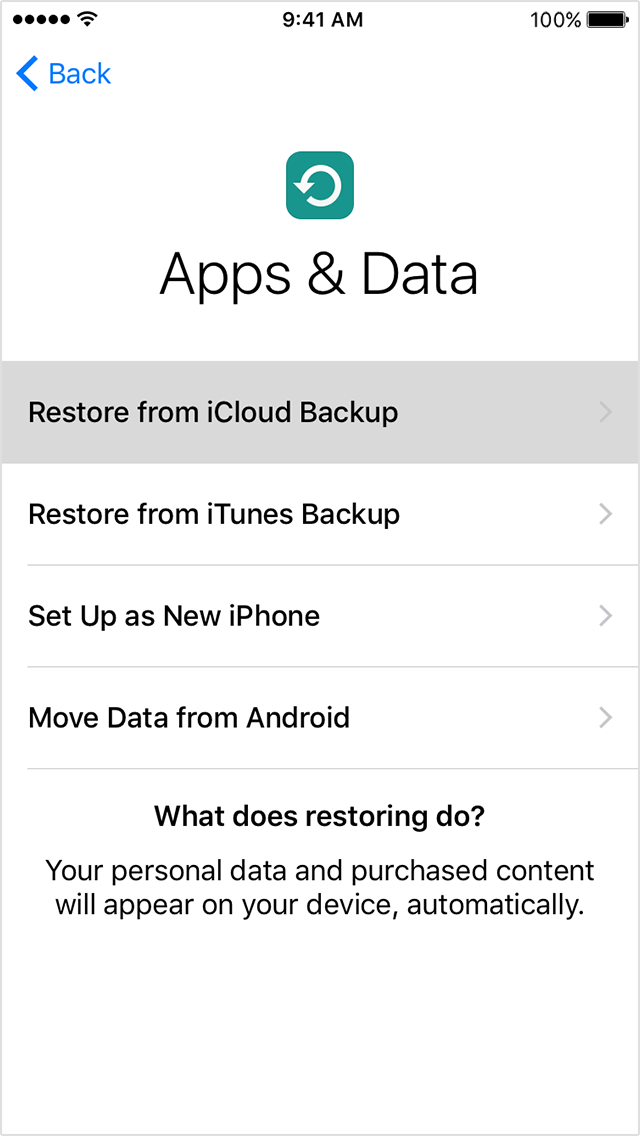
  2. Follow the onscreen setup steps until you reach the Apps & Data screen, then tap Restore from iCloud Backup. User uploaded file
  3. Sign in to iCloud with your Apple ID.
  4. Choose a backup. Look at the date and size of each and pick the most relevant. After you choose, the transfer starts. If a message says that a newer version of iOS is required, follow the onscreen steps to update (If you don't see onscreen steps to help you update, learn what to do).
  5. When asked, sign in to your Apple ID account to restore your apps and purchases (If you've purchased iTunes or App Store content using multiple Apple IDs, you'll be asked to sign in to each). If you can’t remember your password, you can tap Skip this Step and sign in later.
  6. Stay connected and wait for a progress bar to appear and complete. Depending on the size of the backup and the network speed, the progress bar might need a few minutes to an hour to complete. If you disconnect from Wi-Fi too soon, the progress will pause until you reconnect.User uploaded file

Now you can finish setup and enjoy your device. Content like your apps, photos, music, and other information will continue to restore in the background for the next several hours or days, depending on the amount of information there is. Try to connect often to Wi-Fi and power to let the process complete.

Get help with restoring from your iCloud backup.

User uploaded file

Restore your device from an iTunes backup

  1. Open iTunes on the Mac or PC that you used to back up your device.
  2. Connect your device to your computer with a USB cable. If a message asks for your device passcode or to Trust This Computer, follow the onscreen steps. If you forgot your passcode, get help.
  3. Select your iPhone, iPad, or iPod touch when it appears in iTunes. If your device doesn't appear in iTunes, learn what to do.User uploaded file
  4. Select Restore Backup in iTunes. If a message says that your iOS device's software is too old, learn what to do.
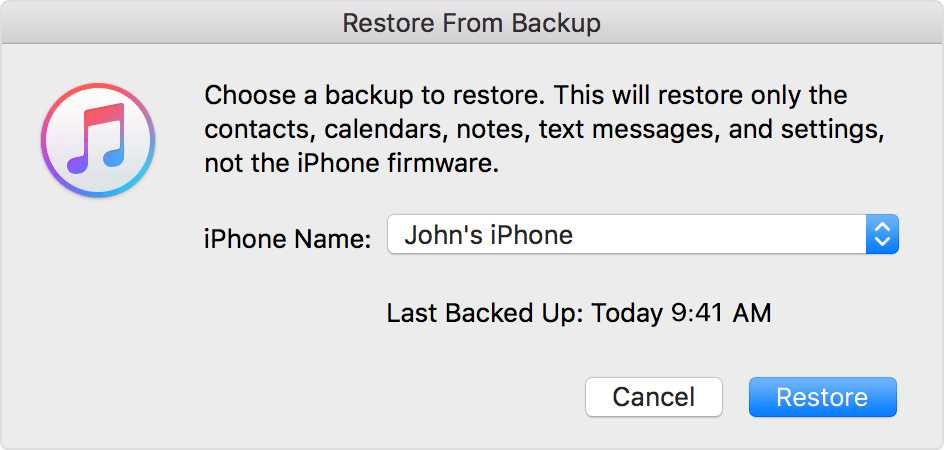
  5. Look at the date and size of each backup and pick the most relevant.
  6. Click Restore and wait for the restore time to finish. If asked, enter the password for your encrypted backup.User uploaded file
  7. Keep your device connected after it restarts and wait for it to sync with your computer. You can disconnect after the sync finishes.

This thread has been closed by the system or the community team. You may vote for any posts you find helpful, or search the Community for additional answers.

How to retrieve lost photos after back up?

Welcome to Apple Support Community
A forum where Apple customers help each other with their products. Get started with your Apple Account.