Why do my notifications overlap?

My phone notifications, specifically from Instagram overlap each other like in this picture. I clear all my notifications and they go away. But once a get a new notification it goes back and overlaps with it. It's the same notification too. Anyway how to fix this annoying bug? I have a 32G iPhone 7 with the latest version of iOS (3/7/17).User uploaded file

iPhone 7, iOS 10.2.1, 32G

Posted on Mar 7, 2017 8:01 PM

Reply
1 reply

Mar 8, 2017 12:18 PM in response to Soccerastyle

Hello Soccerastyle,

Thank you for using Apple Support Communities. It's my understanding that your Instagram notifications have been overlapping on your iPhone. From the image you provided, I can see how this would be concerning. I'm happy to help.

If you haven't already, I recommend restarting your iPhone. This can resolve many unexpected behaviors.
Restart your iPhone, iPad, or iPod touch

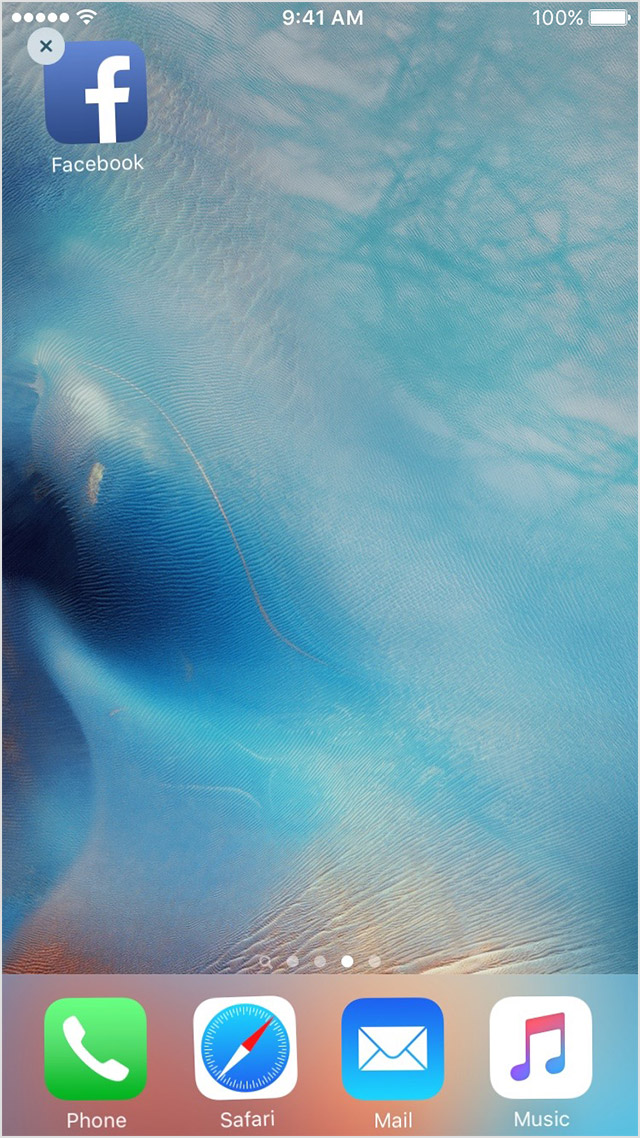
If the behavior continues, try deleting the Instagram app and reinstalling it. Use the steps and image below:
  1. Tap and hold the app until it jiggles.
  2. Tap the User uploaded file on the app.
    User uploaded file
  3. Press the Home button.
  4. Go to the App Store and download the app again.
  5. Wait for the app to download, then open it from the Home screen.
If an app you installed unexpectedly quits, stops responding, or won't open

Have a great day!

This thread has been closed by the system or the community team. You may vote for any posts you find helpful, or search the Community for additional answers.

Why do my notifications overlap?

Welcome to Apple Support Community
A forum where Apple customers help each other with their products. Get started with your Apple Account.