my apple tv does not let me sign in with a verificatio code it keeps going back to start the process again
I've tried signing in with verification code from my phone but it does not work
Yep, stuck in this endless loop. Enter the email, enter the passcode followed with the 2 step code and...back to enter email...varies between unable to contact server try again, or just plain nothing...weird thing is, it's contacting the server otherwise I wouldn't be getting the 2 step code sent to me...
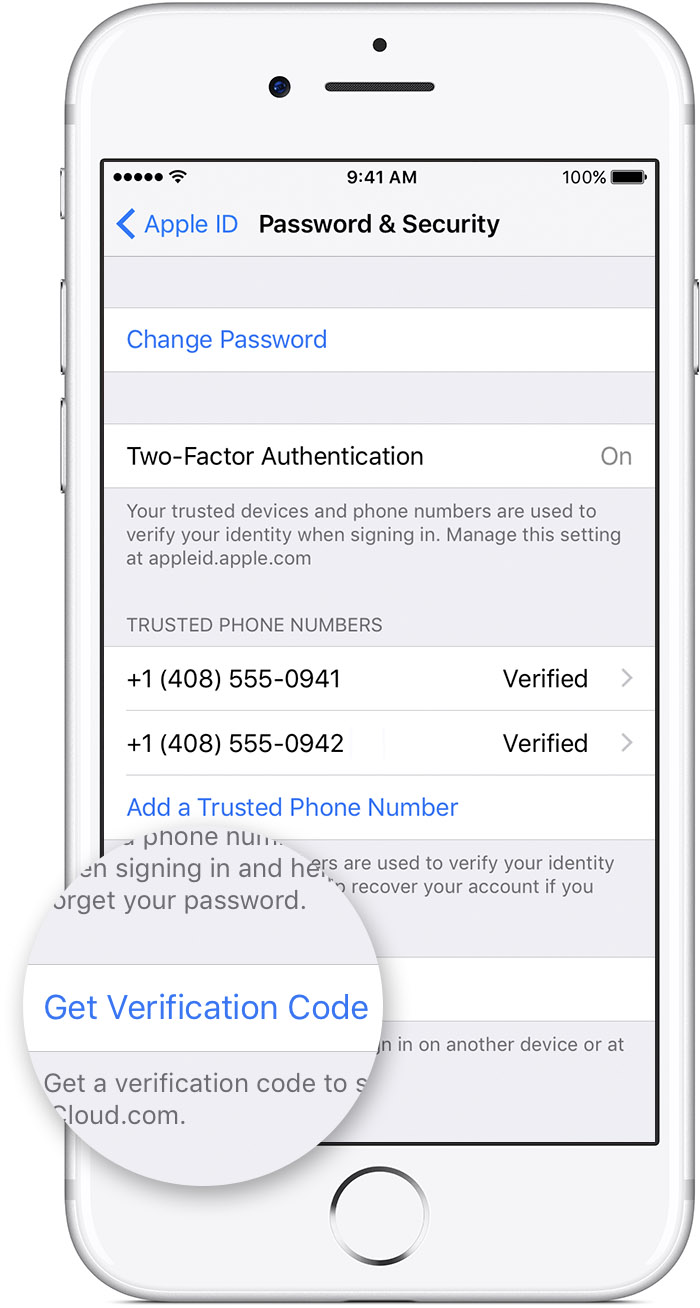
Get a code from Settings on your trusted device
If you can’t receive a verification code on your trusted devices automatically, you can get one from Settings, even if your device is offline.
From your iPhone, iPad, or iPod touch with iOS 9 and later:
- Go to Settings > iCloud.
- Tap your Apple ID username.
- If your device is offline, tap Get Verification Code.
- If your device is online, tap Password & Security > Get Verification Code.
From your Mac with OS X El Capitan and later:
- Go to Apple Menu > System Preferences > iCloud.
- Click Account Details.
- If your device is offline, click Get Verification Code.
- If your device is online, click Password & Security > Get Verification Code.
The suggestion didn't work. Whether I initiate from Apple TV settings, the phone, or Apple TV purchase the code isn't working. I get the code on my phone and enter into Apple TV and is stuck in a loop, it just goes back to the enter email screen. I'm unable to rent, purchase or access any of my previously purchased material.
i had this issue on my apple tv, which i stopped using but left physically connected to my tv for months until i switched from Time Warner turn Spectrum to Verizon. The issue stopped but in looking through diagnostics many of the diagnostics reports are easily 10x more massive in syntax and length vs. my device diagnostic reports on days when it wasnt being used...by me. I noticed another apple tv and or devices via bluetooth showing up on my private wifi, even after password changes.
(each time i navigate to my bank on my iMac with safari im directed to authorize my computer if i log out and return right away)
Darren.s your solution does not work. I am having this problem with only one of my Apple TV's. the other Apple TV accepted the verification code I received on my trusted device (phone). Like the other reports here, no matter how I request/receive a verification code, the problem Apple TV throws me back into the enter password loop.
I finally solved this problem by waiting a day. Then I turned off my primary trusted device (phone). I used verification code generated on another trusted device (iPad). Now apple TV is working. This solution is fine if you have two trusted apple devices but it's not for everyone. Apple really should fix this problem.
When I turn off my iPhone or the wifi on my phone, my Apple TV can't connect to iTunes and thus doesn't go to the page where I have to introduce the code. Conclusion: I'm not able to generate a code on a other device. Very strange.
When my iPhone is on, or the wifi, I end up in the loop + It's like my Apple TV won't work without my iPhone connected to wifi...??
Now I have 2 strange things going on. Anyone some new insights on this case?
I was suddenly locked out of my Apple TV at 8 pm. After resetting Apple TV, Router, and Modem..then trying to sign into Apple TV. My password no longer worked. Tried multiple times to reset password, and had to completely reset my Apple Account. I keep getting messages that it may take a few days.. After 2 hours, I was able to use my iPad to finally reset my Apple password. But I'm still getting locked into the same loop after entering only 4 characters of the password, Apple TV is telling me I am unable to sign in at this time. 11:00 pm.. and Apple wonders why I gave up the iPhone 4 years ago.
I'm having the same issue, and there doesn't seem to be a fix in place. It is SUPER frustrating. Has anyone figured out any tips to get this to stop yet?
Everyone seems to be having this issue. I just went through the loop easily 15 times to try and get it to work. This is worse than the 7th level of He11.
I am having same issue
I am in the same Boat sign in keeps sending me back to sign in. about to throw this POS out and cancel everything Apple.
Go into settings and check the list of accounts you have listed. sign out and try going in with one of the other names. this worked for me.
Isn't there anyone from Apple or Apple Helpdesk who can help us solve this very irritating problem? Or aren't they reading this? Could the solution be to switch off 2-factor verification perhaps?
my apple tv does not let me sign in with a verificatio code it keeps going back to start the process again