Can the iPhone 7 send normal text messages?

Hi,


I'm a new owner of an iPhone 7 Plus. I have a quick question. I've just sent a text message to someone, but lost confidence in knowing if that message got sent or not.


Question 1:

Can iPhones send text messages to any phone - such as android phones?


Question 2:

Is the default configuration of the iPhone 7 Plus such that sending text messages to any phone is possible? Or, would one need to adjust something in the settings of the iPhone in order to send a text message to non-iPhone compatible devices?


Question 3:

I've just sent something from the iPhone 7 Plus using "Messages" to an Android phone (default configuration). Will this message get delivered or would the recipient need an iPhone?


Thanks for reading!


David

MacBook Pro (Retina, 15-inch, Mid 2015), OS X El Capitan (10.11.1)

Posted on Mar 17, 2017 9:58 AM

Reply
18 replies

Mar 17, 2017 10:02 AM in response to silver_mica

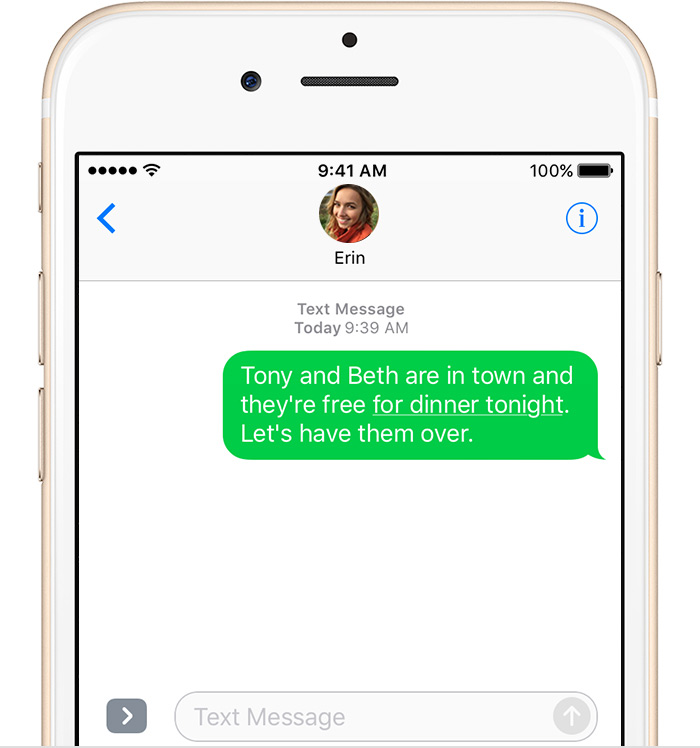
Yes, of course they can send SMS. SMS and MMS to non-iOS accounts/number appear green in Messages. You don't need to do anything to make this work in most cases. SMS and MMS are handled by your wireless carrier the iPhone is just the device to create the message.


About iMessage and SMS/MMS - Apple Support


Messages for iPhone, iPad, Apple Watch, and Mac - Apple Support

Mar 17, 2017 10:46 AM in response to razmee209

razmee209,

I disagree. I'll make a YouTube video detailing my conclusions.

Have a good day,

David

razmee209 wrote:


silver_mica wrote:


Test Three.


I had the second person send me an SMS message from her phone to my iPhone 7 Plus. She is providing feedback when I send a message through Messages. I replied to her SMS text message and that message went to her SMS chat/window thing on her Android phone.


That's great, however from my vantage point email and text messages are indistinguishable as seen from the Message app on the iPhone 7 Plus (they all look like chat). That is to say, I have absolutely no idea if the (intended to be) text message got sent as an email or as a text - when I send what appears to be an SMS text. At this time it seems that it is not possible for me to independently send a simple SMS text message to android phones without FIRST having the recipient send me a text message.


In general it's very confusing.


I never would have thought sending simple text message would have been so convoluted.


Oh well - I'll assume Apple phones don't really do SMS text messaging very well.

That's an absurd statement, you've had plenty of other user reply stating that you can most definitely send a SMS text to and Android phone.


I don't think you know the difference between imessage and text message.


My parent who are in their 60's have no issue sending a text message.


As stated already contact your phone carrier.

Mar 17, 2017 10:27 AM in response to silver_mica

What exactly do you mean by "it went to her e-mail"?


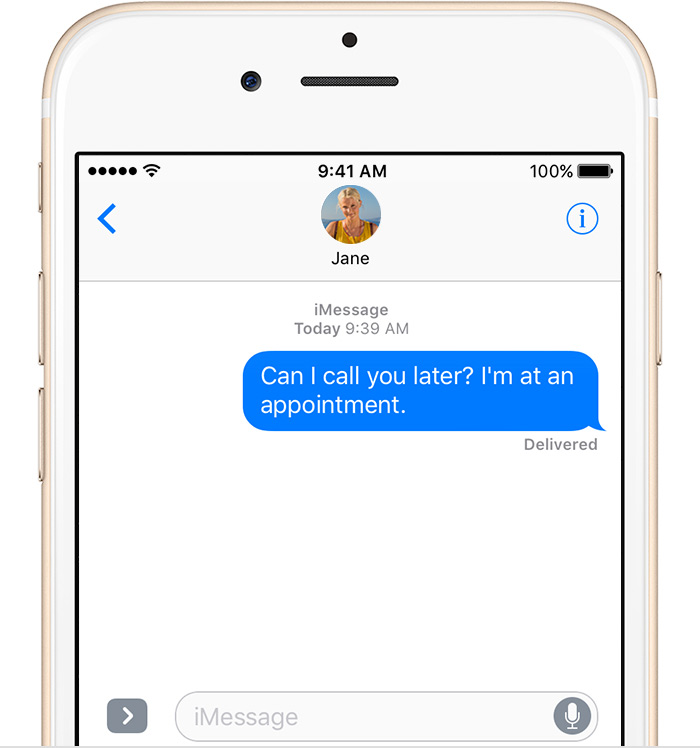
What color is the message bubble? If its blue, it was sent as an iMessage, which implies the recipient has an Apple Device associated with her number.


Otherwise it should be green if it was sent as an SMS.

If the recipient has any Apple device such as a Mac or an iPad, the Messages App (User uploaded file) may automatically attempt to send the message as an iMessage to one of those devices instead of as an SMS.


Beyond that, as has already been answered, Yes an iPhone can send SMS messages to non-Apple devices.


You can as a test go into Settings->Messages->iMessage, and turn it off. Then the messages App will send it as an SMS only.

Mar 17, 2017 10:53 AM in response to silver_mica

Let's try this again. Messaging 101.


When you use the Messages App, yes the green icon with a white bubble: User uploaded file


Messages are sent in two ways. iMessage and SMS.. If a Message was sent as SMS it will have a green background:

User uploaded file


The message itself has a green background.


If it was sent as an iMessage, the message will have a blue background:

User uploaded file


What color do your messages have when you send them?


As I said above, you can turn off iMessage and force all messages to go via SMS.


Settings->Messages->iMessage, and turn it off

Mar 17, 2017 11:14 AM in response to silver_mica

As can be seen all text bubbles sent by me are green. The recipient, my girlfriend who owns an Android phone, is responding. Clearly, as I've stated in this thread, some of the text messages I sent got received as emails and others as SMS.


In this test, the only way I was able to have the recipient receive an actual SMS text message was to have her FIRST send me an SMS text. Unfortunately, I see no obvious way to distinguish between those messages that got sent via email and those message that were real SMS text messages.


The text below (in the screen capture) started off with me entering the mobile number directly.


Oh, by the way, the recipient who received an email (originally sent through Messages) got an email from me that had the domain @vzwpix.com in it - so this may have something to do with my carrier (as someone stated). I use Verizon Wireless.


I'm about to hit the road - I'm headed to a film screening and will be coordinating with others this weekend - which was the initial reason I made this thread - I needed to know if my text messaging was reliable or even working. At this time I will not use SMS text messaging.


I'm sure whatever the issue is can eventually be worked out. But, being that I'm in a rush I simply do not have time to troubleshoot.


When I get back into town I'll make a clear YouTube video showing the issue.


I'm leaving now. Have a great weekend!


User uploaded file

Mar 17, 2017 10:24 AM in response to silver_mica

silver_mica wrote:


Thanks for the help, but I haven't had any luck actually sending a text message. I am using an Apple app known as "Messages" on my iPhone 7 Plus. I ran a test just now (with a second person) and got feedback. When I send a message using Messages it goes to her email and not her SMS message. I tried two ways 1) from the contact list and 2) manually entering the mobile number. In each case it went straight to her email and not her SMS text message box.


Again, I'm using Messages - the little green icon at the bottom of the iPhone.


So, something is obviously wrong and I must ask again. Can an iPhone 7 Plus send a normal SMS text message without having to configure something first?


Maybe I'll just post a YouTube video.

if it is going to her email that means your sending her an imessage (blue text) to her email address instead of her phone number.


You can't send a SMS (green text) to an apple id.

Use Messages on your iPhone, iPad, or iPod touch - Apple Support

If you can't send or receive messages on your iPhone, iPad, or iPod touch - Apple Support


if you're having issue with text message then you need to contact your phone carrier that is their issue.


I have no issue sending text message to an Android phone, there is no configuration that I need to do.

Mar 17, 2017 10:32 AM in response to silver_mica

silver_mica,


Make sure that the "mobile" number was a true model number and not a land-line etc. It should work 🙂


Be aware that if the other person has an iPhone the message will be sent as an iMessage (the text will appear on your phone with a blue background.) Messages sent to non-iPhones will be sent as SMS text messages through your cellular data plan (the text on your phone will have a green background).


If you're having trouble with iMessages see the link below:


Activating iMessage


Let us know if you get it figured out.


P.S. you can send messages (SMS messages or iMessage messages) to yourself to test out the various options. Then find another person with an iPhone and test. Then find a person with a non-iPhone and test again. This stuff actually works. You'll be a expert in no time 🙂

Mar 17, 2017 10:55 AM in response to gadgetvirtuoso

gadgetvirtuoso - Thanks for that link - very useful. All of my text bubbles are green - both the one's that got received as an email and SMS.

gadgetvirtuoso wrote:


Yes, of course they can send SMS. SMS and MMS to non-iOS accounts/number appear green in Messages. You don't need to do anything to make this work in most cases. SMS and MMS are handled by your wireless carrier the iPhone is just the device to create the message.


About iMessage and SMS/MMS - Apple Support


Messages for iPhone, iPad, Apple Watch, and Mac - Apple Support

Mar 17, 2017 10:08 AM in response to silver_mica

silver_mica wrote:


Question 1:

Can iPhones send text messages to any phone - such as android phones?


David

Yes. All iPhone's are capable of sending SMS messages to phones from other manufacturers. SMS messaging is general a carrier service. An iPhone much like a Windows Phone, or an Android Phone can use this service to send messages to other devices.


silver_mica wrote:


Question 2:

Is the default configuration of the iPhone 7 Plus such that sending text messages to any phone is possible? Or, would one need to adjust something in the settings of the iPhone in order to send a text message to non-iPhone compatible devices?


There's nothing that needs to be done to send messages to non Apple devices, other than having active cell / mobile service from your carrier. Again SMS messaging is a carrier service.


silver_mica wrote:


Question 3:

I've just sent something from the iPhone 7 Plus using "Messages" to an Android phone (default configuration). Will this message get delivered or would the recipient need an iPhone?


It should get delivered to the recipient as long as his phone is turned on, and has cell service.


Millions of people all over the world message people from iPhones to non iPhones and back. Or do you think iPhone users have no friends with other types of phones they might message?

Mar 17, 2017 10:16 AM in response to silver_mica

Thanks for the help, but I haven't had any luck actually sending a text message. I am using an Apple app known as "Messages" on my iPhone 7 Plus. I ran a test just now (with a second person) and got feedback. When I send a message using Messages it goes to her email and not her SMS message. I tried two ways 1) from the contact list and 2) manually entering the mobile number. In each case it went straight to her email and not her SMS text message box.


Again, I'm using Messages - the little green icon at the bottom of the iPhone.


So, something is obviously wrong and I must ask again. Can an iPhone 7 Plus send a normal SMS text message without having to configure something first?


Maybe I'll just post a YouTube video.

Mar 17, 2017 10:28 AM in response to silver_mica

Test Three.


I had the second person send me an SMS message from her phone to my iPhone 7 Plus. She is providing feedback when I send a message through Messages. I replied to her SMS text message and that message went to her SMS chat/window thing on her Android phone.


That's great, however from my vantage point email and text messages are indistinguishable as seen from the Message app on the iPhone 7 Plus (they all look like chat). That is to say, I have absolutely no idea if the (intended to be) text message got sent as an email or as a text - when I send what appears to be an SMS text. At this time it seems that it is not possible for me to independently send a simple SMS text message to android phones without FIRST having the recipient send me a text message. And, even if that has been done I still would not recognize the difference between email or SMS text - since Apple sort of uses a chat window to send an email. Yeah . . .


In general it's very confusing.


I never would have thought sending simple text message would have been so convoluted.


Oh well - I'll assume Apple phones don't really do SMS text messaging very well.

Mar 17, 2017 10:29 AM in response to silver_mica

silver_mica wrote:


Test Three.


I had the second person send me an SMS message from her phone to my iPhone 7 Plus. She is providing feedback when I send a message through Messages. I replied to her SMS text message and that message went to her SMS chat/window thing on her Android phone.


That's great, however from my vantage point email and text messages are indistinguishable as seen from the Message app on the iPhone 7 Plus (they all look like chat). That is to say, I have absolutely no idea if the (intended to be) text message got sent as an email or as a text - when I send what appears to be an SMS text. At this time it seems that it is not possible for me to independently send a simple SMS text message to android phones without FIRST having the recipient send me a text message.


In general it's very confusing.


I never would have thought sending simple text message would have been so convoluted.


Oh well - I'll assume Apple phones don't really do SMS text messaging very well.

That's an absurd statement, you've had plenty of other user reply stating that you can most definitely send a SMS text to and Android phone.


I don't think you know the difference between imessage and text message.


My parent who are in their 60's have no issue sending a text message.


As stated already contact your phone carrier.

Mar 17, 2017 10:34 AM in response to Phil0124

Phil0124 - I'll post a YouTube video.


The recipient does not have an iPhone - they have some type of Android phone. I'm using Apple's "Messages" - the green colored app located at the bottom of the iPhone 7 Plus. There is no blue anything. I sent a message, entering her mobile number manually (that's so 21 century!) and it went to her email. Later, after some troubleshooting a workaround was found by having her send me an SMS directly. This worked, however I am unable to differentiate if the Messages app sent an email or sent an SMS text. They all look the same. In fact, as we troubleshot this problem all of our communications show up in my Message chat window - where some were emails and others were SMS text.


Well, I don't really need to use SMS text I suppose. But, still, it's hyper annoying.

Mar 17, 2017 10:39 AM in response to MrBill3

MrBill3


She's my girlfriend - we've been together for 7 years using the same phones over that period of time sending thousands of text messages to each other. I have her mobile number memorized.


I've been testing today - the results are shown in this thread.


Essentially, the conclusion at this time is that I can send an SMS under certain conditions. And, text sent using Messages may or may not go to email - and there is no obvious marker that lets the iPhone user know (realize) that their text went to an email instead of a text. This is expecially confusing since the format appears, very much, to resemble instant chat or SMS text rather than email.


For reference: my icon doesn't say iMessages - just Messages - it's green in color and located at the bottom of the iPhone


David

This thread has been closed by the system or the community team. You may vote for any posts you find helpful, or search the Community for additional answers.

Can the iPhone 7 send normal text messages?

Welcome to Apple Support Community
A forum where Apple customers help each other with their products. Get started with your Apple Account.