Can't Find "Remove Download" for Movies on PC Anymore

Hi,

I'm looking to clear space on my hard drive by removing downloaded movies. I've used the option to do so several times in the past, but it seems that in the current version of iTunes for PC, "Remove Download" no longer exists in either the right-click menu or from the Movie menu on the top bar. The only option is "Delete From Library", which caused got rid of it permanently from my account without an option to redownload (had to have Support restore it).


The "Remove Download" menu option still exists for purchased music - can anyone tell me where it has moved to for movies, or if there is a new method for clearing the file from your hard drive while keeping the ability to redownload later?


Many thanks!

Windows 10
Posted on Mar 28, 2017 6:52 PM

Reply
12 replies

Aug 3, 2017 4:29 AM in response to Chris Schlerf

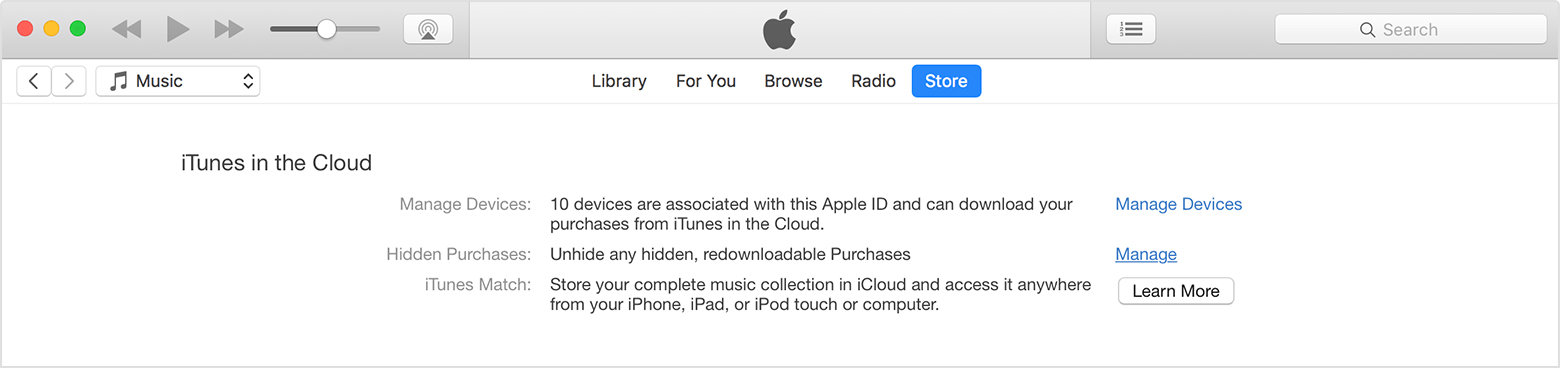
Hi Chris, I had the same issue with one movie in my library. Turns out it was a hidden purchase. I don't know how it ended up like that. Try the following steps, this worked for me. Hope this helps!


Unhide items

To open iTunes and sign in to your Account Information page from your computer, click this link: View My Account. Or follow these steps:

  1. Open iTunes.
  2. If you’re not signed in, sign in with your Apple ID.
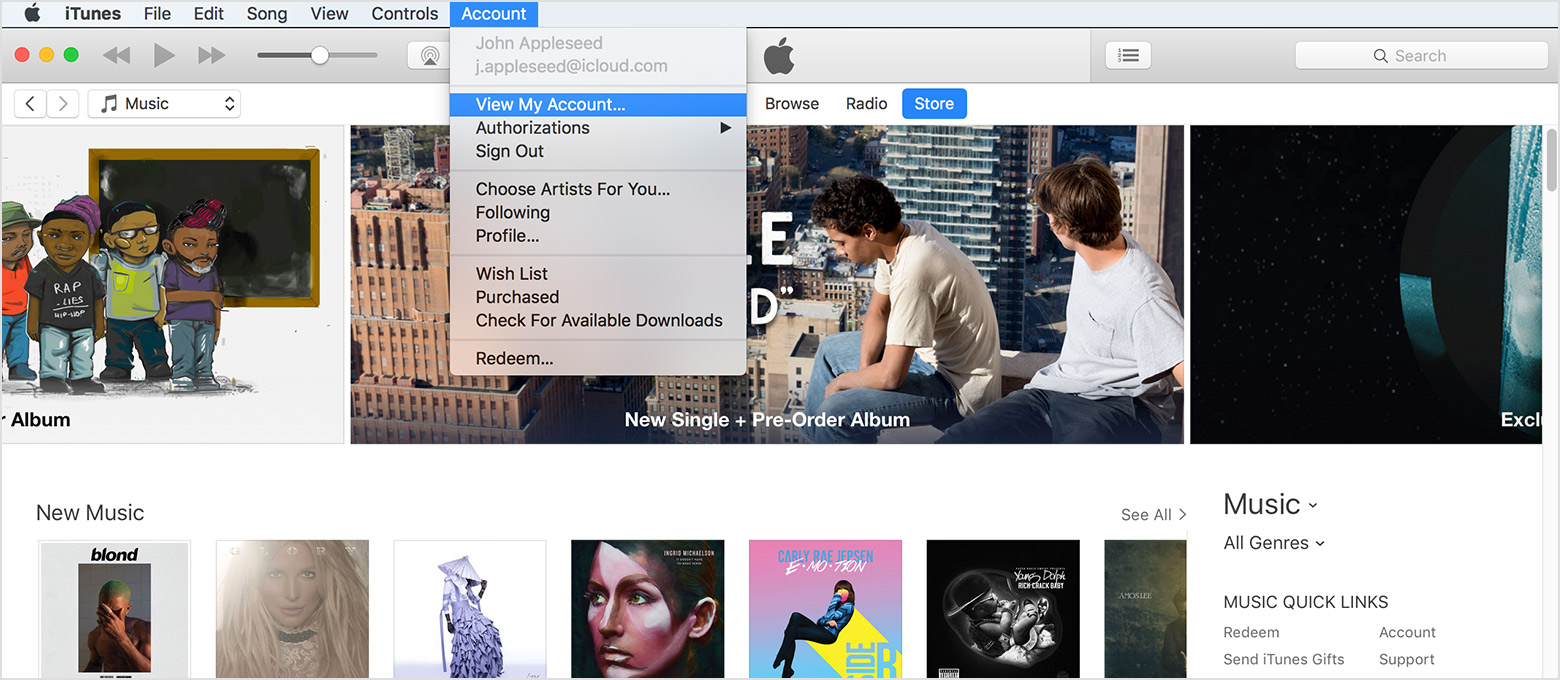
  3. From the menu bar at the top of your computer screen or at the top of the iTunes window, choose Account > View My Account.
    User uploaded file
  4. Enter your password, then press the Return or Enter key on your keyboard, or click View Account.

On the Account Information page:

  1. Scroll to the iTunes in the Cloud section. To the right of Hidden Purchases, click Manage.
    User uploaded file
  2. Depending on what you want to unhide, click Music, Movies, TV Shows, Apps, or Audiobooks at the top of the window.
    If you're using a PC, you can also unhide books. Learn how to unhide books on a Mac.
  3. Find the item that you want to unhide, then click Unhide under it.

Mar 30, 2017 3:13 PM in response to Chris Schlerf

Still no luck. I'm on 12.6.0.100 as well, and just uninstalled/reinstalled to see if that worked.


And unfortunately, just offloading the films isn't a great option - I've already got 12 TB of media from Steam library, my music, digitizing my personal videos, etc - with another 4 as backup for the most critical stuff. Any more hard drives and I'm going to need a rack. Being able to rely on the cloud wherever possible is part of the draw of using iTunes.


Oh, and screen grab for good measure:


User uploaded file

Mar 30, 2017 9:48 PM in response to Chris Schlerf

Heh - the funny thing is that's where this all started.


When I hit either backspace or delete, I get a slightly different pop-up from the one you're seeing:


User uploaded file

That's also the same one I get by selecting "Delete Movie" from the Movie menu or right-clicking.


The reason the issue came up in the first place was because I attempted to clear a movie off my HD by selecting 'Delete Move' since there was no other option - and that's when the movie disappeared from my account entirely.


Also, in terms of looking for possible clues to what's going on, I installed iTunes on a different computer, but still no "Remove Download" option.


The only thing I've been able to come up with is that I only get a 64-bit option when I download the iTunes installer. Is there a 32-bit version, and could there even be a discrepancy if there is?


(and thx for trying to sort thru this with me - just frustrating given how simple this should be)

Mar 31, 2017 3:43 AM in response to Chris Schlerf

If you have a 64-bit machine then you need the 64-bit installer. I'm running 64-bit too, though on Windows 7 in my case. It probably won't make any difference, but try Edit > Preferences > Advanced > Reset Warnings. It's just possible that you've ticked a Do not ask again box at some point which has affected the way that the prompts are offered.


See also Hide and unhide iTunes Store, App Store, or iBooks Store purchases - Apple Support so you can unhide anything you hide in error.


tt2

Mar 29, 2017 11:10 AM in response to Chris Schlerf

Looks like that option is currently missing. 😕

I've tried alternate views and menus but it doesn't show.


FWIW you should always keep your own copy in case the studio pulls the movie from the store, and a backup. You might be better off moving the files manually to an external drive for example. See CustomRenamer for a script that can be used for this.


tt2

Aug 6, 2017 9:16 AM in response to RonChiChio

Hey, thx for the idea - sadly, it turns out there's not anything I can do on my end. I contacted Apple, who told me that the reason I couldn't restore the films I had an issue with is because I had used a codes that came with my blu-rays as opposed to purchasing the movies through the store. They said they'd restore the movies on their end, but then after briefly reappearing, they disappeared from my library again.


Spent a lot of time trying to work it out with them, and then in the end only wound up frustrated and had to put off pursuing it further until another day.

Aug 7, 2017 2:54 AM in response to Chris Schlerf

The movie I had an issue with was actually redeemed from a code that came with a blu-ray. My friend recently bought some blu-rays and she just texted me pics of the codes. 4 of those codes were for iTunes, 3 of them were fine but one of them somehow ended up as a hidden purchase. I followed the steps I posted and I was able to download it to my library. I probably would've been out of luck if I had deleted it from my library. If my friend sends me more codes and one happens to be for a movie I already have, I'll give it to you.

This thread has been closed by the system or the community team. You may vote for any posts you find helpful, or search the Community for additional answers.

Can't Find "Remove Download" for Movies on PC Anymore

Welcome to Apple Support Community
A forum where Apple customers help each other with their products. Get started with your Apple Account.