In pages, how to add space after paragraphs

Using Pages for ios, how do I add apace after paragraphs? I don't want space after every line - which seems to be the primary option - I just want an additional space - but not another line - after each paragraph. This is a pretty standard option with most word processing programs. Surely there is a way to do it in Pages?

Thank you,

iPad Pro, iOS 10.1.1, New as of Dec. 2016.

Posted on Mar 29, 2017 11:20 AM

Reply
4 replies

Mar 30, 2017 7:11 PM in response to Bobby Collins

Good afternoon Bobby,

Thanks for your questions about Pages for iOS. The information I'm providing here is for the latest version of Pages for iOS, which is 3.1. Here's how to change line spacing in general:

Pages Help for iPad - Adjust line spacing

And here's how to add a soft carriage return after a paragraph:

Pages Help for iPad - Add line, page, and column breaks

A line break, also called a soft return, starts a new line without starting a new paragraph.

  1. Tap where you want the break to occur.

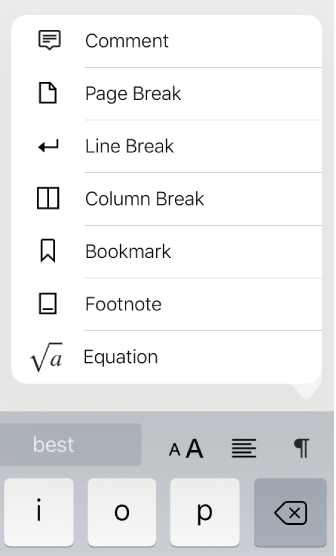
  2. Tap User uploaded file in the shortcut bar above the keyboard, then tap Line Break or Page Break.

    User uploaded file

    If you don’t see Page Break, your document is a page layout document and doesn’t use page breaks. In that case, open the document in Pages on your Mac, add a new page, then open the document again on your iOS device.

When you insert a line break or page break, Pages inserts a formatting character called an invisible. You see these formatting characters when you select text that includes them. For more information about invisibles, see About formatting symbols.

Enjoy your day!

Sep 26, 2017 5:49 PM in response to judysings

Although it was kind to take the time to reply to Bobby Collins your answer applied to an entirely different problem & did not provide information pertinent to the question asked. Like Bobby Collins I would like to increase the space between paragraphs not between the lines in a paragraph. For example: I want the spacing between the lines in my paragraph to be 1.2. This spacing will apply to every line within the paragraph whether there are 2 or 20 lines, whether there is a soft return or not. What I want to happen between paragraphs is a little bit more space, I want it to be 1.5 between each and every paragraph. It doesn't matter if the paragraph is a single line or 100 lines the space between the lines should remain at 1.2 while the space between paragraphs should be 1.5. This is an easy thing to do in MS Word but I can't figure out how to make it happen -easily- in pages. My tedious work around has been to create a single cell table. I won't go into further details because it is tedious.

Can you suggest an easier solution? I would be very grateful.

Jul 26, 2017 2:15 AM in response to Bobby Collins

Select the paragraphs you want to add additional space after and tap the Format Icon. Scroll down the options and adjust Line Spacing to suit.


If you have Pages on a Mac, you can create your own paragraph styles, then use them in your document on in iOS or create a template with your own styles. I don't believe you can edit paragraph styles on your iPad.

This thread has been closed by the system or the community team. You may vote for any posts you find helpful, or search the Community for additional answers.

In pages, how to add space after paragraphs

Welcome to Apple Support Community
A forum where Apple customers help each other with their products. Get started with your Apple Account.