Hi w'
Your formula should work, but you have entered it as a 'custom format', not as a formula.
Click on cell B32 to select it, then click the Format brush and choose Cell.
In the Cell Format inspector shown in your screen shot, click the Edit custom format button, and delete the custom format that is shown.
Then change the Cell format selection back to Automatic.
Deselect B32 by clicking any other cell, then reselect it by clicking once on B32.
Place the mouse pointer between the Row reference tab for row 32 and the edge of the table. Click the v that appears in the space and choose Convert to Footer row.
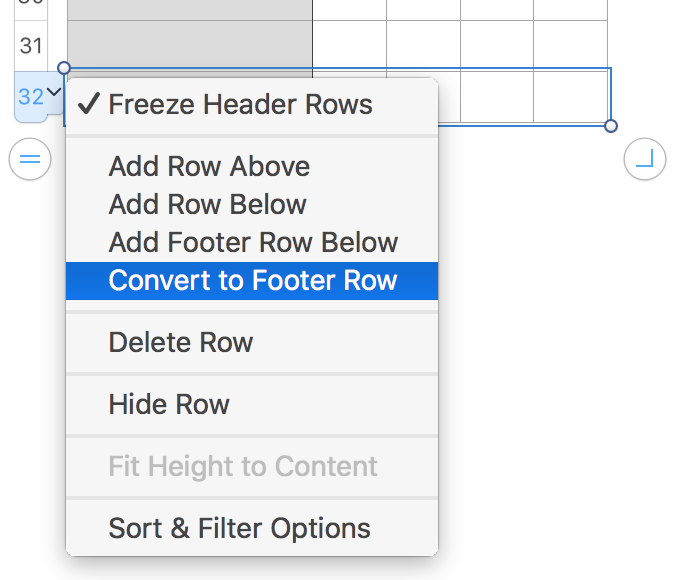
If Rows 1 and 2 are not both header rows, repeat this process, choosing Convert to header row for each. (If the row is already a Header row, the choice to convert will not be available in the menu
Footer rows and Header rows are excluded from whole column references in functions such as COUNTIF, making the formula a bit simpler.
Reselect B32 to ensure it is the only selected cell.
Press = to open the Formula editor.
Type either of the two formulas below into the Formula editor.*
COUNTIF(B,TRUE)
COUNTIFS(B,TRUE)
Click the green checkmark to confirm the entry.
Move the mouse pointer toward the right edge of the selected cell (B32). A yellow dot will appear in the middle of that edge. Grab it with the mouse and drag right to fill the formula into the rest of the cells in the Footer row.
Each copy of the formula will count the checked cells in its column.

Regards,
Barry
* The first function (COUNTIF) counts a cell if one condition is met.
The second counts a cell only if ALL specified conditions are met.
As you case requires only one condition (The cell's value is TRUE), either function can be used.
EDIT: Added screen shot with formula.

