If one AirPod is louder than the other

When I listening to my AirPods it sounds like my right AirPod is slightly louder than the left. I even replaced the left one on an Apple Store, but still having the same issue. Unpair/Pair was another try.


Has anyone else experienced anything like this?


Thanks!!


[Re-Titled by Moderator]

AIRPODS

Posted on Apr 5, 2017 4:47 PM

Reply
Question marked as Top-ranking reply

Posted on Mar 21, 2021 8:25 PM

There are two main problems that could be causing this: volume settings or dirty airpods.


The former is simply fixed by going to settings -> general -> accessibility -> audio/visual and then scrolling down to the bottom to see the scroll bar that controls how loud one speaker is over the other. Adjust it to your needs.


however, if you still find that your airpods sound muffled or that just didn’t plain work, the solution is cleaning them. You should already have a set cleaning regime for them to improve and maintain good sound quality. However, I will share mine (that includes the suction method that some mentioned here as well minus the gross sucking-with-your-mouth part).


  1. take a vacuum cleaner, shop-vac, or something of that nature with a small nosil. put the AirPod up to the nosil and turn the vacuum on. create a suction by patching up most air pockets. hold this at 15 second increments for 2-3 times per/AirPod.
  2. next, take a toothpick and scrape the inside edges where a lot of ear wax, hair, and dirt builds up. Repeat this for ALL THREE holes on the AirPod (although you may think you don’t need to clean the other two holes, you do).
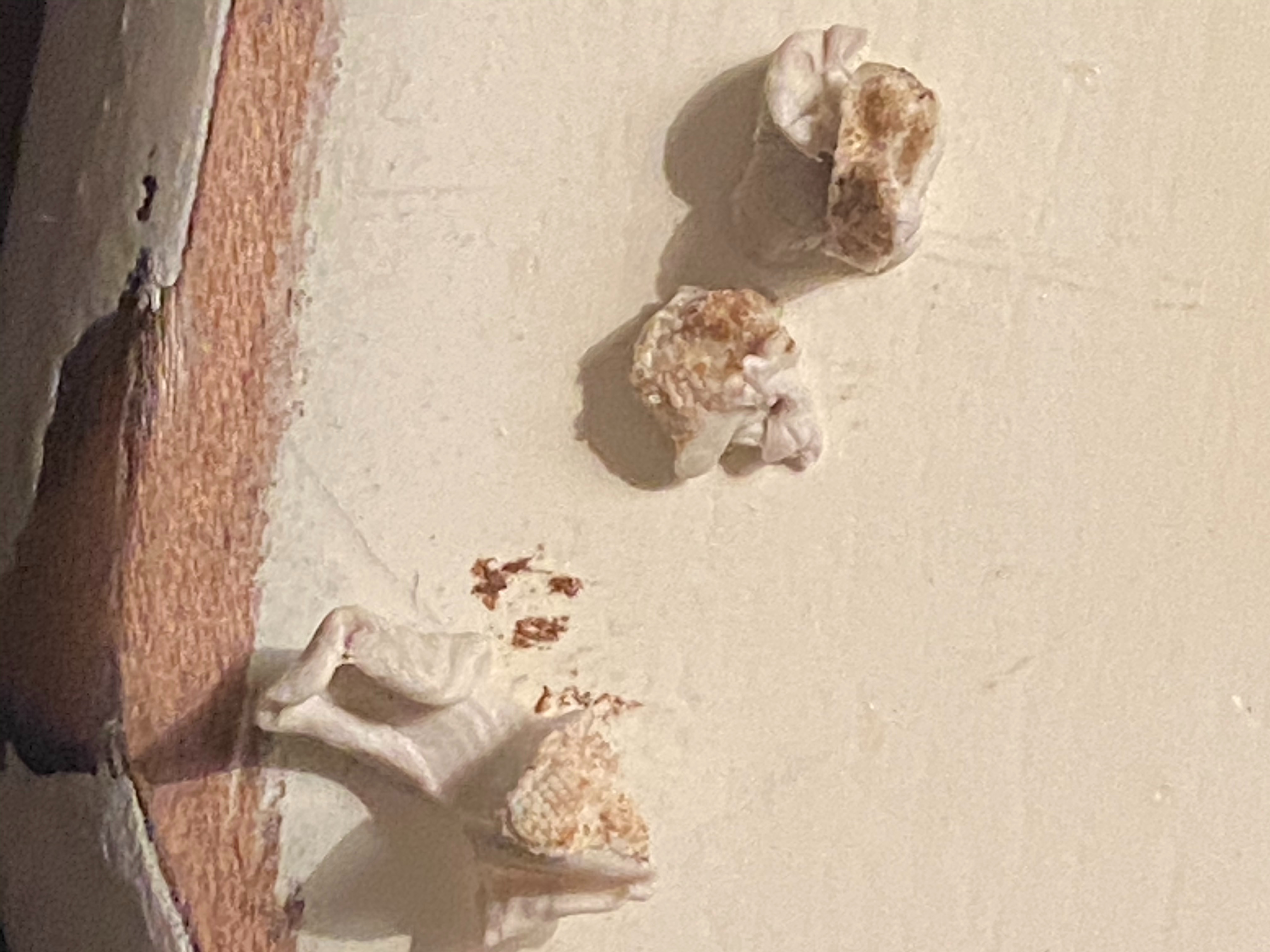
  3. Next, take sticky tack (like, the stuff you use to hang up posters) and taking a small bit, mold the sticky tack to the inside of the hole and press down to where the sticky tack is now inside the hole. Pull upwards and repeat as many times as needed (make sure to change out your sticky tack frequently and do this for all three holes).
  4. Finally, to finish this off, take a cotton swab and douse it with rubbing alcohol. Wring it out slightly and rub it all over the airpods (including inside the holes).


Now, if neither of these things work you may have broken/damaged airpods on your hands.


as shown by the image, I had the latter as my problem and this cleaning method worked really well and now my sound quality and volume is 100x better for both airpods! This is what came out of my airpods using the sticky tack, and I can only imagine what came out with the suction.
1,187 replies

Sep 6, 2021 4:47 PM in response to paulosoaresf

That is exactly what’s happening with my AirPods after cleaning with Q-tips and alcohol gently, facing downward so not to enter. There was not much earwax to begin with, but once there was so much I thought they were broken until I looked with a magnifying glass, and screen completely covered with wax-grossness!. Gently scraping with a Q-tip, damp with alcohol, completely removed, making sure AirPod screen downward. Worked perfectly, and like brand new afterwords, letting air dry upside down. Now, the right is louder than the left, or the left is not as loud as the right! Looked to see if there was a volume or balance control - No 👎. I would think this would be an important option, as peoples’ ears vary, and not bilaterally symmetric. One may fit differently and cause a drastic difference in volume. Hope someone here has a fix. Best, Seth

Sep 9, 2021 5:23 AM in response to wilsonmg8181

You described as an amount of material that exited, and assume dried earwax exiting the speaker screen cover, yes? I did not experience or see anything come out, yet the loudness returned to near normal or normal; and, no longer required using the balance control, which only diminished the volume on the right, and creating a sound of lesser quality, it seemed. Perhaps just A lower volume, yet, by increasing the volume it did not seem quite as clear. However, it now functions nicely. Seth

Sep 20, 2021 2:46 PM in response to piper165

This probably sounds a bit funky, but does anyone have any experience of sucking or blowing too hard and damaging the little speaker diaphragm(or it’s equivalent), Or does the plumbing between the two orifices go around, not affecting the sensitive components? My concern was blowing too hard in the side oval hole 🕳. Does anyone have a diagram of what’s going on inside the first and second GEN AirPods? The design clearly did not take into account earwax being shoved over and through the screen. This was circumvented with the AirPods Pro, which I also have, and it is offset by a small rubber covering, with three sizes. The comfort and sound is dramatically increased in quality and comfort. This small offset and no direct contact with the AirPod precludes this problem. There’s a sale going on right now at Costco for $169, $50 off their regular price, and highly recommend picking up a set if you are able. The earwax problem is no longer an issue with the AirPods Pro. Apple should provide folks here with what’s going on with the first and second GEN AirPods, that this problem is affecting so many, and the solution so bizarre. Surely this Is an embarrassment with the initial design. Someone mentioning scolding a daughter about hygiene, but that is not the problem, it is with the design of the first and second GEN AirPods. I cringe when I see someone using a Q-tip and inserting it in their ear canal. There’s only a 1 to 2 cell layer lining over the osseous canal, and easily damaged. This can cause serious infections which lead directly to the mastoid process and then to Brain tissue. You do not want Cerebritis. Do not insert a Q-tip in the ear canal. It’s states this prominently on each Q-tip package, put people don’t read the warnings, apparently, or ignore them thanking that years use means it’s OK. One mistakes is all it takes. Best, Seth

Sep 22, 2021 5:34 AM in response to Petergolfclash

Hopefully someone will have a diagram of some kind of the inner plumbing of the first and second GEN AirPods so we know what’s going on, and why this does work. I suspect it is a bass reflect system with tiny ports for air movement and the diaphragm to move, and if this is clogged movement is prevented and And that’s a decrease in volume. Other type of speaker systems use a infinite baffle system, Which require more power for the same volume level but a tighter response and sound. What I think is going on is changing a base reflect system tour infinite baffle, which would explain what’s going on. But if anyone has a diagram of the inner workings and plumbing please post it.

May 20, 2024 10:13 PM in response to Yardenbourg

a combination of this and using a very slightly damp toothbrush head to scrub inside the main speaker worked! I was so disappointed when this was the second time I experienced this issue, and thus SO relieved when it was solved. I personally didn’t feel for the air flowing through the smaller speaker because I wasn’t 100% sure what that meant, but it definitely still worked for me. Thank you so much! :)

This thread has been closed by the system or the community team. You may vote for any posts you find helpful, or search the Community for additional answers.

If one AirPod is louder than the other

Welcome to Apple Support Community
A forum where Apple customers help each other with their products. Get started with your Apple Account.
