If one AirPod is louder than the other

When I listening to my AirPods it sounds like my right AirPod is slightly louder than the left. I even replaced the left one on an Apple Store, but still having the same issue. Unpair/Pair was another try.


Has anyone else experienced anything like this?


Thanks!!


[Re-Titled by Moderator]

AIRPODS

Posted on Apr 5, 2017 4:47 PM

Reply
Question marked as Top-ranking reply

Posted on Mar 21, 2021 8:25 PM

There are two main problems that could be causing this: volume settings or dirty airpods.


The former is simply fixed by going to settings -> general -> accessibility -> audio/visual and then scrolling down to the bottom to see the scroll bar that controls how loud one speaker is over the other. Adjust it to your needs.


however, if you still find that your airpods sound muffled or that just didn’t plain work, the solution is cleaning them. You should already have a set cleaning regime for them to improve and maintain good sound quality. However, I will share mine (that includes the suction method that some mentioned here as well minus the gross sucking-with-your-mouth part).


  1. take a vacuum cleaner, shop-vac, or something of that nature with a small nosil. put the AirPod up to the nosil and turn the vacuum on. create a suction by patching up most air pockets. hold this at 15 second increments for 2-3 times per/AirPod.
  2. next, take a toothpick and scrape the inside edges where a lot of ear wax, hair, and dirt builds up. Repeat this for ALL THREE holes on the AirPod (although you may think you don’t need to clean the other two holes, you do).
  3. Next, take sticky tack (like, the stuff you use to hang up posters) and taking a small bit, mold the sticky tack to the inside of the hole and press down to where the sticky tack is now inside the hole. Pull upwards and repeat as many times as needed (make sure to change out your sticky tack frequently and do this for all three holes).
  4. Finally, to finish this off, take a cotton swab and douse it with rubbing alcohol. Wring it out slightly and rub it all over the airpods (including inside the holes).


Now, if neither of these things work you may have broken/damaged airpods on your hands.


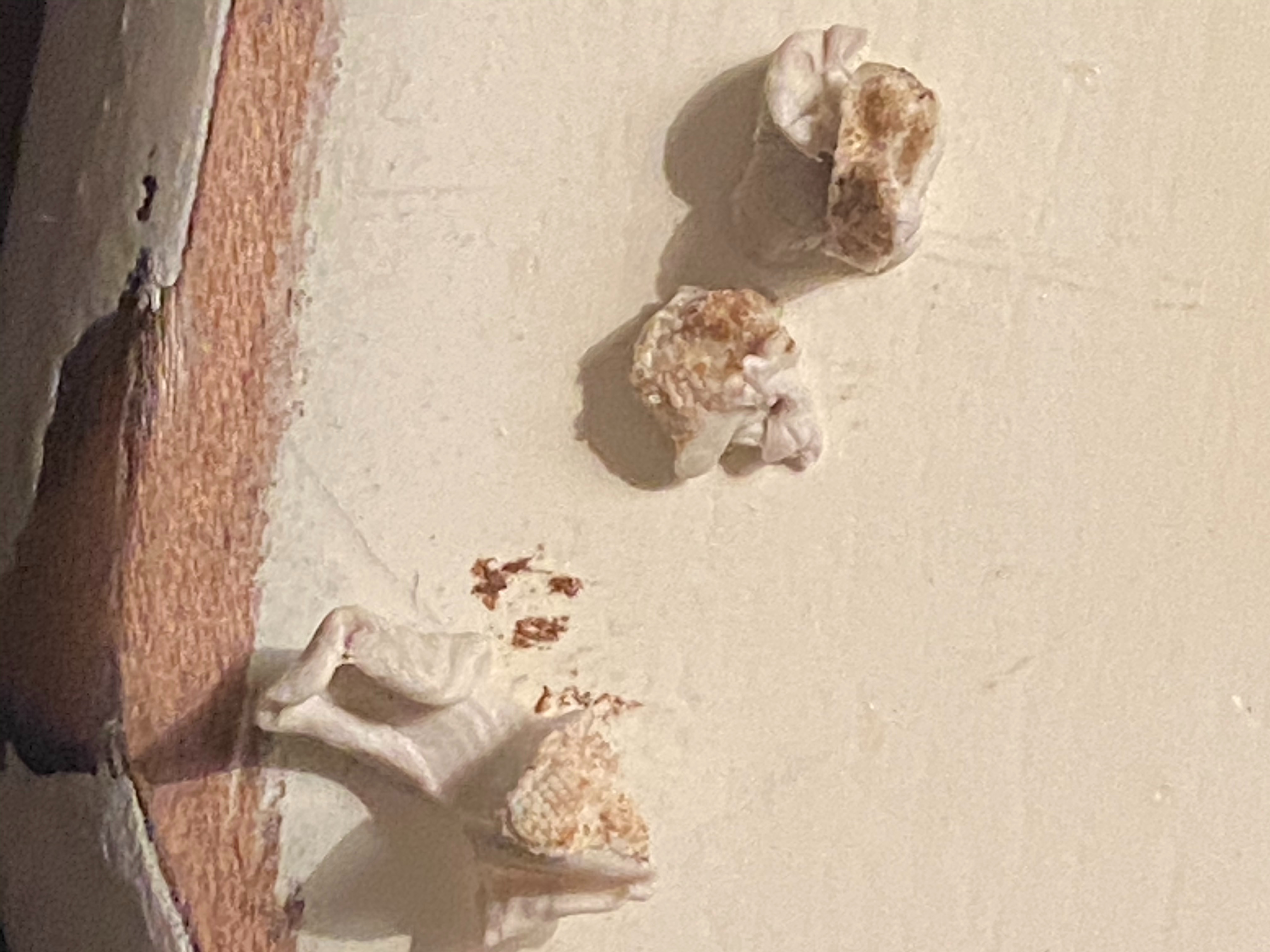
as shown by the image, I had the latter as my problem and this cleaning method worked really well and now my sound quality and volume is 100x better for both airpods! This is what came out of my airpods using the sticky tack, and I can only imagine what came out with the suction.
1,187 replies

Jan 10, 2020 8:09 PM in response to paulosoaresf

You can try going into the settings app. In the settings app (in iOS 13) go to accessibility, go the the category HEARING. Click “audio and visual” after you press it, you can either turn on “mono audio” which makes the left and the right speaker play like the same content, or either fix the volume by adjusting the the volume underneath “mono audio”. Mono audio worked best for me, and got both of my AirPods to play the same sound instead of one being louder. I hoped that this helped. Thank you

Apr 15, 2020 7:12 PM in response to paulosoaresf

I kept reading that it could be a wax build up which grossly made sense so I tried the gunk squares first-but you have to be super careful bc it’s the consistency of gum so it can slightly get stuck n the mesh. Worked ok cleaning the outer areas but I think they actually pushed the wax in! Couldn’t even hear out of the right one anymore. Saw a bunch of people doing this weird sucking method...IT TOTALLY WORKED. I dabbed a q tip with hydrogen peroxide to the mesh (super carefully bc they aren’t water proof)...it breaks the wax down Then sucked til I felt air. Did it lightly once more then dabbed with a dry q tip and soft cloth. PRESTO...like new!!!!

May 19, 2020 11:47 AM in response to Marie-Claude Leblanc

Thanks for the suggestion!! OK so I couldn’t get myself to suck the wax out so instead, used a clean toothbrush first to brush the wax away. It got all the caked wax off the main speaker with the screen. And my AirPod is back in business.. My son had a similar problem where one AirPod was much lower than the other. There was no build up and we took it into Apple and they replaced the one side for free after they tested it out.. it was still under warranty.

Aug 29, 2020 7:31 AM in response to dark_mider

Adjusting the balance doesn’t actually “fix” the problem. It just adjusts the volume of the opposite AirPod. So, in your case, since the volume coming out of the right side was lower than the volume coming out of the left side, by sliding the balance a little right of center, you decreased the volume coming out of the left side, rather than increasing the volume coming out of the right side. The issue is that there is earwax muffling the right AirPod. The wax has to be removed to truly fix the problem.

Oct 16, 2020 9:24 PM in response to Marie-Claude Leblanc

Thanks for your response...this was the only thing that fixed my issue. I believe the issue occurred when I tried cleaning the screen as well. After I read your post, I ended up using a compressed air canister and blew air through all the screens in the left air pod...and the volume came back to normal levels again....wow.


My airpods are out of warranty and it would have cost me $70 to get it replaced brand new.

Thanks again for your advice...super helpful.

Dec 12, 2020 1:11 PM in response to paulosoaresf

I had the same issues. Took them to Apple and they replaced the bad bud. The original airpods are nutorious for getting jammed with ear wax. I ordered AirPod pros because there design is less likely to get jammed with ear wax. The day I got my new AirPod pros I forgot about my original ones and accidentally sent them through the washing machine in my pocket! They fell out and tumbled around. When I found them I stuck them in some rice for a few days incase they had water inside of them and to my surprise a week later when I tested them it fixed the volume issue!!😂 I wouldn’t suggest this but I thought it was pretty funny. Now I have a backup pie of wireless buds.

Dec 14, 2020 1:47 PM in response to paulosoaresf

This might sound absurd, but I tried several things mentioned on this thread, without success, until I remembered I had long ago set my laptop speakers to be right-side-only with no sound from the left speaker, which is broken. When I adjusted this slider back to the middle, that translated to my AirPods as well. Don't judge me lol, just leaving this here in case it helps somebody! :)

This thread has been closed by the system or the community team. You may vote for any posts you find helpful, or search the Community for additional answers.

If one AirPod is louder than the other

Welcome to Apple Support Community
A forum where Apple customers help each other with their products. Get started with your Apple Account.

