If one AirPod is louder than the other

When I listening to my AirPods it sounds like my right AirPod is slightly louder than the left. I even replaced the left one on an Apple Store, but still having the same issue. Unpair/Pair was another try.


Has anyone else experienced anything like this?


Thanks!!


[Re-Titled by Moderator]

AIRPODS

Posted on Apr 5, 2017 4:47 PM

Reply
Question marked as Top-ranking reply

Posted on Apr 5, 2017 4:53 PM

Hi


It may help to check your settings:


Go to: Settings > General > Accessibility > under "Hearing", check and, if required, adjust the audio volume balance slider between the left and right channels.

1,187 replies

Nov 30, 2017 1:42 AM in response to paulosoaresf

The following steps may help:


Check your settings:

  • On your iPhone, go to: Settings > General > Accessibility > under "Hearing", check and, if required, adjust the audio volume balance slider between the left and right channels.


Clean your AirPods:

Apr 24, 2020 4:12 PM in response to paulosoaresf

I found the solution. Besides sucking into the AirPods, you can connect your AirPods to your MacBook (if you have one) then hover over bluetooth in the upper right, hover over your AirPods from the menu, then click "Open sound preferences." from there on "Output" make sure the lever is in the center.


Sometimes the level can be set to the right or left which would play sound on either the right or left side. Make sure your lever is in the center for equal volume on both AirPods, this will play the sound equally as loud on both of the AirPods.


Hopefully you guys will be able to use this in the future! Have a great day!

Dec 14, 2020 1:47 PM in response to paulosoaresf

This might sound absurd, but I tried several things mentioned on this thread, without success, until I remembered I had long ago set my laptop speakers to be right-side-only with no sound from the left speaker, which is broken. When I adjusted this slider back to the middle, that translated to my AirPods as well. Don't judge me lol, just leaving this here in case it helps somebody! :)

Mar 21, 2021 8:25 PM in response to paulosoaresf

There are two main problems that could be causing this: volume settings or dirty airpods.


The former is simply fixed by going to settings -> general -> accessibility -> audio/visual and then scrolling down to the bottom to see the scroll bar that controls how loud one speaker is over the other. Adjust it to your needs.


however, if you still find that your airpods sound muffled or that just didn’t plain work, the solution is cleaning them. You should already have a set cleaning regime for them to improve and maintain good sound quality. However, I will share mine (that includes the suction method that some mentioned here as well minus the gross sucking-with-your-mouth part).


  1. take a vacuum cleaner, shop-vac, or something of that nature with a small nosil. put the AirPod up to the nosil and turn the vacuum on. create a suction by patching up most air pockets. hold this at 15 second increments for 2-3 times per/AirPod.
  2. next, take a toothpick and scrape the inside edges where a lot of ear wax, hair, and dirt builds up. Repeat this for ALL THREE holes on the AirPod (although you may think you don’t need to clean the other two holes, you do).
  3. Next, take sticky tack (like, the stuff you use to hang up posters) and taking a small bit, mold the sticky tack to the inside of the hole and press down to where the sticky tack is now inside the hole. Pull upwards and repeat as many times as needed (make sure to change out your sticky tack frequently and do this for all three holes).
  4. Finally, to finish this off, take a cotton swab and douse it with rubbing alcohol. Wring it out slightly and rub it all over the airpods (including inside the holes).


Now, if neither of these things work you may have broken/damaged airpods on your hands.


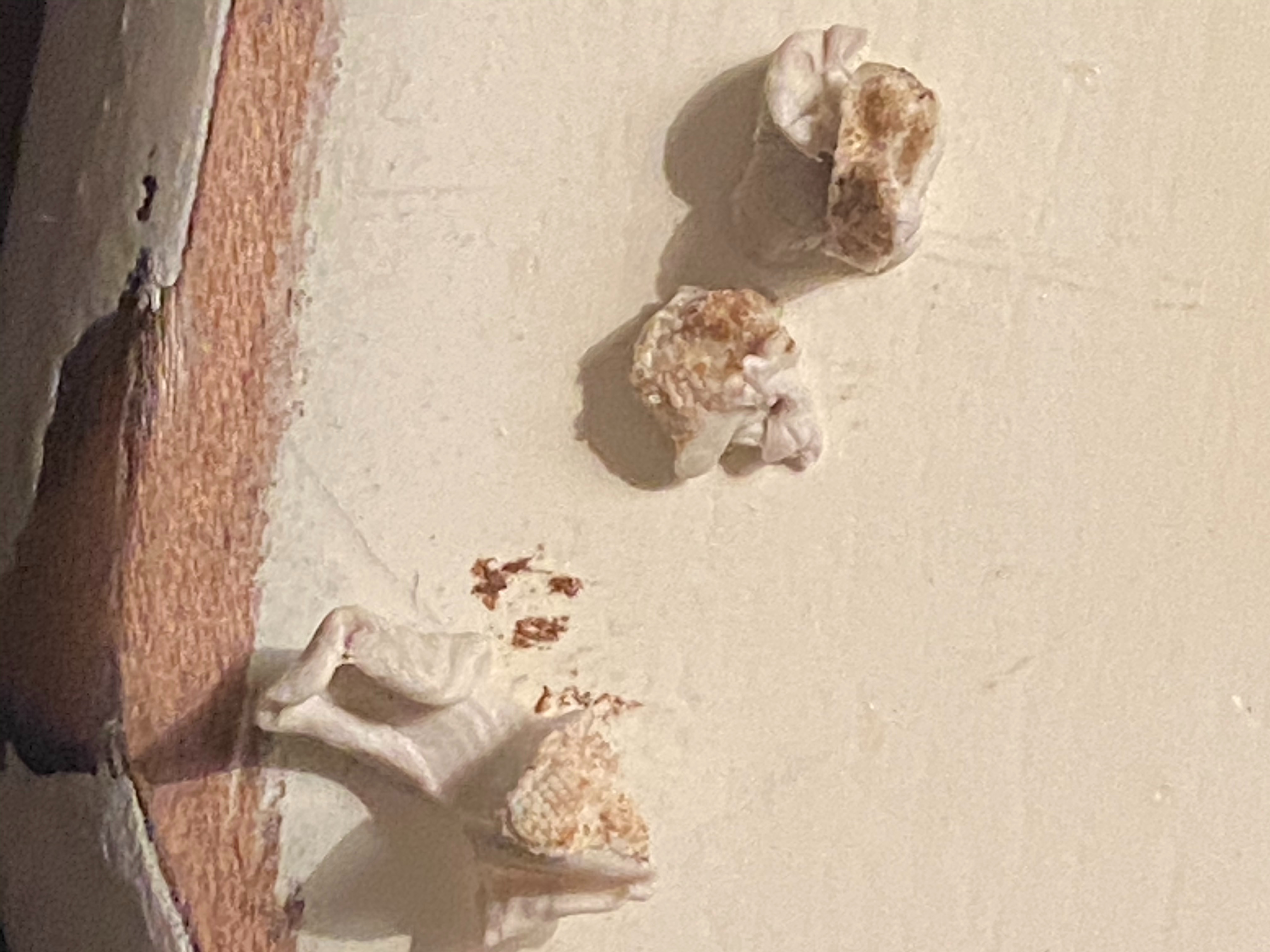
as shown by the image, I had the latter as my problem and this cleaning method worked really well and now my sound quality and volume is 100x better for both airpods! This is what came out of my airpods using the sticky tack, and I can only imagine what came out with the suction.
Mar 16, 2021 1:56 PM in response to paulosoaresf

I had this problem until I went further into the comments and read what people suggested. Here is what worked for me:


Take an old toothbrush you don't use anymore, and some alcohol wipes. First, use the alcohol wipes and wipe the screen of the pod face down (so othat no liquid goes inside). Then use the toothbrush and scrub the screen of the pod gently. Next, I know it sounds gross, but using just the edge of your lips, suck the pod to get any stuck ear wax out of the pod. Then repeat the process until you visibly can't see any earwax on the rim of the airpod.


My airpod fixed itself as soon as I did this, but make sure to check if you can hear from both sides clearly. Hope this helps!

Jun 22, 2021 9:16 AM in response to paulosoaresf

My left Airpod was about twice as loud as my right one. I took photos with my iPhone of both Airpods and the right one had a slight film, probably ear wax, covering the screen surface. I dipped a toothbrush into rubbing alcohol and rubbed it on the screen surface of the right Airpod. I gently wiped the Airpod dry with a soft cloth. I tried both Airpods again and the sound level was identical for both Airpods.


The first photo below is of the right Airpod before I cleaned it. The second one is after I cleaned it.


Mar 14, 2022 6:20 AM in response to paulosoaresf

I just had this issue. I'd first try the AirPods on another iPhone to see if the issue is the AirPods or the phone itself (they didn't work properly on my phone or my daughter's, but did work on my partner's - all iPhones).


I cleaned them first, no joy.


Found a solution after quite a bit of searching: Settings > General > Transfer or Reset iPhone > Reset > Reset All Settings.


Oct 11, 2023 6:05 AM in response to paulosoaresf

i check the settings and everything seemed balanced, nevertheless one ear was still louder. The solution is cleaning out the ear wax stuck in the AirPod. I couldn’t suck it as one person commented on here, but I used an antiseptic wipe to clean out the wax then blew into the AirPod from the smaller outlet by the side so the air forced out the wax stuck in the main sound outlet and I wiped some more and kept blowing it out till I was satisfied and voila my AirPod is back to life 🤭

This thread has been closed by the system or the community team. You may vote for any posts you find helpful, or search the Community for additional answers.

If one AirPod is louder than the other

Welcome to Apple Support Community
A forum where Apple customers help each other with their products. Get started with your Apple Account.

