Pages and Adobe Acrobat Reader

I had to download Adobe acrobat reader. When I open a pages doc it is converted to a PDF automatically. So, now I have PDF's that I can't change back to pages doc's. Have to recreate the entire pages doc! What gives with the free standard and How do I stop this Adobe Acrobat Reader DC from doing any more damage.

MacBook Pro, OS X Yosemite (10.10.4)

Posted on Apr 8, 2017 5:52 PM

Reply
8 replies

Apr 8, 2017 7:59 PM in response to outlawmule

"I had to download Adobe acrobat reader."


Why?


"When I open a pages doc it is converted to a PDF automatically."


If Reader is able to open import a Pages document, then the process of opening it involves a translation to PDF, as PDF is the native format of documents in Adobe Reader. The current edition of Adobe Reader DC, running in OS X 10.11 (l Capitan) is unable to open a Pages (5.6.2) document.
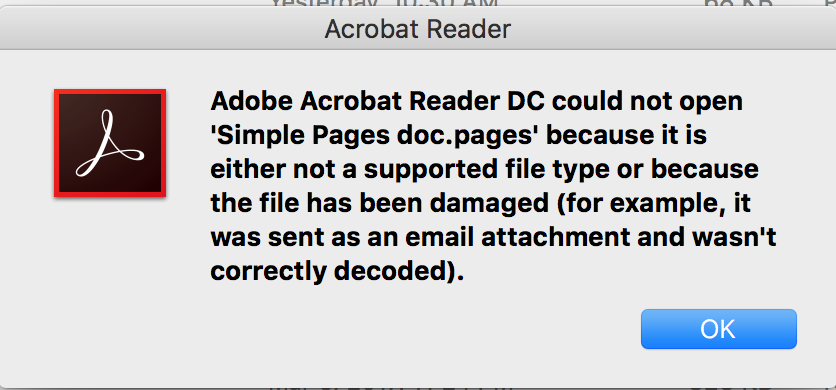
User uploaded file

The document, containing only text and a jpeg image, was created and saved locally.


"So, now I have PDFs that I can't change back to pages docs."


You may be able to select and copy the text from the PDF when it is open in Reader or in Preview.

But unless you have deleted the Pages documents from which these PDFs were created, you'll find it easier to simply locate and open the Pages documents in Pages.


How did you create the PDFs?

Did you Save the original Pages documents from which the PDFs were created? Where?


"What gives with the free standard"


What is "the free standard"?


"How do I stop this Adobe Acrobat Reader DC from doing any more damage."


Set Preview as the default application to open PDFs. Open PDFs only in Preview. If necessary, open PDF files by launching Preview, then using File > Open to open the file.


That said, I doubt that Adobe Acrobat Reader has done any damage. All that it should be doing is opening and displaying a PDF file that has been created, probably by Pages, from a Pages document.


Apr 9, 2017 9:21 PM in response to outlawmule

Adobe Acrobat Reader, and Reader DC have no provision for generating a new PDF from any document format other than an existing, opened PDF document. As I have mentioned before, the application cannot open anything but a PDF, and cannot take control of the Pages application and force it to generate a PDF. Reader is a by-stander watching a mugging, but it is not a participant.


Only the Pages application knows how to convert its internal, proprietary document content to PDF — either via the File : Export To : PDF, or File : Print… : PDF : Save as PDF… menu hierarchies. There is something else going on to produce a PDF document from an open Pages document:

  1. A keyboard shortcut tied to an Automator Workflow that tells Pages to generate a PDF
  2. A file saved into a Desktop folder, either a watch folder, or folder action, that achieves the same as item 1.


I have Pages v5.6.2 on El Capitan 10.11.6, and with Adobe Reader DC opened, there is no PDF generation automatically occurring with Adobe Acrobat Reader DC open, and a Pages document just opened.

Apr 8, 2017 6:59 PM in response to outlawmule

Adobe Acrobat Reader strictly reads, and opens PDF documents. Reader's File Chooser will only show you PDF documents as available for opening — all other file types are grayed out, and unavailable.


Only the Pages application, and with some backward version limitations, can open Pages documents, and non-destructively, export them to PDF.


So, having mentioned these two paragraphs, how are you destructively opening a Pages document, that automatically becomes a PDF? There's more to this story than what you have shared so far. What specific version of Pages?


Although you can certainly copy/paste plain text from a PDF, with proper copy permission, back into an opened Pages document, you cannot transform a PDF document back into a Pages document, because internally, the PDF contents do not represent any organized, word processing document structure, and Apple's internal Pages document structure is proprietary.

Apr 8, 2017 7:08 PM in response to VikingOSX

Viking


Maybe the O.P's Pages files have pdf previews and Adobe Acrobat Reader is picking those up and applying Adobe Reader Icons to the files.


But it remains a mystery as to why the O.P. "had to download Adobe Acrobat Reader" and then "had to" open the Pages files with it.


I am amazed how many people can not find and use the basic installed software that sits in the Dock. And don't look around when using a new computer.


I am guessing ex-Windows Users clutching at familiar straws.


Peter

Apr 9, 2017 6:21 PM in response to VikingOSX

OS X 10.11.6, pages 5.6.2..

on the doc - Adobe acrobat reader is open, no PDF have been opened or are open. So, Adobe application is running in background. I open a pages doc that I created last year. as it opens or very soon after it converts to an Adobe PDF. If I close the Adobe app. then the pages doc functions just fine. But if I forget to close the Adobe app. it will convert..

Apr 9, 2017 11:04 PM in response to outlawmule

"Adobe application is running in background. I open a pages doc that I created last year. as it opens or very soon after it converts to an Adobe PDF. If I close the Adobe app. then the pages doc functions just fine. But if I forget to close the Adobe app. it will convert.."


What action do you take to "open a pages doc"?

What version of Pages was used to create this doc?

"…as it opens" in what application? Especially in the case of "…or very soon after…"


I tested by opening two Pages documents, one created in 2009, the other in 2016. Both triggered a launch of Pages 5.6.2, and opened in that application. Neither was converted to PDF at opening or some time after opening, although Adobe Reader was running (with no document opened) at the time.


IOW, I'm unable to reproduce what you describe.


Regards,

Barry

This thread has been closed by the system or the community team. You may vote for any posts you find helpful, or search the Community for additional answers.

Pages and Adobe Acrobat Reader

Welcome to Apple Support Community
A forum where Apple customers help each other with their products. Get started with your Apple Account.
