Forecast Function

Hi guys


"FORECAST" function returns the forecasted y value for a given x value based on a sample values using linear regression.


I would like to use this function for this set of values:


Results for 20 days:


28.49

16.80

63.83

213.97

90.70

-6.93

-109.91

137.88

-354.13

10.53

2.11

-0.57

2.83

-1.47

54.79

-42.30

1.98

110.64

-268.74

131.24


Now, based on the above results, I would like to forecast what would happen next. Entering =FORECAST(range of values) yields error. What am I doing wrong? How can I fix it. I only have 1 set of values. Is there a workaround? Thank you in advance.

iMac (27-inch, Late 2013), macOS Sierra (10.12.1), null

Posted on Apr 14, 2017 10:59 AM

Reply
3 replies

Apr 14, 2017 1:04 PM in response to DanielDay

Daniel,


you can use the built-in help in Numbers while entering formulas:
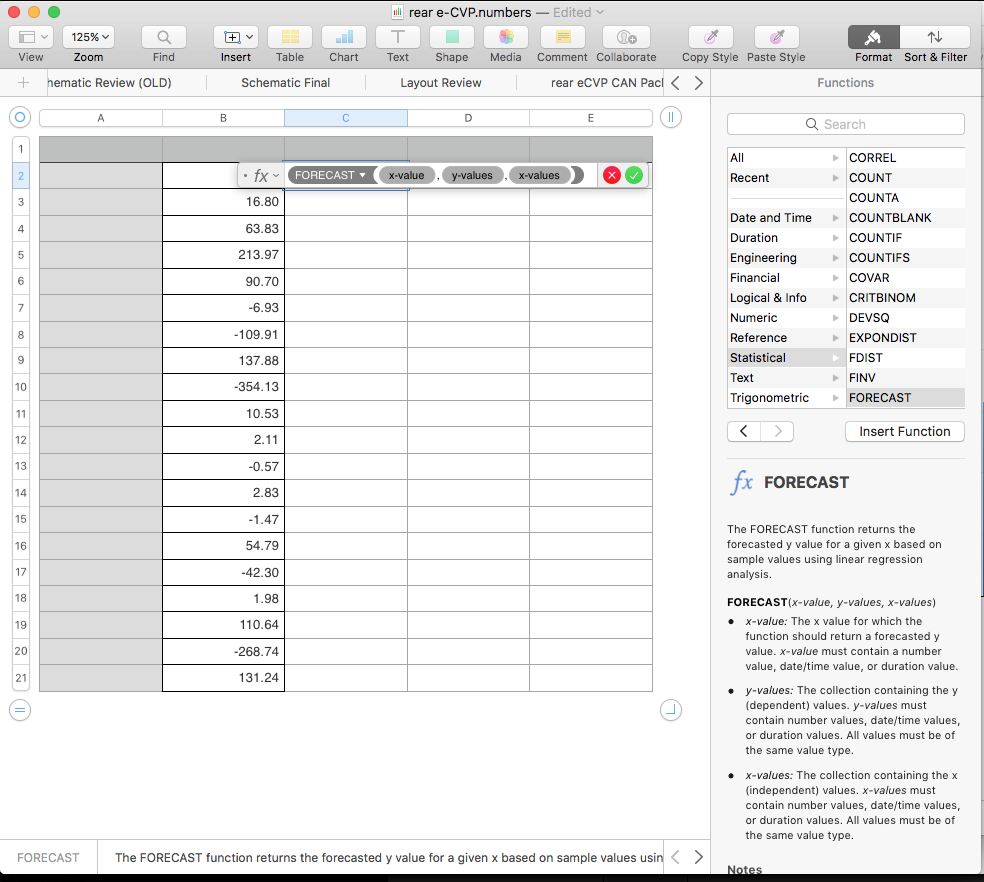
User uploaded file


to access the built-in help,

- select the cell where you want to enter the formula

- open the formatter (top right):

User uploaded file


- enter the function you want in the cell, or search for the function in the built-in help to see the details for each function.


from the built-in help, here is the description for FORECAST:

The FORECAST function returns the forecasted y value for a given x based on sample values using linear regression analysis.


FORECAST(x-value, y-values, x-values)

x-value: The x value for which the function should return a forecasted y value. x-value must contain a number value, date/time value, or duration value.

y-values: The collection containing the y (dependent) values. y-values must contain number values, date/time values, or duration values. All values must be of the same value type.

x-values: The collection containing the x (independent) values. x-values must contain number values, date/time values, or duration values. All values must be of the same value type.

so you need X and Y values, you have only provided (I am guessing) Y values.

assuming that the Y values are equally spaced in X, I am going to make up some X data. made up X values in column B, and your Y values in column C. For forecast value in column D:
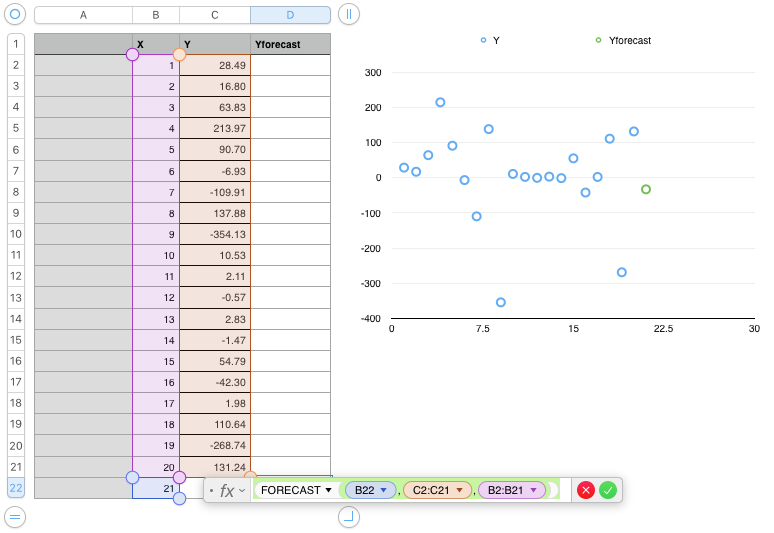
User uploaded file

D22=FORECAST(B22,C2:C21,B2:B21)

this is shorthand for... select cell D22, then type (or copy and paste from here) the formula:

=FORECAST(B22,C2:C21,B2:B21)


Apr 14, 2017 11:37 AM in response to DanielDay

One more question: Is it possible to use historical data to forecast future data and then create a chart how this forecasted future data looks like? Office Excel has this capability and it only requires 2 sets of data, see here https://support.office.com/en-us/article/Create-a-forecast-in-Excel-2016-for-Win dows-22c500da-6da7-45e5-bfdc-60a7062329f…


How about Apple Numbers?

This thread has been closed by the system or the community team. You may vote for any posts you find helpful, or search the Community for additional answers.

Forecast Function

Welcome to Apple Support Community
A forum where Apple customers help each other with their products. Get started with your Apple Account.