Turn off "Send as SMS" for once recipient

My wife is traveling with her iPhone outside of our carrier's service area, so she has left her SIM card at home and cannot receive SMS messages. When she's around Wi-Fi we can send iMessages to each other, which we have been doing. When she's out of Wi-Fi range the iMessages naturally fail to send, so they are sent as SMS (I have "Send as SMS" turned on) which she of course won't get.


Is there any way to turn off "Send as SMS" for just her? I don't want to turn it off for everybody else I text. Or what else can I do to temporarily stop iMessages from being sent to her as SMS?

Posted on Apr 19, 2017 5:56 PM

Reply
Question marked as Top-ranking reply

Posted on Apr 19, 2017 5:59 PM

No, you can turn off send as SMS for everyone, or leave it on. But it's not selective at all.


I assume she's sticking to free wifi only then while traveling? If so, maybe just use email only while she's away? That way, you can send your message whenever you wish, and she'll get them and can respond whenever she has access to wifi.

6 replies
Question marked as Top-ranking reply

Apr 19, 2017 5:59 PM in response to Király

No, you can turn off send as SMS for everyone, or leave it on. But it's not selective at all.


I assume she's sticking to free wifi only then while traveling? If so, maybe just use email only while she's away? That way, you can send your message whenever you wish, and she'll get them and can respond whenever she has access to wifi.

Apr 19, 2017 6:11 PM in response to Király

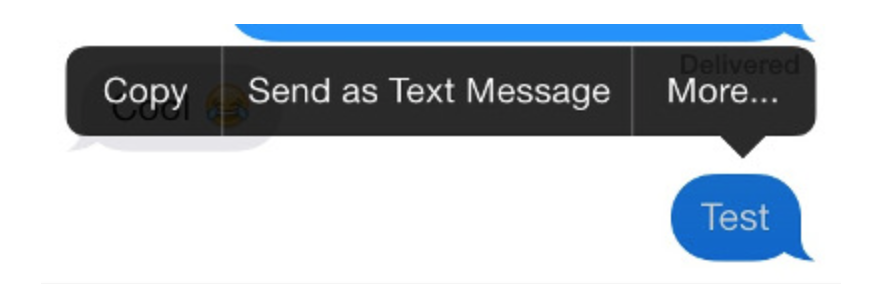
You can also long press on any message while it is sending and simply choose the option that says "send as text message." This option is only accessible when the message is still sending. (So when the progress bar is going across the screen at the top." This option is especially helpful when the recipient cannot receive imessages.


The menu should look something like this:

https://i.gyazo.com/c802f5360ada114588162fd1838ceaea.png


Edit: Sorry, I missunderstood this post.

This thread has been closed by the system or the community team. You may vote for any posts you find helpful, or search the Community for additional answers.

Turn off "Send as SMS" for once recipient

Welcome to Apple Support Community
A forum where Apple customers help each other with their products. Get started with your Apple Account.