"This Item is no longer available" but I never downloaded this apps

Hi all,


My apps store prompt out an update for one apps which I never downloaded previously. So when I click update, it appear "This item is no longer available". I can't delete it away from my apps store update list.


Even when I tried to download this apps & hit the update button, it's still prompting out " this item is no longer available".


Any of you guys faced this issue before? Need some help.

Asus A53S -OTHER, Windows 7

Posted on May 11, 2017 8:56 PM

Reply
4 replies

May 12, 2017 1:36 PM in response to blacknic

Hi, blacknic!


Thanks for using the Apple Support Communities. If I understand your post, the App Store is prompting you that there is an update available. However, when you go to install this update you see it is for an app you have never downloaded. Additionally, if you try to update, you get a prompt that says "This item is no longer available," which also happens if you try to download the actual app first. I'd be happy to help!


First, I recommend force closing the App Store app, as detailed in this article: Force an app to close on your iPhone, iPad, or iPod touch

After you have closed the App Store app, reopen it and test to see if you still are getting the update prompt and error message. If so, next sign out of, and back into, the iTunes and App Store. Instructions can be found below from the "iTunes Store, iBooks Store, and App Store" section of the Sign in with a different Apple ID on your iPhone, iPad, or iPod touch article:

iTunes Store, iBooks Store, and App Store

  1. Tap Settings > [your name] > iTunes & App Store. On iOS 10.2 or earlier, tap Settings > iTunes & App Store. If you see the option to Sign In, you can change your Apple ID now.
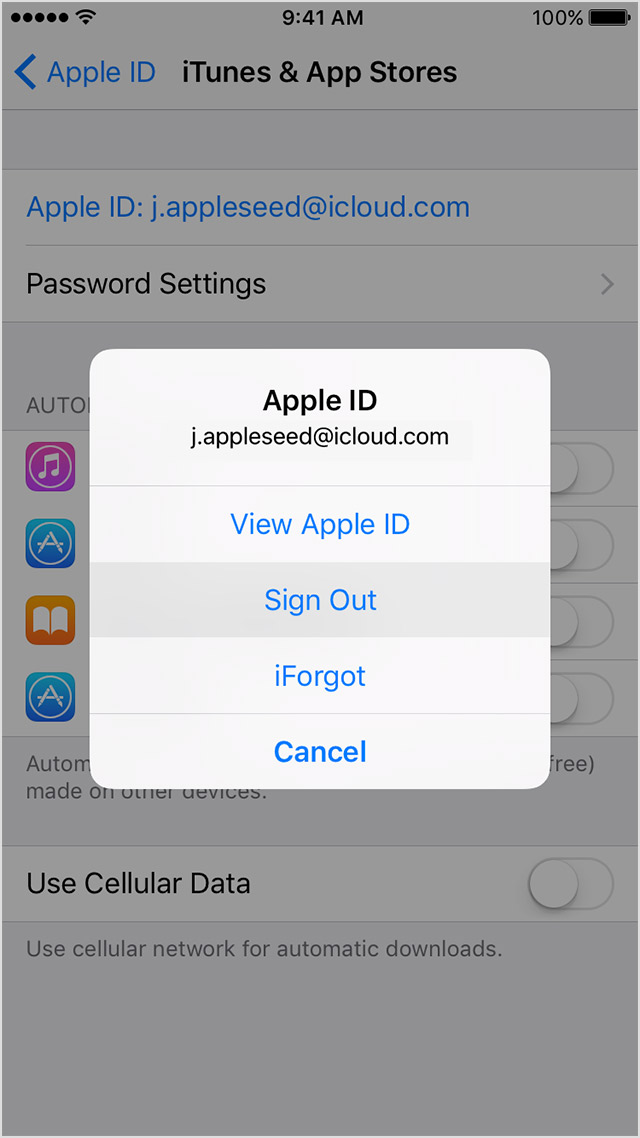
  2. Tap your Apple ID, then tap Sign Out.
    User uploaded file
  3. Go back to Settings > [your name] > iTunes & App Store. On iOS 10.2 or earlier, go back to Settings > iTunes & App Store.
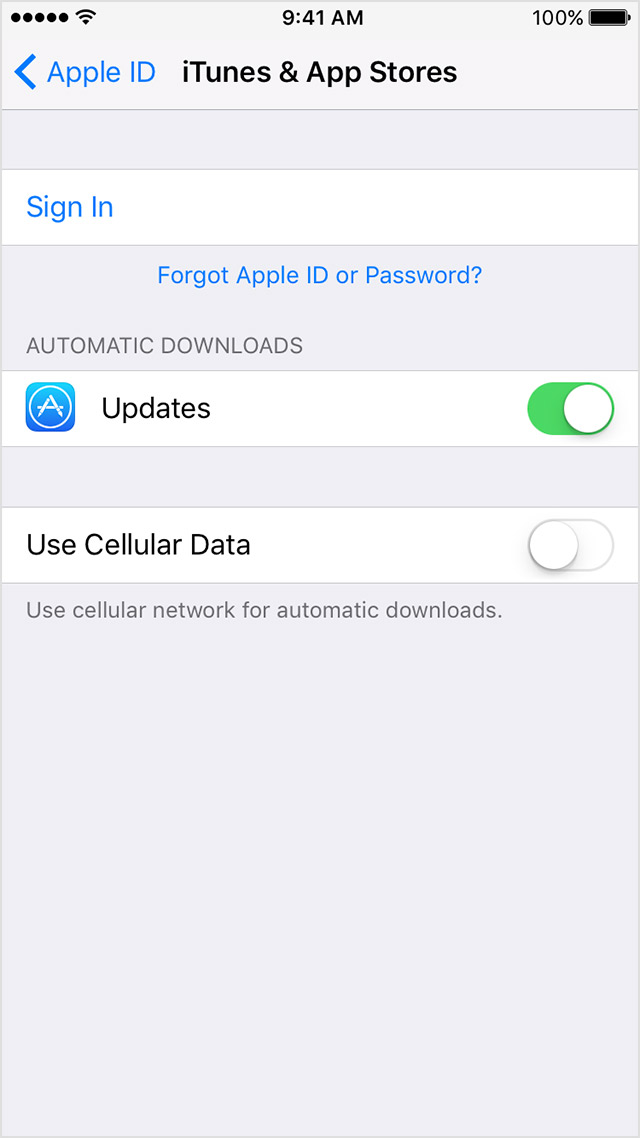
  4. Tap Sign In, then enter your Apple ID and password.
    User uploaded file
  5. If you changed your Apple ID to share content with a family member or because you have multiple Apple IDs, try Family Sharing instead. With Family Sharing, you can link your family's Apple IDs into a group that can share purchases, photos, and more.


If you're still getting the update prompt and can't install the app, the next step I can suggest is to restart your iPhone as described here: Restart your iPhone, iPad, or iPod touch .


Should you continue to have trouble after going through those steps, don't hesitate to reply back. If you do, please include the iPhone model you have (example, iPhone 7) and what iOS version it is running (found under Settings > General > About).

Have a lovely day!

May 12, 2017 5:58 PM in response to sterling r

Hi Sterling,


Thanks for your reply. I do not know whether is it workable. Because I have tried restart my iphone after I post this question.

Then when i go app store to click on the update again, it prompted me that this is an app that downloaded via other apple ID. So I just sign into that apple ID and the problem is fixed. But what I can remember is I never download apps from another apple ID, got no idea why having this issue.


Anyway, the problem is solved now. Thanks a lot for your time and effort.

This thread has been closed by the system or the community team. You may vote for any posts you find helpful, or search the Community for additional answers.

"This Item is no longer available" but I never downloaded this apps

Welcome to Apple Support Community
A forum where Apple customers help each other with their products. Get started with your Apple Account.