My contact from iPhone are not showing on Mac - why?

If I look in my iPhone I see loads of contacts.

If I go to my MacBook Air, and open iMessage, I see the messages from iPhone, but the contact names are not showing.


So three questions here:


1) How do I make the contacts on iPhone, show on Mac?

2) How do I stop all the email accounts that flow in, go into my Contacts automatically, because I have loads from customer service accounts I never email.

3) How do I delete a bunch of contacts at one time, without having to go Edit, scroll down, Delete. Back. Edit Scroll Down , Delete........


Thanks.

MacBook Air, iOS 10.2

Posted on Jun 2, 2017 4:13 AM

Reply
3 replies

Jun 2, 2017 4:41 PM in response to simon_a6

Hi simon_a6,

I understand that you would like to sync the contacts that you have on your iPhone with your Mac, prohibit contacts found in Mail and other apps from being added to your contacts, and you'd like to know if it's possible to delete more than one contact at a time. I know it's important to be able to manage where you see your contacts and how you use them; I'd like to help and provide some information.

To add your contacts to your Mac, you'll want to see which accounts are associated with the contacts on your iPhone. To do this tap Settings > Contacts > Accounts. This will let you know which accounts you need to add to your Mac using the steps below:

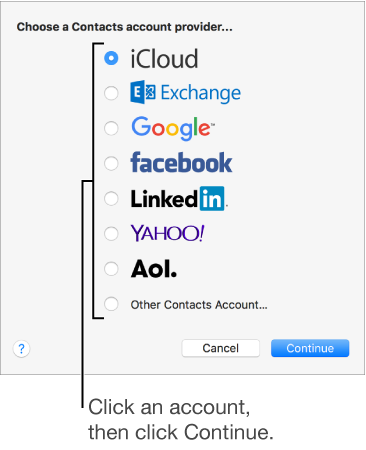
You can add family, friends, and businesses directly to Contacts, or add your other accounts—like iCloud, Google, Facebook, work, or school—so you can access all your contacts in one place. To add an account, choose Contacts > Add Account, then select the type of account you want to add. Learn more.

User uploaded file

Contacts for Mac: Contacts overview

If you are using iCloud as your primary source for storing contacts on your iPhone, you'll want to make sure that your Mac is set up with the same Apple ID for iCloud: iCloud: Set up iCloud
Once this is complete your contacts should sync automatically from your iPhone to your Mac and vice versa.

To prevent contacts from your E-mail account and other apps from appearing in your contacts, Tap Settings > Contacts > Disable Contacts Found in Apps. It is not possible to delete more than one contact at a time. For more information on managing your contacts on your iPhone, check out this link: Manage and delete contacts on your iPhone, iPad, or iPod touch


Best Regards.

Jun 3, 2017 9:23 AM in response to simon_a6

Hi simon_a6,

We can understand wanting to have your contacts synced to one account however, it is possible for you to see all of your contacts on your Mac and iPhone without copying them from one account to another. For this you would want to ensure that both your iCloud and Hotmail accounts are active for syncing contacts on your Mac as detailed here: Contacts for Mac: Use contacts from your Internet accounts

If you'd prefer to copy contacts to your iCloud account and use that going forward you'll want to follow the steps detailed below:

Add your Hotmail account to use with Contacts on your Mac, then follow these steps to export the contacts you'd like to add to your iCloud account: Contacts for Mac: Export and archive contacts

Once the exporting process is completed you'll want to deactivate the Hotmail account in Contacts and ensure that your Mac is signed in to iCloud with the same Apple ID as your iPhone:

User uploaded file

iCloud
Go to System Preferences > iCloud. Enter your Apple ID and password. Click Sign In.

Sign in with your Apple ID

Lastly, you'll want to import back to iCloud the contacts you exported from your Hotmail account. Those steps can be found here: Contacts for Mac: Import contacts

Jun 3, 2017 1:06 AM in response to sterling r

I believe this issue stems from before I used Apple devices. all my contacts were on Hotmail.

So now if I go to my Phone and uncheck Hotmail as the primary source for contacts, most disappear.

So would the first task be, to somehow copy them from Hotmail to iCloud (so as not to Lose them from Hotmail), and then use only iCloud for contacts?


How do I do that?


Found that last option you mention about "found in apps" - thanks.

Hopefully once copied to iCloud there is a way to delete multiple as I have hundreds as a result of that other option.

This thread has been closed by the system or the community team. You may vote for any posts you find helpful, or search the Community for additional answers.

My contact from iPhone are not showing on Mac - why?

Welcome to Apple Support Community
A forum where Apple customers help each other with their products. Get started with your Apple Account.