Good evening Tommy Bahama,
Welcome to the Apple Support Communities!
From your description of the issue you are having with the Music app on your iPhone, it sounds like Repeat is enabled. Take a look at the resource below to turn that feature off. I've highlighted some key information here for you. Click on the link for complete details.
Play, pause, and shuffle music in the Music app
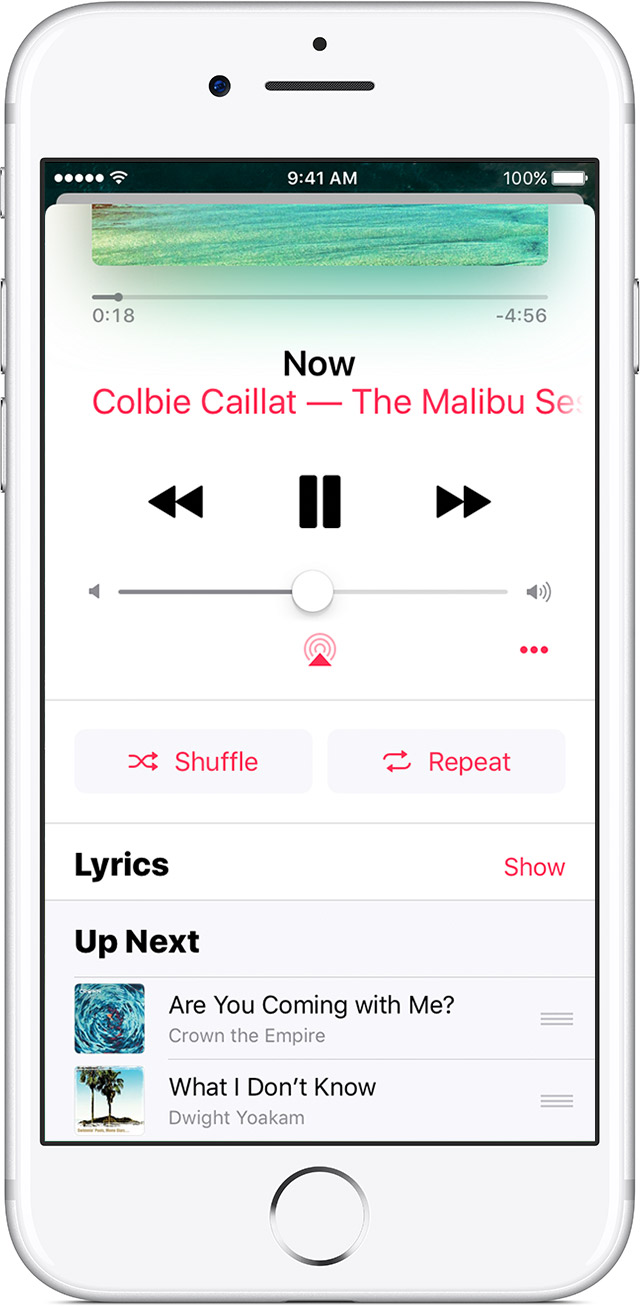
On the Now Playing screen, you can rewind, pause, or fast forward a song, control the song's volume, use Air Play to stream the song, and more.
Tap  to turn on shuffle for the songs in a playlist or album.
When Shuffle is on, you'll see  .
.
Tap  once to turn on repeat for an entire playlist or album. Tap
  again to turn on repeat for one song. Tap
  a third time to clear the repeat.
When Repeat is on, you'll see or .
Tap Show to the right of Lyrics to view lyrics. Lyrics are not available for all songs.
Learn more about Lyrics in Apple Music.

At the bottom of the Now Playing screen is Up Next, which is a list of all of the songs that you’ve selected to play.
To add music to Up Next, find a song, album, or playlist that you want to listen to, and firmly press the item to use 3D Touch or touch and hold on the item. Then:
- Tap Play Next to add the item to the top of your Up Next list.
- Tap Play Later to add the item to the bottom of your Up Next list.
To reorganize Up Next, drag songs with  to rearrange their order, or swipe left to remove a song that you want to skip. If you don't see , turn off repeat.
Take care.



