I have ca Czech Keyboard set for English, and I can't figure out how to type the question mark, exclamation symbols etc. Using the alt key and pressing the key results in the regular symbol for the key. Help

I have a Czech Keyboard set for English, and I can't figure out how to type the question mark, exclamation symbols etc. Using the alt key and pressing the key results in the regular symbol for the key. Help

MacBook Air, iOS 10.3.2, Keyboard question

Posted on Jun 13, 2017 12:04 AM

Reply
2 replies

Jun 13, 2017 2:33 PM in response to moirathepoet

Hello moirathepoet,

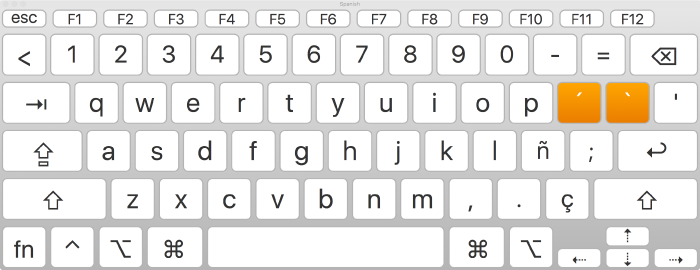
After reviewing your post, it sounds like you are trying to type the question mark but it is not in the same location as on an English keyboard. One thing you can do is to use the keyboard viewer and see where it is located on the keyboard and you can enter it from there too. ​I would recommend you read this article, it explains how to use this feature.

See where characters for other languages, and special characters and symbols, are located on your keyboard.

User uploaded file

  1. Click the Input menu in the menu bar, then choose Show Keyboard Viewer.

    If the command isn’t shown, choose Apple menu > System Preferences, click Keyboard, click Keyboard, then select “Show keyboard and emoji viewers in menu bar.”

  2. Click the Input menu in the menu bar, then choose the input source for the language whose keyboard you want to view.

  3. Press the key on your keyboard that corresponds to the character shown in the Keyboard Viewer, or click keys in the Keyboard Viewer.

macOS Sierra: Use the Keyboard Viewer
Thank you for using Apple Support Communities. Have a nice day.

This thread has been closed by the system or the community team. You may vote for any posts you find helpful, or search the Community for additional answers.

I have ca Czech Keyboard set for English, and I can't figure out how to type the question mark, exclamation symbols etc. Using the alt key and pressing the key results in the regular symbol for the key. Help

Welcome to Apple Support Community
A forum where Apple customers help each other with their products. Get started with your Apple Account.