Hey there, kouroubalis.
It appears that you've started using two-factor authentication to protect your Apple ID and your devices. Now you're being asked to authenticate your ID being used in the Music application on your iPhone. I'm happy to help with this.
Two-factor authentication for Apple ID -- This article describes how two-factor authentication works.
Get a verification code and sign in with two-factor authentication -- You can obtain a verification code from a trusted device. Once your ID is verified for use with the Music app, you shouldn't see the prompt. If you change your Apple ID or its password, you will need to authenticate again.
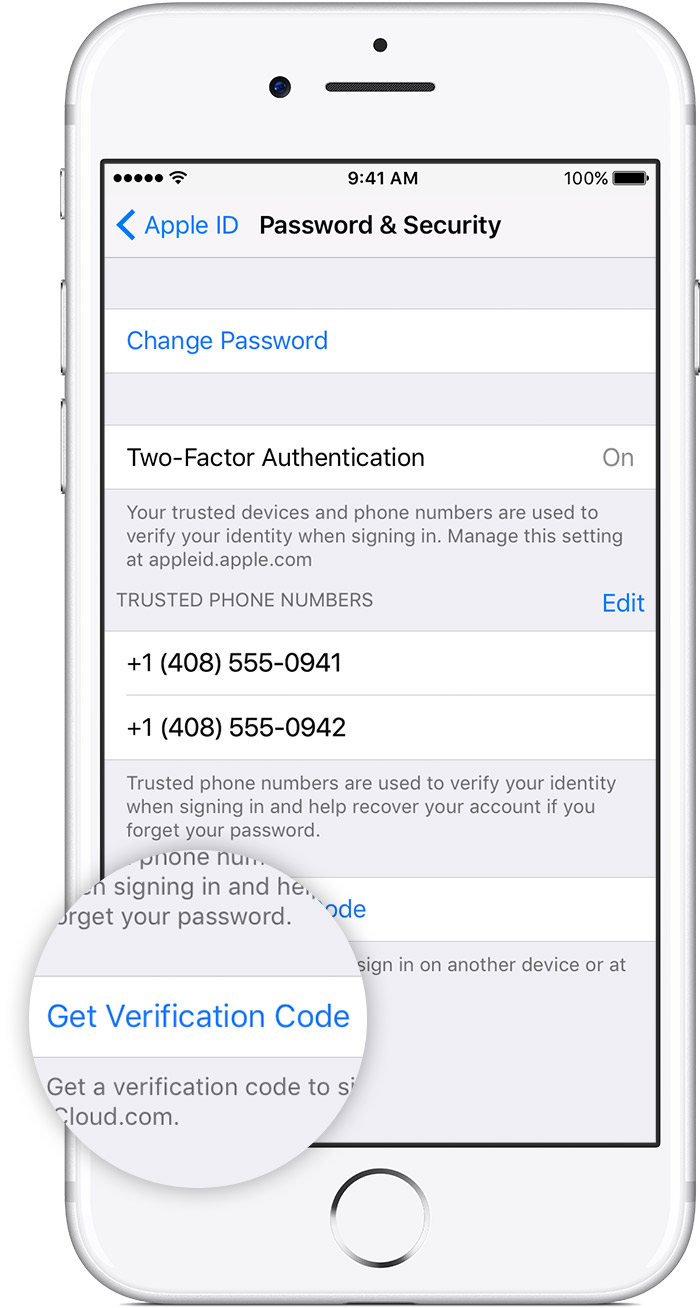
If you can’t receive a verification code on your trusted devices automatically, you can get one from Settings, even if your device is offline.
From your iPhone, iPad, or iPod touch:
In iOS 10.3 or later:
- Go to Settings > [your name].
- Tap Password & Security > Get Verification Code.
In iOS 10.2 or earlier:
- Go to Settings > iCloud.
- Tap your Apple ID username.
- If your device is offline, tap Get Verification Code. If your device is online, tap Password & Security > Get Verification Code.
From your Mac:
- Go to Apple Menu > System Preferences > iCloud.
- Click Account Details.
- If your device is offline, click Get Verification Code. If your device is online, click Password & Security > Get Verification Code.
Take care!


