Couldn't find my iPhone device in iTunes

Hi,


I connected my iphone6 first time with usb cable in MacBook Air 2017, however it doesn't recognize my iPhone device, its not listing in iTunes left side menu, please suggest which part am I missing here?

MACBOOK AIR (13-INCH, 2017)

Posted on Jul 15, 2017 6:19 AM

Reply
1 reply

Jul 16, 2017 9:08 AM in response to manivannanveerapandian

Hello manivannanveerapandian,

After reviewing your post, it sounds like your MacBook Air is not recognizing your iPhone. I would recommend you read this article and use it to help troubleshoot the issue.

If you use a Mac

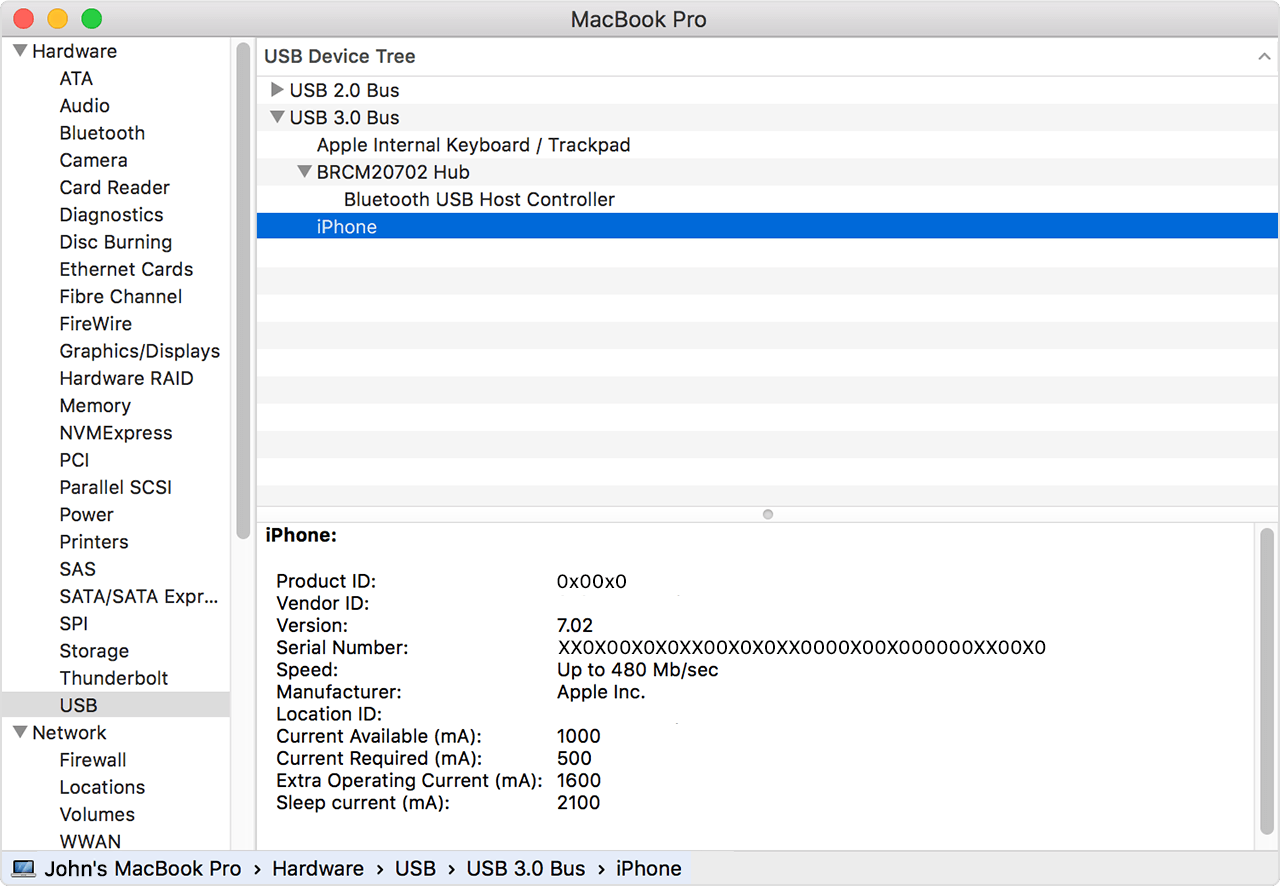
  1. Hold down the Option key, click the Apple menu, and choose System Information or System Report.
  2. From the list on the left, select USB.
  3. If you see your iPhone, iPad, or iPod under USB Device Tree, uninstall third-party security software. If not, contact Apple Support.
    User uploaded file


If iTunes doesn't recognize your iPhone, iPad, or iPod
Thank you for using Apple Support Communities. Have a nice day.

This thread has been closed by the system or the community team. You may vote for any posts you find helpful, or search the Community for additional answers.

Couldn't find my iPhone device in iTunes

Welcome to Apple Support Community
A forum where Apple customers help each other with their products. Get started with your Apple Account.