Bootcamp "The startup disk cannot be partitioned or restored to a single partition" error.

Hi, all. I'm trying to remove Windows from my Mac to free up more space. However, when I try to remove it the conventional way (by using Boot Camp), I get an error that says "The startup disk cannot be partitioned or restored to a single partition." It goes on to say "The startup disk must be formatted as a single Mac OS Extended (Journaled) volume or already partitioned by Boot Camp Assistant for installing Windows." I already tried erasing the disk and unmounting it in Disk Utility. Any help would be appreciated.

MacBook, macOS Sierra (10.12.5)

Posted on Jul 15, 2017 6:33 AM

Reply
Question marked as Top-ranking reply

Posted on Jul 13, 2018 7:22 PM

philip99song wrote:


Hi LonerT,

I saw that you asked for people to put in the command.

#: TYPE NAME SIZE IDENTIFIER

0: GUID_partition_scheme 251.0 GB
disk0

1: EFI EFI 314.6 MB
disk0s1

2: Apple_APFS Container disk1 202.0 GB
disk0s2

3: Microsoft Basic Data BOOTCAMP 8.0 GB disk0s3

4: Microsoft Basic Data BOOTCAMP 40.6 GB disk0s4

This should work in your case as well.


Run (only once)


diskutil eraseVolume jhfs+ BC1 disk0s3

diskutil eraseVolume jhfs+ BC2 disk0s4

diskutil mergePartitions jhfs+ BCMP disk0s3 disk0s4

diskutil list


If you only see disk0s3, then


diskutil eraseVolume fat32 BOOTCAMP disk0s3


and now run BC Assistant and click on Restore/Remove.

532 replies

Jul 15, 2017 6:04 PM in response to Loner T

#: TYPE NAME SIZE IDENTIFIER

0: GUID_partition_scheme 251.0 GB disk0

1: EFI EFI 314.6 MB disk0s1

2: Apple_CoreStorage Macintosh HD 201.3 GB disk0s2

3: Apple_Boot Recovery HD 650.0 MB disk0s3

4: Apple_HFS BOOTCAMP 40.6 GB disk0s4


/dev/disk1 (internal, virtual):

#: TYPE NAME SIZE IDENTIFIER

0: Apple_HFS Macintosh HD +201.0 GB disk1

Logical Volume on disk0s2

7D769077-39D6-4422-B73D-101B2C819B29

Unlocked Encrypted

Feb 4, 2018 8:45 AM in response to LU_Yu

Assuming you want to erase and install/re-install Windows using BCAssistant, disconnect the external disk first. Run


diskutil eraseVolume jhfs+ BC1 disk0s4

diskutil eraseVolume jhfs+ BC2 disk0s5

diskutil eraseVolume jhfs+ BC3 disk0s6

diskutil mergePartitions jhfs+ BCMP disk0s4 disk0s6

diskutil list


If you only see disk0s4, then


diskutil eraseVolume fat32 BOOTCAMP disk0s4


and now run BC Assistant and try to Remove/Restore.

Feb 23, 2018 6:49 PM in response to Loner T

It is also the case for me. Please help me how to deal with. The Boot camp doesnt allow me ta make a new partition and the Disk Utility doesn't detect any other partition. Here is the command


/dev/disk0 (internal, physical):

#: TYPE NAME SIZE IDENTIFIER

0: GUID_partition_scheme *500.3 GB disk0

1: Apple_CoreStorage MacHD 499.4 GB disk0s1

2: Apple_Boot Recovery HD 650.0 MB disk0s2


/dev/disk1 (internal, virtual):

#: TYPE NAME SIZE IDENTIFIER

0: Apple_HFS MacHD +499.1 GB disk1

Logical Volume on disk0s1

6AA3C76E-2C06-44E7-9E58-56210CD89004

Unlocked Encrypted


/dev/disk2 (external, physical):

#: TYPE NAME SIZE IDENTIFIER

0: GUID_partition_scheme *7.8 GB disk2

1: EFI EFI 209.7 MB disk2s1

2: Apple_HFS Install macOS Sierra 7.5 GB disk2s2

Apr 18, 2018 8:25 PM in response to Loner T

APFS Containers (2 found)

|

+-- Container disk1 D4D698E8-FCE4-4242-A82F-F2EC388F3411

| ====================================================

| APFS Container Reference: disk1

| Capacity Ceiling (Size): 36684869632 B (36.7 GB)

| Capacity In Use By Volumes: 85106688 B (85.1 MB) (0.2% used)

| Capacity Available: 36599762944 B (36.6 GB) (99.8% free)

| |

| +-< Physical Store disk0s4 498D90B8-9B9E-408E-AD9E-81B544EC3356

| | -----------------------------------------------------------

| | APFS Physical Store Disk: disk0s4

| | Size: 36684869632 B (36.7 GB)

| |

| +-> No Volumes

|

+-- Container disk2 7C0A19E4-5E17-4B36-A04D-2D6941555D9D

====================================================

APFS Container Reference: disk2

Capacity Ceiling (Size): 205999996928 B (206.0 GB)

Capacity In Use By Volumes: 186173960192 B (186.2 GB) (90.4% used)

Capacity Available: 19826036736 B (19.8 GB) (9.6% free)

|

+-< Physical Store disk0s2 45E3C46D-037A-4964-97CA-56ACFA574B3C

| -----------------------------------------------------------

| APFS Physical Store Disk: disk0s2

| Size: 205999996928 B (206.0 GB)

|

+-> Volume disk2s1 661CFA5D-9D77-3C64-B998-29EA8C2D0B55

| ---------------------------------------------------

| APFS Volume Disk (Role): disk2s1 (No specific role)

| Name: Macintosh HD (Case-insensitive)

| Mount Point: /

| Capacity Consumed: 184423346176 B (184.4 GB)

| Encrypted: No

|

+-> Volume disk2s2 C30C1B51-2A37-43D4-9648-5B0A15FA74B2

| ---------------------------------------------------

| APFS Volume Disk (Role): disk2s2 (Preboot)

| Name: Preboot (Case-insensitive)

| Mount Point: Not Mounted

| Capacity Consumed: 21860352 B (21.9 MB)

| Encrypted: No

|

+-> Volume disk2s3 9AF600A8-D3FF-4AA2-8BD9-2DF67BA91C03

| ---------------------------------------------------

| APFS Volume Disk (Role): disk2s3 (Recovery)

| Name: Recovery (Case-insensitive)

| Mount Point: Not Mounted

| Capacity Consumed: 520765440 B (520.8 MB)

| Encrypted: No

|

+-> Volume disk2s4 F1E92B55-1D59-445A-8264-EDB6CB6B803B

---------------------------------------------------

APFS Volume Disk (Role): disk2s4 (VM)

Name: VM (Case-insensitive)

Mount Point: /private/var/vm

Capacity Consumed: 1073766400 B (1.1 GB)

Encrypted: No

Apr 20, 2018 3:58 PM in response to chkchk33

chkchk33 wrote:


Out of curiosity - where can I find out more about this? For instance, why did neither diskutil list nor diskutil apfs list show any reference to there being a 'fat32' formatted BOOTCAMP disk from what I can see, but instead showed APFS?

The remaining container has Macintosh HD, so it should not be touched. The standard High Sierra layout has only one container, so the second container is not expected. The second container was created, due to failure of BCA to remove the Windows partition correctly.


chkchk33 wrote:


What made you want to run diskutil apfs list in the first place and why did you delete in the order Volume-Container-Volume.

A Container is created first, a volume is created within a container, so the deletion order is reversed. It also exposes the underlying disk partition (disk0s3 in your case), which is formatted by default as HFS+.


chkchk33 wrote:


Sorry, I don't expect a full answer, but I am curious to learn more about this.

See these additional references.


Prepare for APFS in macOS High Sierra - Apple Support

How to choose between APFS and Mac OS Extended when formatting a disk for Mac - Apple Support

May 31, 2018 2:57 PM in response to Loner T

Here are the results:


diskutil eraseVolume jhfs+ BC1 disk1s4

Started erase on disk1s4 NO NAME

Unmounting disk

Erasing

Initialized /dev/rdisk1s4 as a 100 MB case-insensitive HFS Plus volume with a 512k journal

Mounting disk

Finished erase on disk1s4 BC1

Admins-iMac:~ kris$ diskutil eraseVolume jhfs+ BC2 disk1s5

Started erase on disk1s5 NO NAME

Unmounting disk

Erasing

Initialized /dev/rdisk1s5 as a 100 MB case-insensitive HFS Plus volume with a 512k journal

Mounting disk

Finished erase on disk1s5 BC2

Admins-iMac:~ kris$ diskutil eraseVolume jhfs+ BC3 disk1s7

Started erase on disk1s7

Unmounting disk

Error: -69874: Couldn't modify partition map

Admins-iMac:~ kris$ diskutil mergePartitions jhfs+ BCMP disk1s4 disk1s7

Merging partitions into a new partition

Start partition: disk1s4 BC1

Finish partition: disk1s7

Started partitioning on disk1

Merging partitions

Waiting for partitions to activate

Growing disk

Finished partitioning on disk1

/dev/disk1 (internal, physical):

#: TYPE NAME SIZE IDENTIFIER

0: GUID_partition_scheme *2.0 TB disk1

1: EFI EFI 209.7 MB disk1s1

2: Apple_CoreStorage Macintosh HD 1.7 TB disk1s2

3: Apple_Boot Recovery HD 650.0 MB disk1s3

4: Apple_HFS BC1 266.9 GB disk1s4

Admins-iMac:~ kris$ diskutil list

/dev/disk0 (internal):

#: TYPE NAME SIZE IDENTIFIER

0: GUID_partition_scheme 121.3 GB disk0

1: EFI EFI 314.6 MB disk0s1

2: Apple_CoreStorage Macintosh HD 120.9 GB disk0s2

3: Apple_Boot Boot OS X 134.2 MB disk0s3


/dev/disk1 (internal, physical):

#: TYPE NAME SIZE IDENTIFIER

0: GUID_partition_scheme *2.0 TB disk1

1: EFI EFI 209.7 MB disk1s1

2: Apple_CoreStorage Macintosh HD 1.7 TB disk1s2

3: Apple_Boot Recovery HD 650.0 MB disk1s3

4: Apple_HFS BC1 266.9 GB disk1s4


/dev/disk2 (internal, virtual):

#: TYPE NAME SIZE IDENTIFIER

0: Apple_HFS Macintosh HD +1.8 TB disk2

Logical Volume on disk0s2, disk1s2

F688A158-319F-446D-B17E-0B4D2B6CABB5

Unencrypted Fusion Drive


/dev/disk5 (disk image):

#: TYPE NAME SIZE IDENTIFIER

0: GUID_partition_scheme +9.3 GB disk5

1: EFI EFI 209.7 MB disk5s1

2: Apple_HFS InstallESD 9.0 GB disk5s2


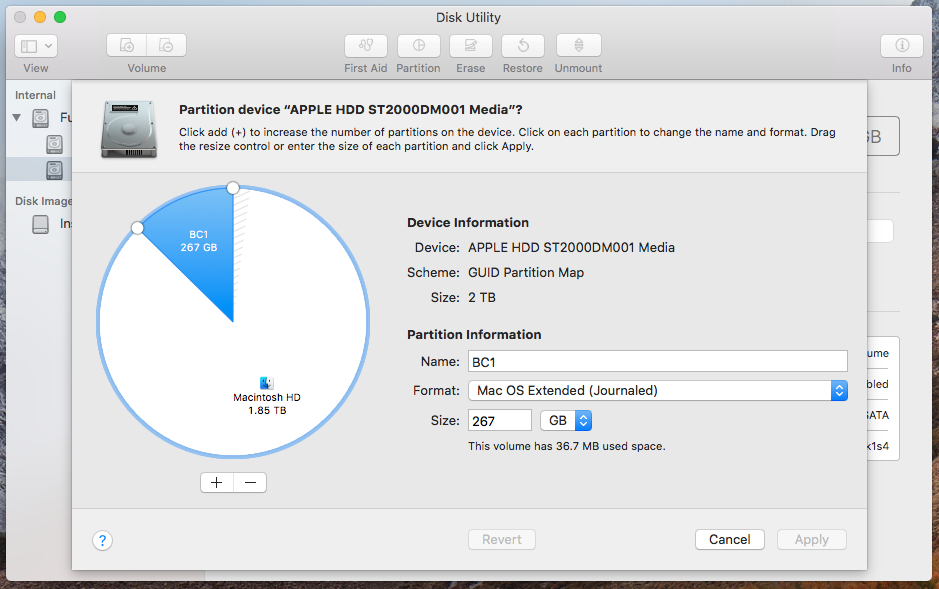
**I went to Disk Utility and now see that the partition is now named BC1 and the - is available to press:


Now waiting on next steps!
User uploaded file

This thread has been closed by the system or the community team. You may vote for any posts you find helpful, or search the Community for additional answers.

Bootcamp "The startup disk cannot be partitioned or restored to a single partition" error.

Welcome to Apple Support Community
A forum where Apple customers help each other with their products. Get started with your Apple Account.

