get rid of grid when Export pdf from Numbers?

Hi,

I just switched from Excel to Numbers.


When I now try to export a PDF, it will always export the grid aswell.

Is there a way to hide the grid or check a box to not export it?


Thanks for a tip,

best,

Lars

MacBook Pro, OS X Mavericks (10.9.2)

Posted on Jul 21, 2017 12:49 AM

Reply
2 replies

Jul 21, 2017 2:28 AM in response to Larshc

Hi Lars,

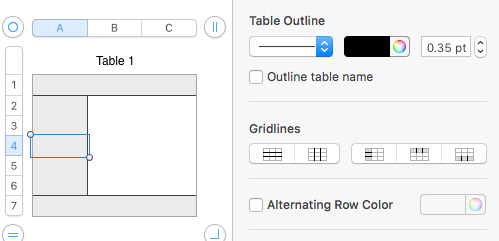
Tables in Numbers can have gridlines (Table properties) and Borders (Cell Properties).

You can control gridlines by clicking anywhere in a table and Format Panel > Table > Gridlines

User uploaded file

Click on each blue button to remove those gridlines. (This is also where you can change or remove the default Alternating Row Colour).
User uploaded file

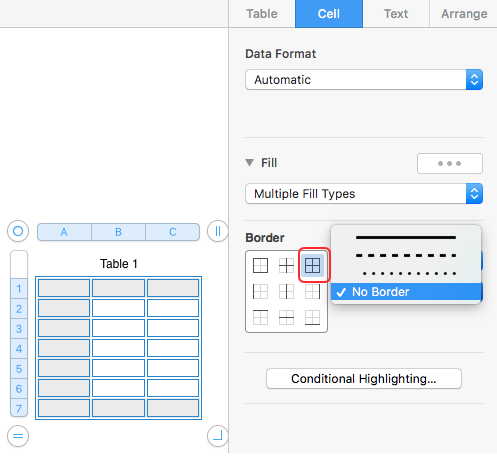
Now for the Cell Borders:

Select the whole Table by clicking on the "bullseye" top left.

Format Panel > Cell > Border

Choose All Borders (the icon top right under Border). Choose No Border.
User uploaded file

This is also where you can get rid of Cell Fill.

User uploaded file

Choose No Fill.

User uploaded file

Gone!

And gone in Print to PDF 😉.

User uploaded file

Regards,

Ian.

This thread has been closed by the system or the community team. You may vote for any posts you find helpful, or search the Community for additional answers.

get rid of grid when Export pdf from Numbers?

Welcome to Apple Support Community
A forum where Apple customers help each other with their products. Get started with your Apple Account.