How do I remove my iCloud account?

I accidentally created an iCloud account (long story). I don't want the account. Please tell me how to delete the account. I do not have any shared files, or anything stored in the cloud right now because this just happened. So I don't need an answer that tells me how to do it while saving my files. I simply want to remove the account, so I won't have an "iCloud" section in my settings anymore. Thank you.


By the way, the list of categories did not include iCloud, so I picked "Apps". Sorry if that's the wrong one, but it seemed like the best of what was available.

iPhone 5s, iOS 10.3.2

Posted on Aug 13, 2017 2:29 AM

Reply
5 replies

Aug 14, 2017 11:37 AM in response to Victory88

Thank you for responding quickly.


Are you saying that, once an iCloud account has been created, it cannot ever be deleted? That's kind of creepy. I don't like the idea that the account is still there, just waiting for me to goof up sometime and change a setting without realizing it, so that some of my data starts to be stored in the cloud. I don't want any of my data to be in the cloud. I know that I can turn off all the iCloud settings (for pictures, emails, etc), and I have done that already. But accidents happen, right? I could inadvertently turn on a setting and not even know that some data is being stored in the cloud. And once the data is in the cloud, then I will not be able to sign out, or else the data will be lost, not only from Apple's cloud servers, but from my iPad as well. OK, that is very creepy. Apple has no right to mess with my own device.


So, I would very much prefer to get rid of it altogether. I never intended to create the account in the first place. I had signed in using an iPad that used a different language for the UI, and I was trying to log in as myself, and somehow I found myself on the iCloud page. So because this was an accident and I didn't want the iCloud account to begin with, I think it should be deleted. I don't want to be stuck with something that I did not choose.


Thanks.

Aug 14, 2017 9:22 AM in response to Joyce3

Hello Joyce3,

Thank you for using Apple Support Communities!

I understand from your post that you would like to sign out of iCloud on your iPhone 5s. The following article has the steps on how to sign out of iCloud. Because you don't have any information in iCloud you wish to save you can select remove when prompted to keep or remove the content on the device.

Sign in with a different Apple ID on your iPhone, iPad, or iPod touch - Apple Support

iCloud

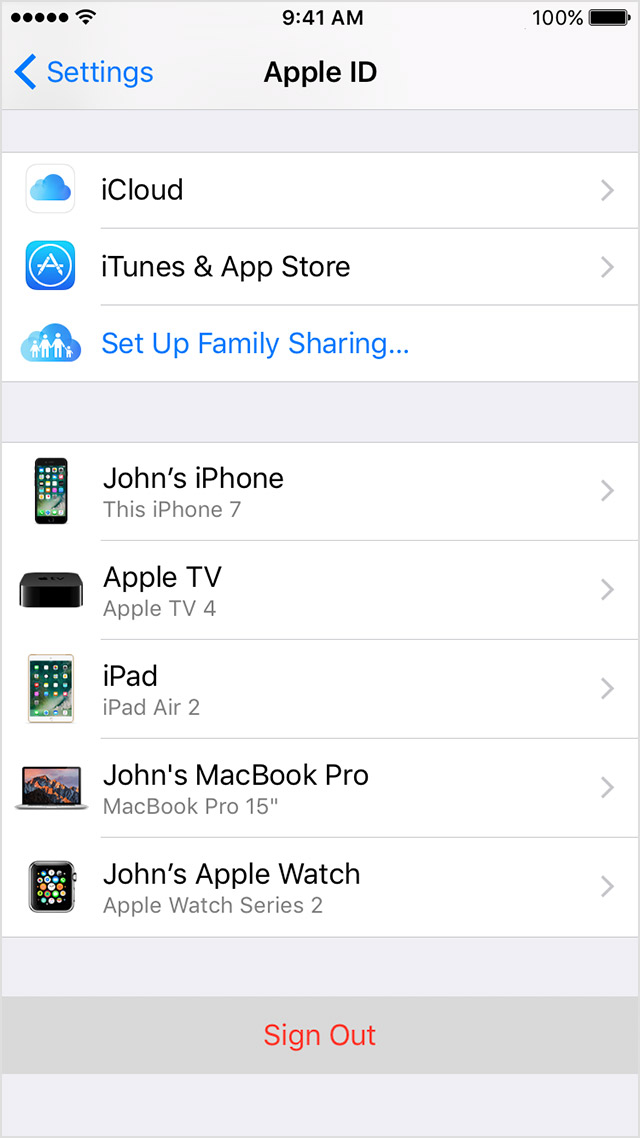
  1. Tap Settings > [your name]. On iOS 10.2 or earlier, tap Settings > iCloud.
  2. Scroll down and tap Sign Out.
    User uploaded file
  3. Follow the onscreen steps and choose what to do with the information you store in iCloud. You can keep a copy on your device and in iCloud, or remove the information from your device and we'll store a copy in iCloud for you. When you're done, tap Sign Out.
Best Regards.

Aug 14, 2017 1:07 PM in response to Phil0124

If you signed on to iCloud using an existing Apple ID, then you did not create anything. All Apple IDs are by extension in and of themselves iCloud accounts. In other words an Apple ID is not independent of iCloud. When you create an Apple ID, it is also at the same time an iCloud ID. It grants you access to all Apple services, iTunes Store, App Store, etc.. and yes iCloud services.


You can choose not to use it, but there is no independent iCloud account to your Apple ID, they are one and the same.

All this time since you created your Apple ID, you have had access to iCloud with it that you have chosen not to use.


You would need to get a court order to get Apple to delete an account, and that would in essence delete your Apple ID as well if they agreed to it.


Just sign out and keep choosing not use iCloud as you have been doing all along.


Thank you, this explains a lot. I misunderstood how iCloud is activated and used. I will just sign out and continue using the iPad as before.

Thanks!

Aug 14, 2017 1:07 PM in response to Joyce3

Joyce3 wrote:


Thank you for responding quickly.


Are you saying that, once an iCloud account has been created, it cannot ever be deleted?

Correct. Only Apple can potentially delete any account created on their servers and will generally only do so for a very good reason. i.e warrant, court order etc...


Joyce3 wrote:


Thank you for responding quickly.


And once the data is in the cloud, then I will not be able to sign out, or else the data will be lost, not only from Apple's cloud servers, but from my iPad as well.

You can sign out at any time. Any time you sign out of iCloud you are asked if you wish to keep a local copy of the data on the device you are signing out on. Also, signing out, as explained above does not in any way delete the data from iCloud. You would need to manually remove it from iCloud generally through iCloud.com for it to be gone entirely.


Joyce3 wrote:


So, I would very much prefer to get rid of it altogether. I never intended to create the account in the first place. I had signed in using an iPad that used a different language for the UI, and I was trying to log in as myself, and somehow I found myself on the iCloud page. So because this was an accident and I didn't want the iCloud account to begin with, I think it should be deleted. I don't want to be stuck with something that I did not choose.


If you signed on to iCloud using an existing Apple ID, then you did not create anything. All Apple IDs are by extension in and of themselves iCloud accounts. In other words an Apple ID is not independent of iCloud. When you create an Apple ID, it is also at the same time an iCloud ID. It grants you access to all Apple services, iTunes Store, App Store, etc.. and yes iCloud services.


You can choose not to use it, but there is no independent iCloud account to your Apple ID, they are one and the same.

All this time since you created your Apple ID, you have had access to iCloud with it that you have chosen not to use.


You would need to get a court order to get Apple to delete an account, and that would in essence delete your Apple ID as well if they agreed to it.


Just sign out and keep choosing not use iCloud as you have been doing all along.

This thread has been closed by the system or the community team. You may vote for any posts you find helpful, or search the Community for additional answers.

How do I remove my iCloud account?

Welcome to Apple Support Community
A forum where Apple customers help each other with their products. Get started with your Apple Account.