Hello,
If your device is missing, you can use Find My iPhone to find your device and take additional actions that can help you recover it and keep your data safe. If you aren't using your device anymore, or if you don't recognize it, you might want to remove it from the list.
If you set up two-factor authentication for your Apple ID, removing a device will ensure that it can no longer display verification codes and won't have access to iCloud and other Apple services, including Find My iPhone, until you sign in again with two-factor authentication. The device won't reappear in the list unless you sign in again with two-factor authentication.
You can remove devices from your Apple ID account page:
- Click the device to see its details, then click Remove.
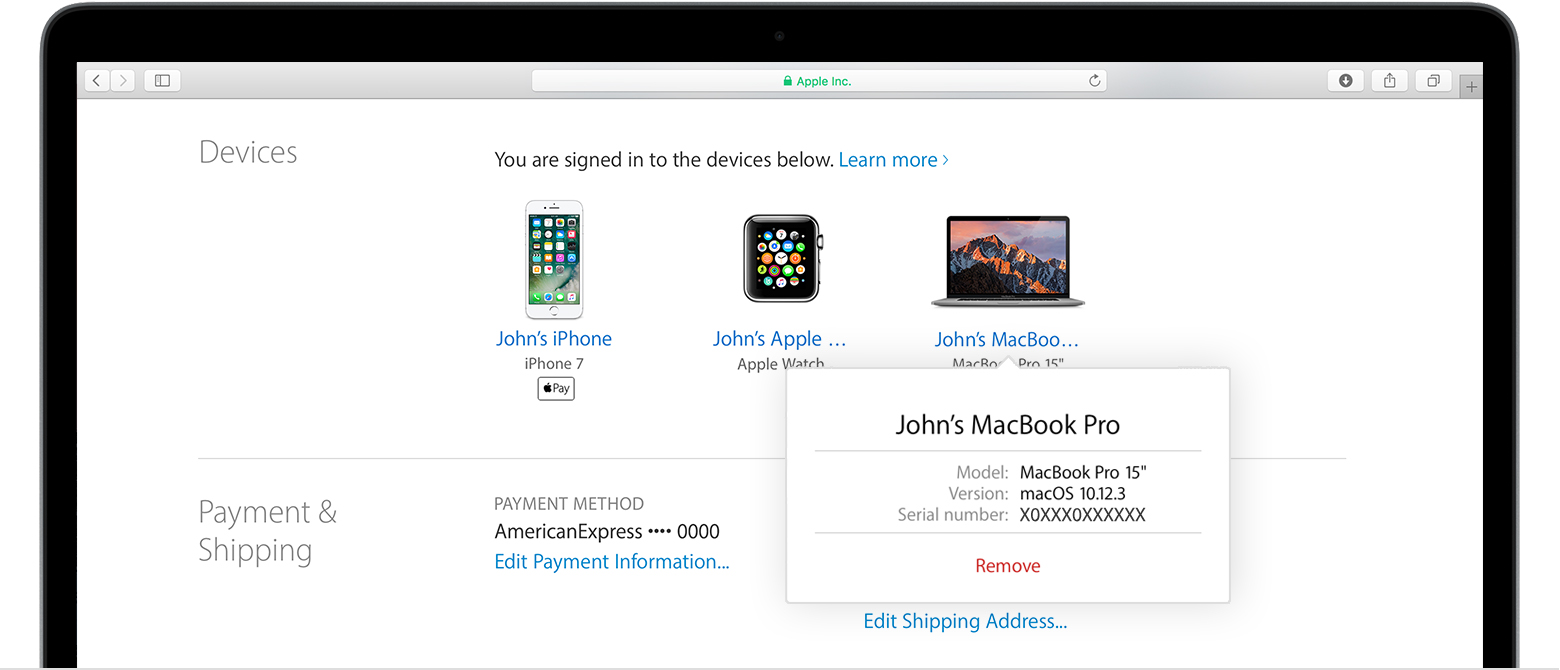
- Review the message that appears, then click again to confirm that you want to remove the device.
- If you're still signed in with your Apple ID on the device, it might reappear on your account page the next time your device connects to the Internet. To permanently remove the device from your account page, sign out of iCloud, iTunes, iMessage, FaceTime, and Game Center, or erase the device.
From:
Check your Apple ID device list to see where you're signed in - Apple Support

