After ios 11.0.2 I cannot open PDF files

I installed IOS 11.0.2 on my iPhone 7. I cannot open up PDF files from the mail app, I tried to save the file to iCloud drive. the icon shows the data, but still cannot open it successfully. it opens with this image:

User uploaded file


It works fine if I send it to a gmail account and open using the GMAIL app.


Is anyone else having or seen this issue?


Thanks

iPhone 7, iOS 11.0.2

Posted on Oct 11, 2017 8:56 AM

Reply
Question marked as Top-ranking reply

Posted on Oct 12, 2017 6:13 AM

Hello and welcome to Apple Support Communities, thewoodshopguy.
If I understand your post correctly, you're trying to view PDF documents sent via email. I'm happy to help.
Follow these steps:

View a PDF email attachment

You can open PDF documents, such as a PDF attached to an email, with iBooks:

  1. Open the email with the PDF attachment, and tap the attachment.
  2. Tap the Share icon User uploaded file.
  3. Tap "Copy to iBooks" to open the attachment in iBooks.
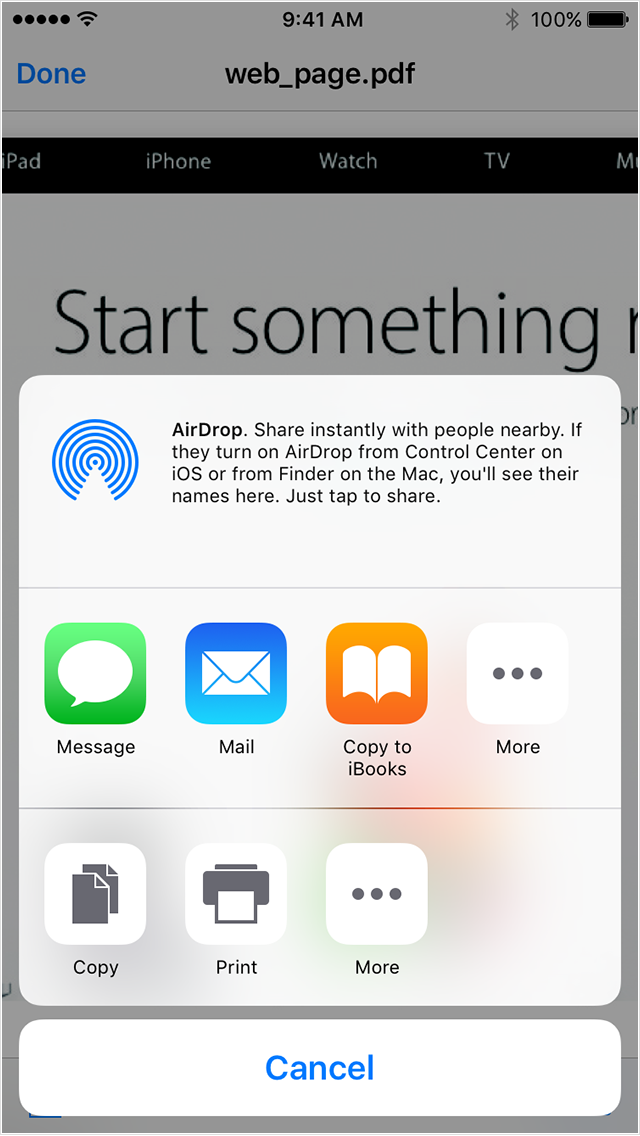
    User uploaded file

When you use iBooks to open a PDF, iBooks automatically saves a copy of the PDF to your iBooks PDF shelf.

The next time you sync your iOS device with a computer, your PDF saves to either iBooks or iTunes.

  • For OS X Mavericks or later, your PDF syncs to your iBooks Library.
  • For OS X Mountain Lion and earlier or Windows users, these PDFs will sync to your iTunes Book Library.

See the full article here:
Use iBooks with PDF documents on your iPhone, iPad, or iPod touch
​Let us know if that resolves this issue for you.
Thanks for using the Apple Support Communities. Take care.

3 replies
Question marked as Top-ranking reply

Oct 12, 2017 6:13 AM in response to thewoodshopguy

Hello and welcome to Apple Support Communities, thewoodshopguy.
If I understand your post correctly, you're trying to view PDF documents sent via email. I'm happy to help.
Follow these steps:

View a PDF email attachment

You can open PDF documents, such as a PDF attached to an email, with iBooks:

  1. Open the email with the PDF attachment, and tap the attachment.
  2. Tap the Share icon User uploaded file.
  3. Tap "Copy to iBooks" to open the attachment in iBooks.
    User uploaded file

When you use iBooks to open a PDF, iBooks automatically saves a copy of the PDF to your iBooks PDF shelf.

The next time you sync your iOS device with a computer, your PDF saves to either iBooks or iTunes.

  • For OS X Mavericks or later, your PDF syncs to your iBooks Library.
  • For OS X Mountain Lion and earlier or Windows users, these PDFs will sync to your iTunes Book Library.

See the full article here:
Use iBooks with PDF documents on your iPhone, iPad, or iPod touch
​Let us know if that resolves this issue for you.
Thanks for using the Apple Support Communities. Take care.

This thread has been closed by the system or the community team. You may vote for any posts you find helpful, or search the Community for additional answers.

After ios 11.0.2 I cannot open PDF files

Welcome to Apple Support Community
A forum where Apple customers help each other with their products. Get started with your Apple Account.