Using CONCATENATE within SUM

I have 2 tables where I am trying to cross reference cells, so in table 1 I have the standard formula plus a little extra formula to programmatically calculate the name of the table reference.


SUM(CONCATENATE("10−",ROW(),"−2017")::E40)


So in my 1st table a cell has the above formula. The goal is my reference table is called '10-2-2017' so per row it will increment by 1. This formula complains that it contains a syntax error so I assume that even though the output of CONCATENATE("10−",ROW(),"−2017") is a string it is not in the form which the SUM('10-2-2017'::E40) expects.


Any thoughts? Also, once I get this I will need to need to auto-increment the cell reference by 1 moves from column D to column J.


The ultimate goal is to have an entire table of cells containing the formula SUM('table'::A1) where both parameter values increment as the cell traverses horizontally and vertically. Should be possible right?

null-OTHER, macOS High Sierra (10.13)

Posted on Oct 25, 2017 2:34 PM

Reply
Question marked as Top-ranking reply

Posted on Oct 25, 2017 10:51 PM

Hi jon,


More or less what Wayne has already said, but looked at through the syntax of the various components of your formula:


SUM(CONCATENATE("10−",ROW(),"−2017")::E40)


Formulas containing parentheses work from the innermost set of parentheses to the outermost level, and within a single level, from left to right.


SUM(CONCATENATE("10−",ROW(),"−2017")::E40)


The innermost set here is the pair in the ROW function, which returns the number of the row containing the formula. For the analysis, we'll assume the formula is in row 2. The result is a number, 2


SUM(CONCATENATE("10−",2,"−2017")::E40)


SUM(CONCATENATE("10−",2,"−2017")::E40)


Concatenate acts on the list contained in the next set of parentheses, and combines the three elements into a single text string:


SUM("10−2−2017"::E40)


SUM(n1,n2,...)

SUM calculates the SUM of a list of numbers. The list may be presented as a comma separated list, or as a range of cells.

Your result, though, is a text string ("10-2-2017" followed by two colons (::) followed by what appears to be a reference to a single cell.


SUM cannot interpret this mixed message to the intended reference to the single cell E40 on the table named "10-2-2017.


It needs assistance from INDIRECT(), a function that translates a text string to an address. INDIRECT requires that the full address be presented as a text string, so CONCATENATE will need to act on '::E40' as well as the elements it is currently reading.


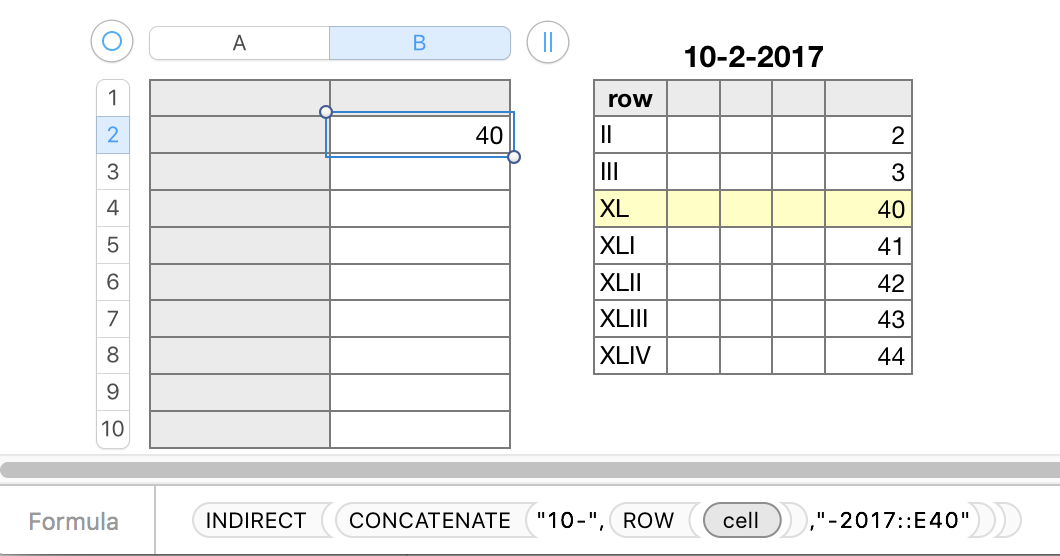
INDIRECT(CONCATENATE("10-",ROW(),"-2017::E40"))


As CONCATENATE is creating only a single cell reference (10-2-2017::E40), there is no need for SUM.
User uploaded file

NOTE: ROWS 4 to 39 are hidden in the 10-202017 table to make it fit in the space available, The value each cell of column E is the number of its row.

The formula in the selected cell in row 2 of the table on the left is shown below the two tables.


I suspect what is done here is not what you are attempting to do. If that is so, please supply a more detailed description of what you want to achieve, and of the table(s) from which the data will be gathered,


Regards,

Barry


Note to Wayne: think your closing CONCATENATE statement is missing a double quote after 2017, OR includes an extraneous comma and double quotation mark between 2017 and the pair of colons.

B

4 replies
Question marked as Top-ranking reply

Oct 25, 2017 10:51 PM in response to jon.ortiz

Hi jon,


More or less what Wayne has already said, but looked at through the syntax of the various components of your formula:


SUM(CONCATENATE("10−",ROW(),"−2017")::E40)


Formulas containing parentheses work from the innermost set of parentheses to the outermost level, and within a single level, from left to right.


SUM(CONCATENATE("10−",ROW(),"−2017")::E40)


The innermost set here is the pair in the ROW function, which returns the number of the row containing the formula. For the analysis, we'll assume the formula is in row 2. The result is a number, 2


SUM(CONCATENATE("10−",2,"−2017")::E40)


SUM(CONCATENATE("10−",2,"−2017")::E40)


Concatenate acts on the list contained in the next set of parentheses, and combines the three elements into a single text string:


SUM("10−2−2017"::E40)


SUM(n1,n2,...)

SUM calculates the SUM of a list of numbers. The list may be presented as a comma separated list, or as a range of cells.

Your result, though, is a text string ("10-2-2017" followed by two colons (::) followed by what appears to be a reference to a single cell.


SUM cannot interpret this mixed message to the intended reference to the single cell E40 on the table named "10-2-2017.


It needs assistance from INDIRECT(), a function that translates a text string to an address. INDIRECT requires that the full address be presented as a text string, so CONCATENATE will need to act on '::E40' as well as the elements it is currently reading.


INDIRECT(CONCATENATE("10-",ROW(),"-2017::E40"))


As CONCATENATE is creating only a single cell reference (10-2-2017::E40), there is no need for SUM.

User uploaded file

NOTE: ROWS 4 to 39 are hidden in the 10-202017 table to make it fit in the space available, The value each cell of column E is the number of its row.

The formula in the selected cell in row 2 of the table on the left is shown below the two tables.


I suspect what is done here is not what you are attempting to do. If that is so, please supply a more detailed description of what you want to achieve, and of the table(s) from which the data will be gathered,


Regards,

Barry


Note to Wayne: think your closing CONCATENATE statement is missing a double quote after 2017, OR includes an extraneous comma and double quotation mark between 2017 and the pair of colons.

B

Oct 25, 2017 7:51 PM in response to jon.ortiz

to use a string (that may be proper text for a reference ) as a reference, you have to use the function

indirect()


however, you formula looks like there is a problem,:


"SUM(CONCATENATE("10−",ROW(),"−2017")::E40)"


uses the function SUM() with and argument.


the argument:

CONCATENATE("10−",ROW(),"−2017")::E40


is not valid


perhaps you are meaning:

CONCATENATE("10−",ROW(),"−2017, "::E40")

Oct 25, 2017 11:23 PM in response to jon.ortiz

Hi Jon,

I am intrigued by your question and your ultimate goal:

The ultimate goal is to have an entire table of cells containing the formula SUM('table'::A1) where both parameter values increment as the cell traverses horizontally and vertically. Should be possible right?

This is possible, and it certainly got my brain stirred, but what outcome do you want?

Are you trying to:

Sum rows or columns within a table?

Sum individual categories within a table?

Sum across several tables? or

just copy a table cell by cell?


I am still puzzling over the reason why you are taking this approach. There may be simpler ways.

More information, including screen shots will help (please include the Row and Column labels and the table names).


Regards,

Ian.

This thread has been closed by the system or the community team. You may vote for any posts you find helpful, or search the Community for additional answers.

Using CONCATENATE within SUM

Welcome to Apple Support Community
A forum where Apple customers help each other with their products. Get started with your Apple Account.
