
how do I select all the songs in my library to download to my iPhone? thanks

how do I select all the songs in my iTunes library at one time to download to my iPhone? thanks

iMac (21.5-inch, Late 2013), iOS 11.0.3
Posted on Oct 27, 2017 7:28 AM

Reply
Question marked as Top-ranking reply

Posted on Oct 28, 2017 6:50 AM

Hello and welcome to Apple Support Communities Nate9834,

From my understanding of your post, you're wanting to sync music from your iTunes library on your computer to your iPhone. Also, you'd like to know how to select all the songs in your library at once for the sync. I'm happy to help you get all of your music synced to your iPhone!

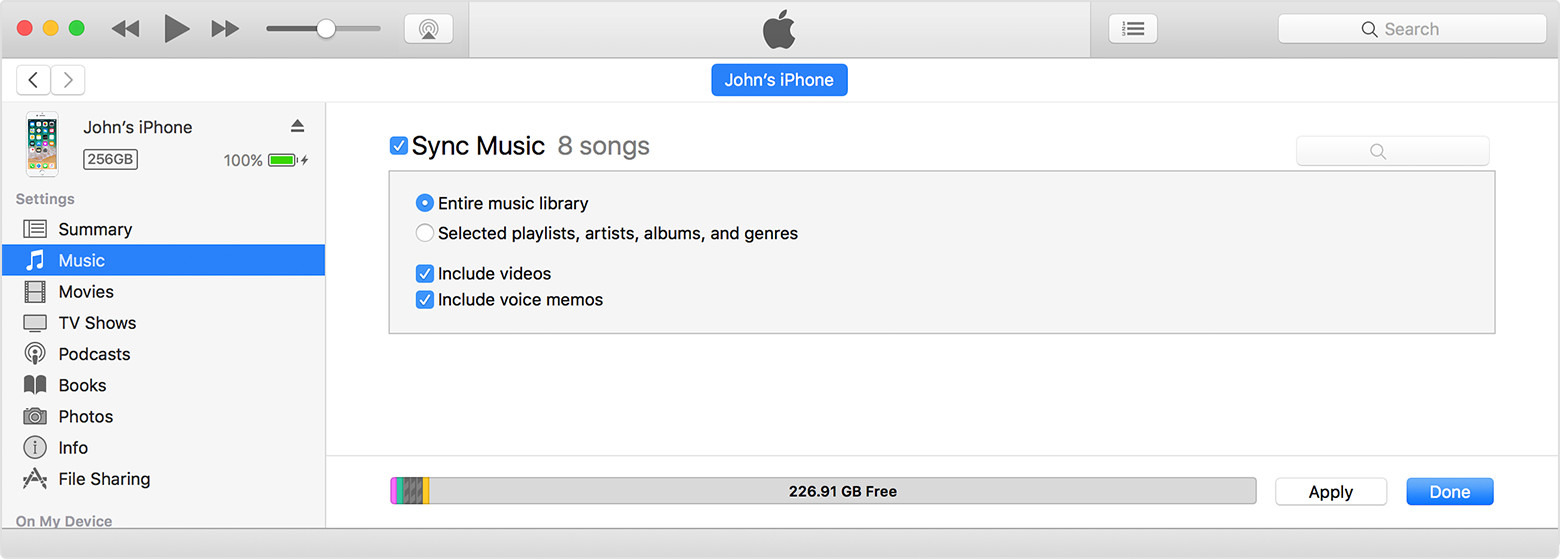
The easiest way to sync your entire music library is to follow the steps listed here: Sync your iPhone, iPad, or iPod touch with iTunes on your computer using USB . When you're in the Music sync settings area, there needs to be a checkmark next to "Sync Music" like you see in the image below. To sync every song/album currently in your library, select the option for "Entire Music Library". Select the Apply and Sync buttons in the bottom-right corner of iTunes to save your sync settings and start the sync process.

User uploaded file

If your iPhone is set to manually manage your music and videos, you may be alerted that syncing will remove all of the existing music on your iPhone and replace it with the music in iTunes. If all of the music currently on your iPhone is also in iTunes on your computer, go ahead and select "Remove and Sync" when prompted. This will automatically uncheck "manually manage music and videos" for your sync settings, and your iPhone will sync any new music added to iTunes each time you connect you connect your iPhone unless you change your sync settings again.

If you have music on your iPhone that you would like to keep and this music is not in iTunes on your computer, select "Cancel" on that message. This will leave "Manually manage music and videos" enabled. To select multiple songs in your iTunes library to sync, click on one song so that it's highlighted and then press and hold the Command button on your keyboard as you click on additional songs. To select every song in your iTunes library, click on one song so that it's highlighted and then select Edit > Select All from the menu bar in the left corner of your screen. When you click and drag a highlighted song to your iPhone in the left sidebar, it will sync any song that you currently have highlighted.

Thanks for using Apple Support Communities.

Take care!
2 replies
Question marked as Top-ranking reply

Oct 28, 2017 6:50 AM in response to Nate9834

Hello and welcome to Apple Support Communities Nate9834,

From my understanding of your post, you're wanting to sync music from your iTunes library on your computer to your iPhone. Also, you'd like to know how to select all the songs in your library at once for the sync. I'm happy to help you get all of your music synced to your iPhone!

The easiest way to sync your entire music library is to follow the steps listed here: Sync your iPhone, iPad, or iPod touch with iTunes on your computer using USB . When you're in the Music sync settings area, there needs to be a checkmark next to "Sync Music" like you see in the image below. To sync every song/album currently in your library, select the option for "Entire Music Library". Select the Apply and Sync buttons in the bottom-right corner of iTunes to save your sync settings and start the sync process.

User uploaded file

If your iPhone is set to manually manage your music and videos, you may be alerted that syncing will remove all of the existing music on your iPhone and replace it with the music in iTunes. If all of the music currently on your iPhone is also in iTunes on your computer, go ahead and select "Remove and Sync" when prompted. This will automatically uncheck "manually manage music and videos" for your sync settings, and your iPhone will sync any new music added to iTunes each time you connect you connect your iPhone unless you change your sync settings again.

If you have music on your iPhone that you would like to keep and this music is not in iTunes on your computer, select "Cancel" on that message. This will leave "Manually manage music and videos" enabled. To select multiple songs in your iTunes library to sync, click on one song so that it's highlighted and then press and hold the Command button on your keyboard as you click on additional songs. To select every song in your iTunes library, click on one song so that it's highlighted and then select Edit > Select All from the menu bar in the left corner of your screen. When you click and drag a highlighted song to your iPhone in the left sidebar, it will sync any song that you currently have highlighted.

Thanks for using Apple Support Communities.

Take care!

Oct 28, 2017 6:50 AM in response to Nate9834

Hello and welcome to Apple Support Communities Nate9834,

From my understanding of your post, you're wanting to sync music from your iTunes library on your computer to your iPhone. Also, you'd like to know how to select all the songs in your library at once for the sync. I'm happy to help you get all of your music synced to your iPhone!

The easiest way to sync your entire music library is to follow the steps listed here: Sync your iPhone, iPad, or iPod touch with iTunes on your computer using USB . When you're in the Music sync settings area, there needs to be a checkmark next to "Sync Music" like you see in the image below. To sync every song/album currently in your library, select the option for "Entire Music Library". Select the Apply and Sync buttons in the bottom-right corner of iTunes to save your sync settings and start the sync process.

User uploaded file

If your iPhone is set to manually manage your music and videos, you may be alerted that syncing will remove all of the existing music on your iPhone and replace it with the music in iTunes. If all of the music currently on your iPhone is also in iTunes on your computer, go ahead and select "Remove and Sync" when prompted. This will automatically uncheck "manually manage music and videos" for your sync settings, and your iPhone will sync any new music added to iTunes each time you connect you connect your iPhone unless you change your sync settings again.

If you have music on your iPhone that you would like to keep and this music is not in iTunes on your computer, select "Cancel" on that message. This will leave "Manually manage music and videos" enabled. To select multiple songs in your iTunes library to sync, click on one song so that it's highlighted and then press and hold the Command button on your keyboard as you click on additional songs. To select every song in your iTunes library, click on one song so that it's highlighted and then select Edit > Select All from the menu bar in the left corner of your screen. When you click and drag a highlighted song to your iPhone in the left sidebar, it will sync any song that you currently have highlighted.

Thanks for using Apple Support Communities.

Take care!

This thread has been closed by the system or the community team. You may vote for any posts you find helpful, or search the Community for additional answers.

how do I select all the songs in my library to download to my iPhone? thanks

Welcome to Apple Support Community
A forum where Apple customers help each other with their products. Get started with your Apple Account.