How Do I Add Custom Ringtones to iPhone 7?

I added the ringtones (.a4r) to iTones on my Windows PC. I selected them, right clicked and selected Add to Phone and selected my phone. They are in the music section of the phone and I can play them from there.


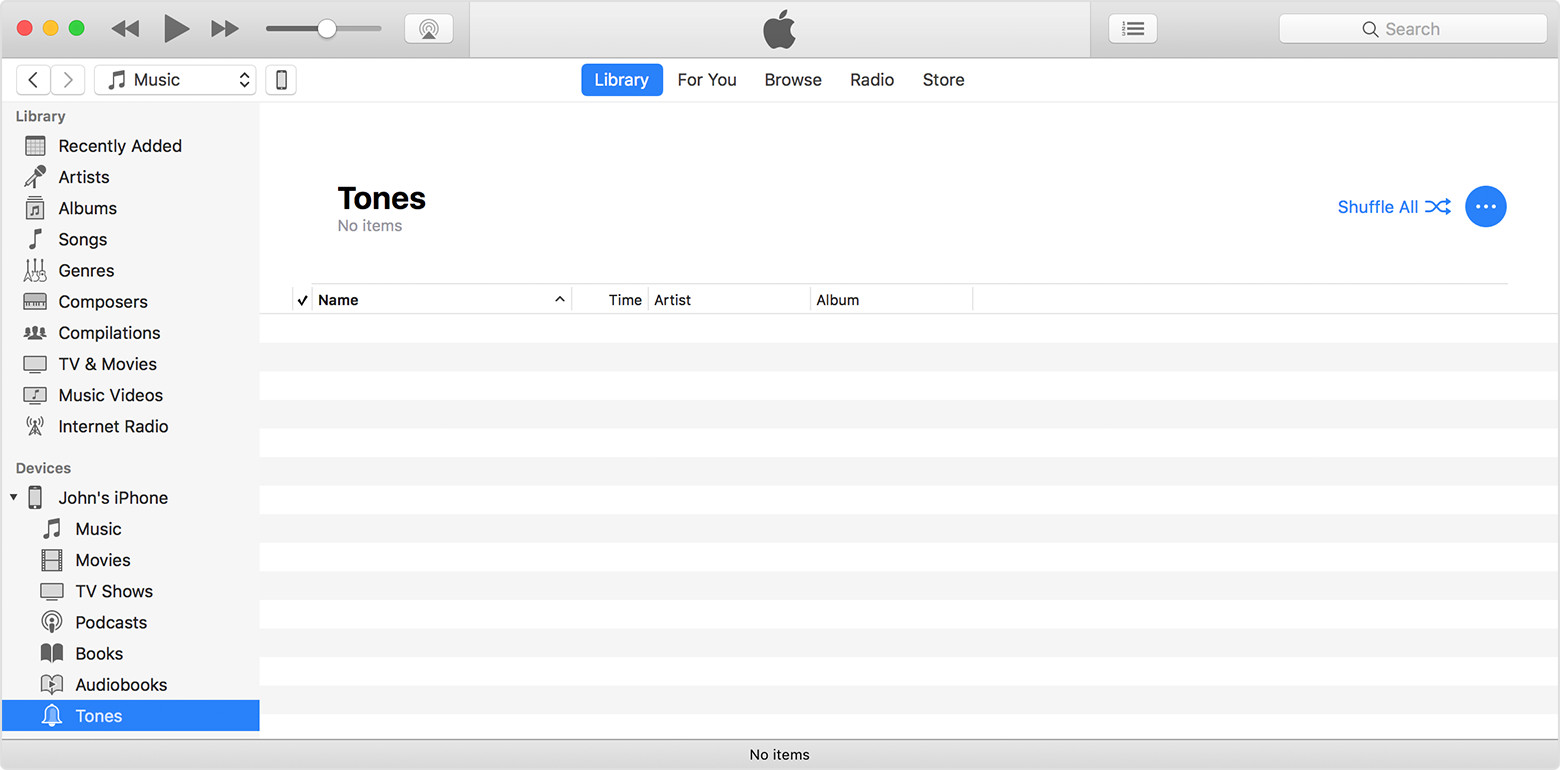
I then opened Devices and selected my phone. Under it I clicked on Tones. I then tried to drag the tones from my PC to the Tones folder. I get an error message that said:

"<file name>" was not copied to the iPhone "<phone name>" because it cannot be played on this iPhone.


What am I doing wrong?

iPhone 7, iOS 11.1

Posted on Nov 4, 2017 2:34 PM

Reply
2 replies

Nov 5, 2017 2:41 PM in response to saberman007

Hi, saberman007!


Thanks for stopping by the Apple Support Communities. From your post, I understand that you are having trouble getting ringtones you've created from your PC to your iPhone. I'm happy to help!


Based on what you've described, I would recommend using the following steps from Use tones and ringtones on your iPhone, iPad, or iPod touch - Apple Support to transfer your tones:

Move ringtones from iTunes to your iPhone, iPad, or iPod touch

If you have a ringtone or tone in iTunes on your Mac or PC that you want to move to your iOS device, you can manually add it to your device using iTunes.

  1. Connect your device to your computer.
  2. Open iTunes. Make sure that you have the latest version.
  3. On your computer, find the ringtone or tone that you want to add to your device. If the ringtone or tone previously appeared in your iTunes library, you can find it in the Tones folder of your iTunes media folder.
  4. Select the tone that you want to add to your device and copy it. (You can use a keyboard shortcut.)
  5. Return to iTunes and go to the Library tab of Music.
  6. Click on your device in the left sidebar, then click Tones.
  7. Paste your tone. (You can use a keyboard shortcut.)
    User uploaded file


Have a wonderful day!

Nov 5, 2017 3:53 PM in response to brenden dv

I tried to copy a ringtone to the Tones folder of my phone. I drag and drop a Ringtone. I see the message at the top flash like it's syncing the phone but the ringtone does not appear.


Now if I click on the sync icon next to the phone's name the phone disappears from iTunes. I then have to unplug the USB cable and plug it back in to get it to appear again.

This thread has been closed by the system or the community team. You may vote for any posts you find helpful, or search the Community for additional answers.

How Do I Add Custom Ringtones to iPhone 7?

Welcome to Apple Support Community
A forum where Apple customers help each other with their products. Get started with your Apple Account.