My Iphone 5s randomly got the Setup Assistant screen

So today many strange things happend with my iPhone 5s. It started with wifi passwords: every wifi connection I ever used was deleted, which means that every password I saved was lost. This wasn't such a problem for me tho. But when I tried to log onto a wifi netwerk the password was always wrong. Even though I was certain it were the right passwords. So i rebooted my iPhone (like I often do when my iPhone does weird stuff) but this time things were different. When I tried to unlock my phone, the Setup Assistent screen randomly appeared. I was confused but I understood that I must follow the steps to unlock it. When I came to the first step (chosing Wifi-networks) it already went wrong. I still had the 'bug' I was trying to fix by rebooting the iPhone: The passwords were always wrong, I tried several Wifi-networks at school, at home, by the neighbours, by friends but nothing worked, the password was wrong everytime. There was only one other option left (Connecting to iTunes) so i prayed this option was going to help me. Well, it didn't. I got an error when I tried to connect my iPhone with iTunes (I did connect it like two days ago with iTunes and everything seemed fine then) I'm so confused right now. Maybe it's because I still had ios 10? I really don't know.


Anyway, if anyone knows what is happening and how I can unlock my phone without losing all my data, hit me up

Posted on Nov 7, 2017 12:47 PM

Reply
5 replies

Nov 8, 2017 2:19 PM in response to Eavez

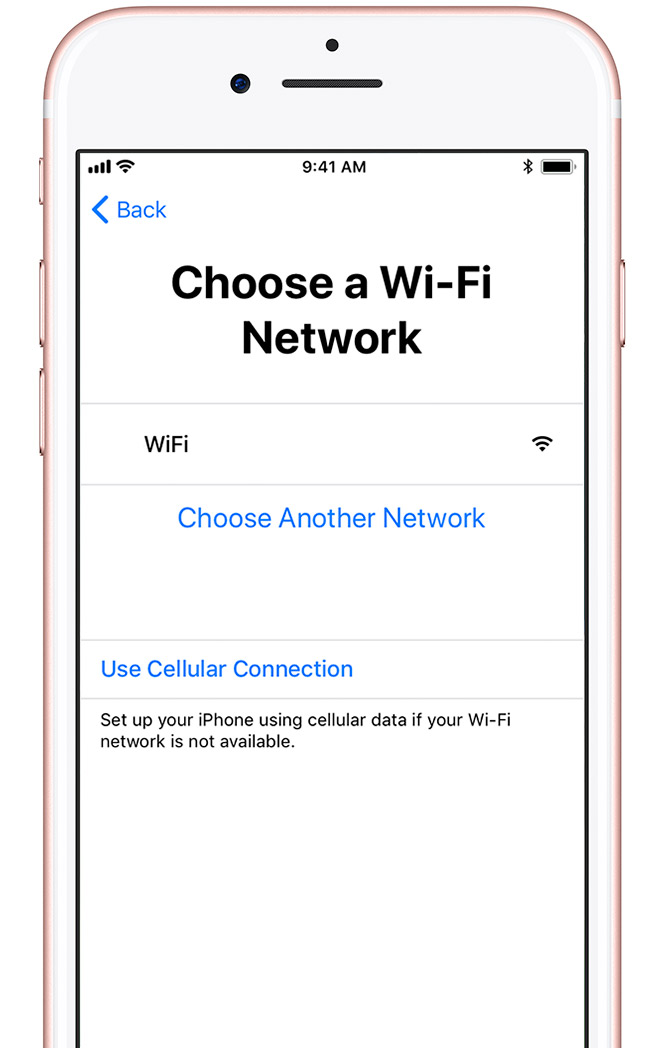
Hi Eva, thanks for getting back to us with the additional information. Here is an example of what the "Use Cellular Connection" option looks like:

User uploaded file

Set up your iPhone, iPad, or iPod touch - Apple Support
If you don't see this option, that's no problem. We can instead focus on getting iTunes to properly recognize your iPhone. Please follow the guidance in this support article next:
If iTunes doesn't recognize your iPhone, iPad, or iPod - Apple Support
Once your iPhone is properly recognized in iTunes, check to see if you're able to successfully activate it. If not, we recommend reinstalling iOS using iTunes with the steps found here:
If your iPhone, iPad, or iPod touch won't turn on or is frozen - Apple Support

Take care.

Nov 8, 2017 7:54 AM in response to Eavez

Hi Eavez,

I understand that your iPhone 5s has been having problems connecting to multiple Wi-Fi networks and also seems to be stuck on the set up screen since you're currently unable to connect to Wi-Fi. Let's see if we can get this sorted out.

Does your iPhone currently have a SIM card inserted with active cellular service? Since you're unable to activate the iPhone using Wi-Fi, you should be able to choose the option at the bottom of that screen that says "Use Cellular Connection".

You mentioned that you received an error when trying to activate the device using iTunes; do you remember the exact error message that appeared?

Please follow the guidance in this article related to the issue you're experiencing:
If you can't activate your iPhone - Apple Support

Cheers.

Nov 8, 2017 1:29 PM in response to Teddy_B

Hi


First of all, thanks for trying to help!


Yes I do have a SIM Card inserted with active cellular service. I don't see a button 'Use cellular connection' tho. Maybe it's because I have an old version of ios 10? I didn't update for months, cause I didn't have storage left.


But could you send me a screenshot of that button? Maybe I just didn't see it.


The error I got was 0xE8000015 (here is a screenshot, it's in Dutch tho, excuses)User uploaded file


I tried to do this: Update of herstel van iPhone, iPad of iPod touch lukt niet - Apple Support But I can't even connect my iPhone to iTunes (The first step) so that didn't work.


Thankyou in advance,

Eva

Nov 9, 2017 8:05 AM in response to brenden dv

Hi


If I remember correctly there wasn't a button called 'Use Cellular Connection'.


But this isn't really priority anymore, since I have a new, much worse problem.


Yesterday my iPhone got the blue screen of death (I had it several times but it always just restarted and nothing really bad happend) but when I got it now, my iPhone kept restarting over and over again. It's like in a restart loop or something. The Apple logo still appears but after a couple of seconds the screen turns black and the iPhone turns itself off again.


I'm getting really worried about the surviving chances of this iPhone haha.


Hopefully it can be saved.

This thread has been closed by the system or the community team. You may vote for any posts you find helpful, or search the Community for additional answers.

My Iphone 5s randomly got the Setup Assistant screen

Welcome to Apple Support Community
A forum where Apple customers help each other with their products. Get started with your Apple Account.