indexing apple loop library

Hello,


i have reinstalled Logic Pro X. And when i go to loop browser it says indexing apple loop library. It is already reindexing for several hours now. Does anybody has an idea what to do?


Jan

Logic Pro X, macOS High Sierra (10.13.1), null

Posted on Nov 9, 2017 7:20 AM

Reply
3 replies

Nov 10, 2017 2:19 AM in response to mastix1980

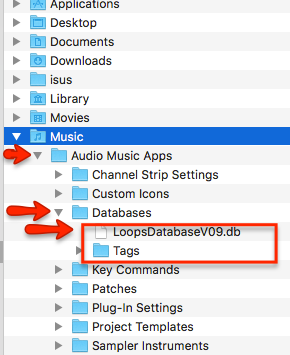
Logic stores the information of the indexed loops in a database file (LoopsDatabaseV09.db). Maybe your database file is corrupted.

  • Quit Logic
  • Go to the user directory ~Music/Audio Music Apps/ Databases/
  • delete the file LoopsDatabaseV09.db and the Tags folder
  • Launch Logic open the Loop Browser and reindex
  • Cross your fingers.


User uploaded file


You can have the Finder window open and while you are reindexing you can see how Logic rebuilds that database file.


Hope that helps


EdgarRothermich - LogicProGEM.com

(Author of the "Graphically Enhanced Manuals")

http://DingDingMusic.com/Manuals/

'I may receive some form of compensation, financial or otherwise, from my recommendation or link.'


Nov 10, 2017 2:19 AM in response to EdgarRothermich

Hello Edgar,


thanks a lot for your answer. It didn't solve the problem directly but it showed me the way. The problem was that in the ~Music/ folder was not the Audio Music Apps folder. There was just a link to the folder with the same name and it was empty and when i wanted to enter it it said that the origin doesnt exists anymore. When i deleted the folder link, logic created the one again. So i deleted the link and created the folder by myself, started the logic and it worked.


Thanks one more times for your help!

Jan

This thread has been closed by the system or the community team. You may vote for any posts you find helpful, or search the Community for additional answers.

indexing apple loop library

Welcome to Apple Support Community
A forum where Apple customers help each other with their products. Get started with your Apple Account.