Replacing line breaks for CSV conversion

Hi all,


I have a table with contact information in Numbers that I would like to import into my OS contacts. I understand this only works via a CSV file format.


The problem is that the data contains address fields where some cells have multiple rows, separated by paragraph marks. OS Contacts when looking at the converted CSV interprets these as end of row paragraph marks and starts a new contact, so rather than importing about 400 entries, I would get about 600 entries with more than half of them truncated.


There seems to be no special character option in "Find and Replace" like in Excel.


I had hoped this was a common problem, but I have been unable to find anything on the web for Numbers specifically.


Any hints would be greatly appreciated.


Thanks,

R

iMac (21.5-inch, Late 2013), OS X Yosemite (10.10.2)

Posted on Nov 22, 2017 10:56 PM

Reply
10 replies

Dec 3, 2017 2:50 AM in response to Roland000

Hi Roland,

There seems to be no special character option in "Find and Replace" like in Excel.

Numbers 4.3.1 (and I think that this was introduced in Numbers 3).

'Use Selection for Find' and 'Use Selection for Replace' is the new way in Numbers 😉.

Numbers (and Pages) distinguish between a paragraph mark (option enter, a hard return) and a new line (control enter, a soft return).

Here is a text box with the text selected to show "invisibles"

User uploaded file

Select the text that you want to find (a paragraph mark).

User uploaded file

Menu > Edit > Find > Use Selection for Find

User uploaded file


Or, you can type \n to insert a paragraph mark (hard return) in the Find box.

For the Replace box,

  • select a soft return (new line)
  • Use Selection for Replace
  • or type \i

User uploaded file

If that Find & Replace box looks grey, click on the ">" button (bottom right) to begin then click on Replace All.


Result:

User uploaded file

Hard returns are now replaced with soft returns.

Please reply if that does not give you the 'Export to CSV' that you were hoping for.


Regards,

Ian.

Nov 23, 2017 11:58 AM in response to Roland000

Roland000 wrote:


I understand this only works via a CSV file format.


Hi R,


CSV is not the only way. An AppleScript can sometimes be very efficient in transferring data between apps on the Mac. (No scripting knowledge needed to use; just copy-paste. You'll know within a minute or so whether this solution will work for you).


For example if you have the following table in Numbers...
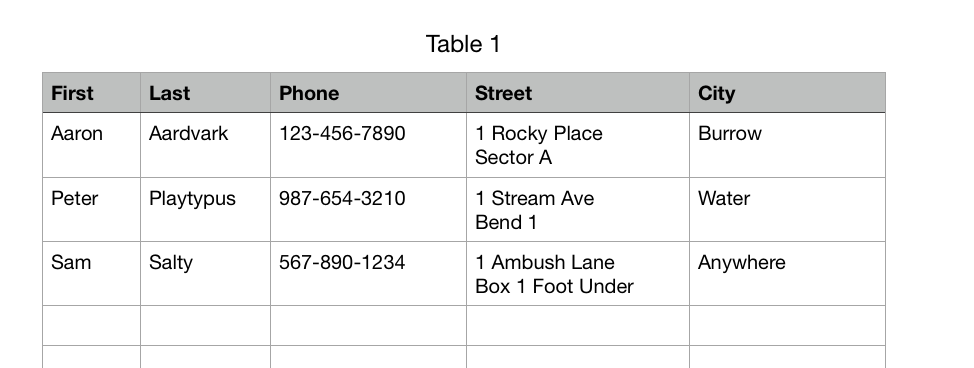

User uploaded file


The script below will import this into Contacts, preserving the line returns.


User uploaded file


To use, just:


  1. Copy-paste script into Script Editor (in Applications > Utilities)
  2. Click in Numbers table containing the addresses
  3. Click the triangle "run" button in Script Editor.


(If "nothing happens" the first time make sure Script Editor.app is checked at System Preferences > Security & Privacy > Privacy > Accessibility).


Best to test using a small table first to make sure it is doing what you want. If you give some details on your data and what you want the results to look like in Contacts (whether you want the addresses to be "Personal" or "Work" rather than "Other" etc., whether you have additional columns, etc) this can be customized without much trouble.


SG


-- 5-column table - First, Last, Phone, Street, City - one Header Row

tell application "Numbers"

tell front document's active sheet

tell (first table whose selection range's class is range)

set vv to (rows 2 thru -1 whose first cell's value is not missing value)'s cells's value

end tell

end tell

end tell

repeat with i in vv's items

my addToContacts(i's first item, i's second item, i's third item, i's fourth item, i's fifth item)

end repeat

to addToContacts(firstName, lastName, phoneNum, theStreet, theCity)

tell application "Contacts"

set thePerson to ¬


makenewpersonwith properties {first name:firstName, last name:lastName}

tell thePerson


makenewphoneat end of phoneswith properties {value:phoneNum}


makenewaddressat end of addresseswith properties {street:theStreet, city:theCity}

end tell


save

end tell

end addToContacts

Dec 3, 2017 3:53 AM in response to Roland000

Hi Roland,


Searching for tabs in Numbers or Pages you can use \t


User uploaded file

(this is in Pages - I'm not sure it's possible to insert tabs into Numbers cells )


A non-breaking space is alt-space (or option-space on some non-UK keyboards). Again this is in Pages. You can't see the character in the search and replace dialog, but you can see the invisible character highlighted in the body of the text (space with a little hat):


User uploaded file


This has found the non-breaking space but not the "soft" spaces.


Just one point - if you are using commas in a Numbers spreadsheet, and export as CSV, then those commas are treated as separators and you'll get an inconsistent CSV document.


(This is why I prefer using tab-delimited formats for this sort of thing, but Numbers won't export as tab-delimited - you have to use an AppleScript.)


Cheers,


H

Nov 23, 2017 12:41 AM in response to Roland000

HI Roland,


What version of Numbers are you using (Numbers menu > About Numbers)?


Numbers '09 v2.3 accepts a paragraph break as a search character in Find. To enter one there, press command-F to open the Find dialogue, click in the box, and press option-return.


Numbers 3 and Numbers 4 do not include this feature, so to replace returns in cells, you will need to use a text editor, such as TextEdit, included with your Mac's OS X software, and most easily accessed with a Spotlight search for 'text'.


Select the cells, copy, then paste into a new TextEdit document.

Press command-F, click in the Find box, and press option-return to enter a return n the box.

Click Find and Replace to open the Replace with box.

Click in the box and type what you want to replace the returns with.


A note of caution:

When you copy and paste the contents of a spreadsheet table into TextEdit (or any text editor) the result is a text document with tabs marking the columns and returns marking the lines, Find will not differentiate between these returns and those contained in a cell. You may have to proceed slowly, finding each return, and replacing only the ones that were originally in a cell.


Fortunately, using a text editor means you will be editing a copy of your data, not the original. If things happen, you'll be able to get back to your original.


Regards,

Barry

Dec 3, 2017 3:03 AM in response to Yellowbox

Thanks all - much appreciated. Unfortunately, my list is dozens of columns wide, so i did not try to expand the script. I went for paragraph marks \n to be replaced by commas to avoid the odd characters.


I searched for a list of the invisible characters and how to specify them in the find/replace function, but could not find anything. Does anybody know a helpful link? For instance if \i are manual line breaks, what is the code for a tab or a non-breaking space?

Dec 3, 2017 3:33 AM in response to Roland000

Hi Roland,

Thanks for the green tick! I am happy to help.

what is the code for a tab or a non-breaking space?

Tested by selecting a character, then Menu > Use Selection for find

Tab is \t

Non-breaking space has no visible symbol in the Find box.


In Pages (but not Numbers) a Page Break is \p

In Pages (and Numbers) a Column Break is \c

Section Break (in Pages) has no visible symbol in the Find box.


Regards,

Ian.

This thread has been closed by the system or the community team. You may vote for any posts you find helpful, or search the Community for additional answers.

Replacing line breaks for CSV conversion

Welcome to Apple Support Community
A forum where Apple customers help each other with their products. Get started with your Apple Account.

