Cannot download digital booklet
I purchased an album on my iPhone that included a digital booklet, but when I went to download the booklet on my computer through iTunes it isn't showing up under my purchases. What gives?
I purchased an album on my iPhone that included a digital booklet, but when I went to download the booklet on my computer through iTunes it isn't showing up under my purchases. What gives?
If you are following these steps and are still not seeing it, you may want to look in other apps for the booklet, possibly iBooks.On your Mac or PC
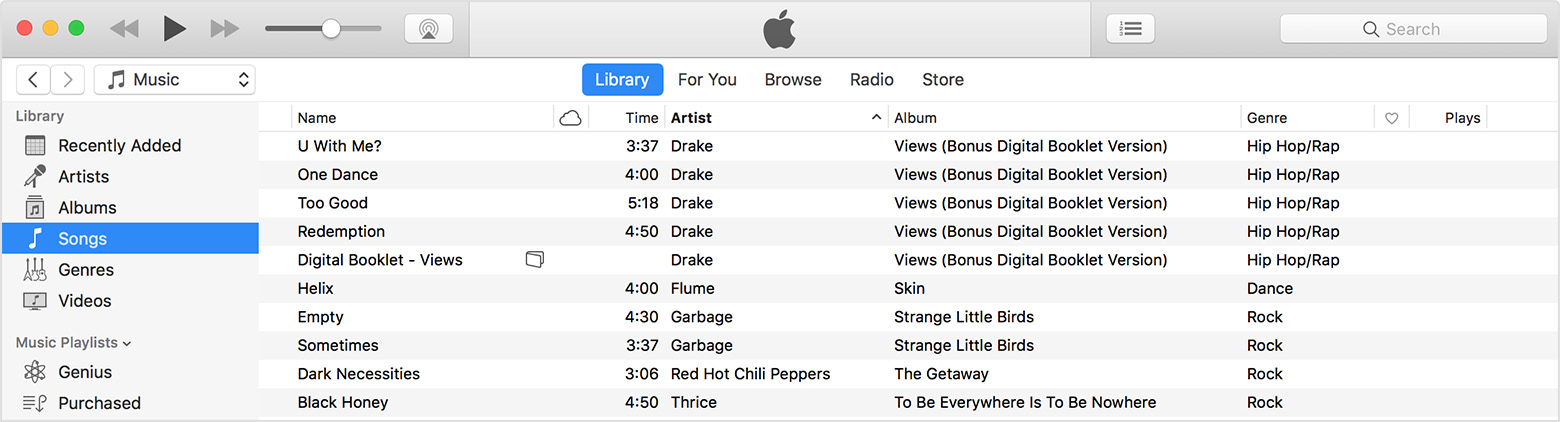
When an album includes an iTunes Digital Booklet, you can download and view it on your Mac or PC in iTunes:
- Open iTunes and click Library.
- In the sidebar on the left side of the iTunes window, click Songs.
- Scroll through your purchases until you see the Digital Booklet icon.
- Double-click the booklet to view it. Depending on your settings, the booklet might open in a different program than iTunes.
I’ve tried all that already. The booklet isn’t showing up with the songs in my purchases—in fact, I’ve noticed this is happening for every album I purchase that includes a booklet from my iPhone, but when I purchase it from iTunes on my computer the booklet is added to my account as normal. I’m really kinda peeved because I specifically purchased this album from iTunes because the booklet was included; else I would have bought the physical CD in this case.
Report a problem
You can report a problem with any purchase that you've made in the last 90 days. Find the purchase that you need help with, then click Report a Problem and follow the onscreen steps. You might need to send us more information, contact the app developer, or download the item again.
If the purchases that you're trying to get help with don't appear in Report a Problem, or you aren't sure which Apple ID these charges were made with, check to make sure your email address has an Apple ID associated with it, then contact Apple Support.
If you use Family Sharing and need help with a shared item, ask the family member who initiated the purchase to complete these steps.
Learn how to get help with subscriptions and apps that unexpectedly quit, stop responding, or won't open.
Cannot download digital booklet