forgot restrictions passcode, how do i recover it?

i set up my sons 5S iphone with parental restrictions. Ive misplaced or forgotten the passcode. We didnt want him having access to alot of content just some music, texting and calling. So no internet, etc. I cant seem to disable find my iphone from the icloud. I ve tried to erase from the icloud, however it says it will occur once the device is connected to internet or comes back online. please help

iPhone 5s, iOS 11.1.2

Posted on Nov 30, 2017 10:18 PM

Reply
Question marked as Top-ranking reply

Posted on Jan 2, 2018 2:42 PM

From the last link I posted.


Erase your device with recovery mode to remove your passcode

If you've never synced with iTunes or set up Find My iPhone in iCloud, you'll need to use recovery mode to restore your device. This will erase the device and its passcode.

  1. Connect your iOS device to your computer and open iTunes. If you don't have a computer, borrow one from a friend, or go to an Apple Retail Store or Apple Authorized Service Provider.
  2. While your device is connected, force restart it:
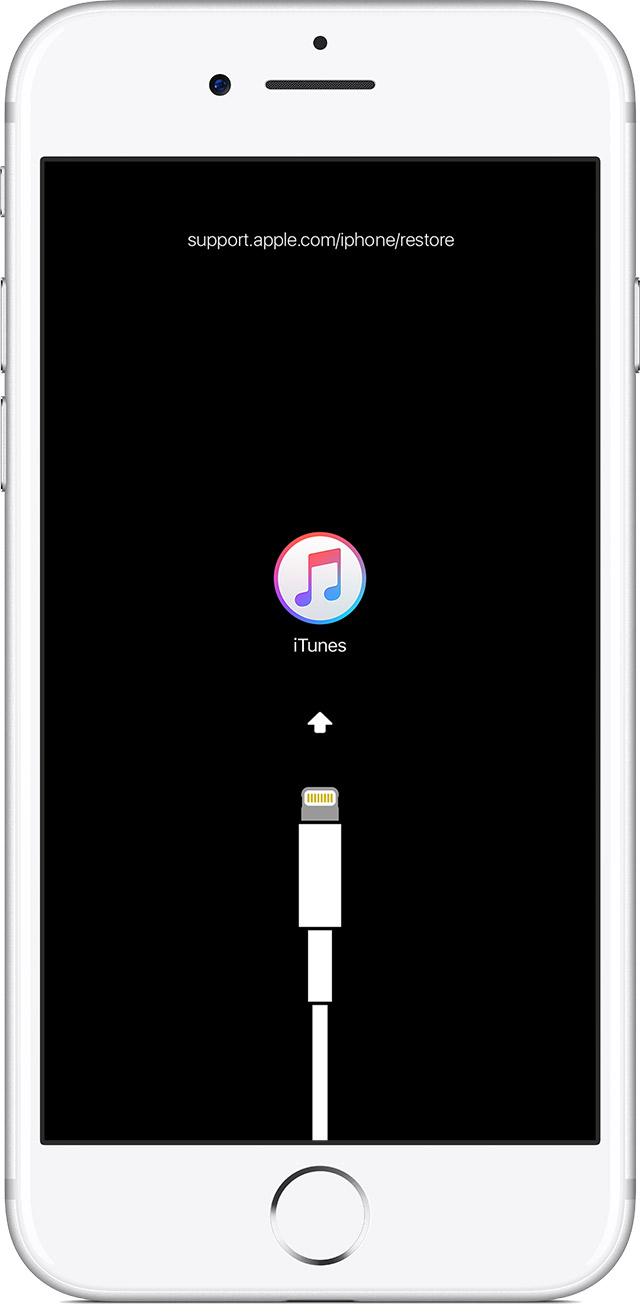
    • On an iPhone X, iPhone 8, or iPhone 8 Plus: Press and quickly release the Volume Up button. Press and quickly release the Volume Down button. Then, press and hold the Side button until you see the recovery-mode screen.
    • On an iPhone 7 or iPhone 7 Plus: Press and hold both the Side and Volume Down buttons at the same time. Keep holding them until you see the recovery-mode screen.
    • On an iPhone 6s and earlier, iPad, or iPod touch: Press and hold both the Home and the Top (or Side) buttons at the same time. Keep holding them until you see the recovery-mode screen.
      User uploaded file
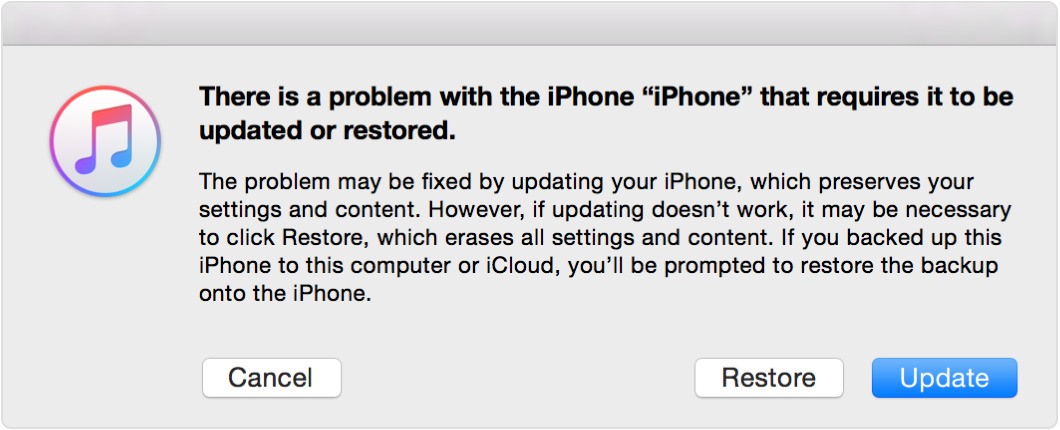
  3. When you see the option to Restore or Update, choose Restore.
    User uploaded file
    iTunes will download software for your device. If it takes more than 15 minutes, your device will exit recovery mode and you'll need to repeat steps 2 and 3.
  4. Wait for the process to finish. Then you can set up and use your device.
3 replies
Question marked as Top-ranking reply

Jan 2, 2018 2:42 PM in response to sparkles3248

From the last link I posted.


Erase your device with recovery mode to remove your passcode

If you've never synced with iTunes or set up Find My iPhone in iCloud, you'll need to use recovery mode to restore your device. This will erase the device and its passcode.

  1. Connect your iOS device to your computer and open iTunes. If you don't have a computer, borrow one from a friend, or go to an Apple Retail Store or Apple Authorized Service Provider.
  2. While your device is connected, force restart it:
    • On an iPhone X, iPhone 8, or iPhone 8 Plus: Press and quickly release the Volume Up button. Press and quickly release the Volume Down button. Then, press and hold the Side button until you see the recovery-mode screen.
    • On an iPhone 7 or iPhone 7 Plus: Press and hold both the Side and Volume Down buttons at the same time. Keep holding them until you see the recovery-mode screen.
    • On an iPhone 6s and earlier, iPad, or iPod touch: Press and hold both the Home and the Top (or Side) buttons at the same time. Keep holding them until you see the recovery-mode screen.
      User uploaded file
  3. When you see the option to Restore or Update, choose Restore.
    User uploaded file
    iTunes will download software for your device. If it takes more than 15 minutes, your device will exit recovery mode and you'll need to repeat steps 2 and 3.
  4. Wait for the process to finish. Then you can set up and use your device.

Jan 2, 2018 2:05 PM in response to Eric Root

Okay, so the next problem is How do I erase my device without the restrictions passcode? When I try to erase my device, it first asks for my general passcode; then, it asks for my restrictions passcode. Without the restrictions passcode, it won't let me erase it. To sum it up, to reset my restrictions passcode because I don't remember it, I must erase my iPad, but I cannot erase my iPad without the restrictions passcode. Quite the conundrum. Got any advice on how to erase the iPad without the restrictions passcode?

This thread has been closed by the system or the community team. You may vote for any posts you find helpful, or search the Community for additional answers.

forgot restrictions passcode, how do i recover it?

Welcome to Apple Support Community
A forum where Apple customers help each other with their products. Get started with your Apple Account.