Hi Jaffa,
Does the order of the numbers count?
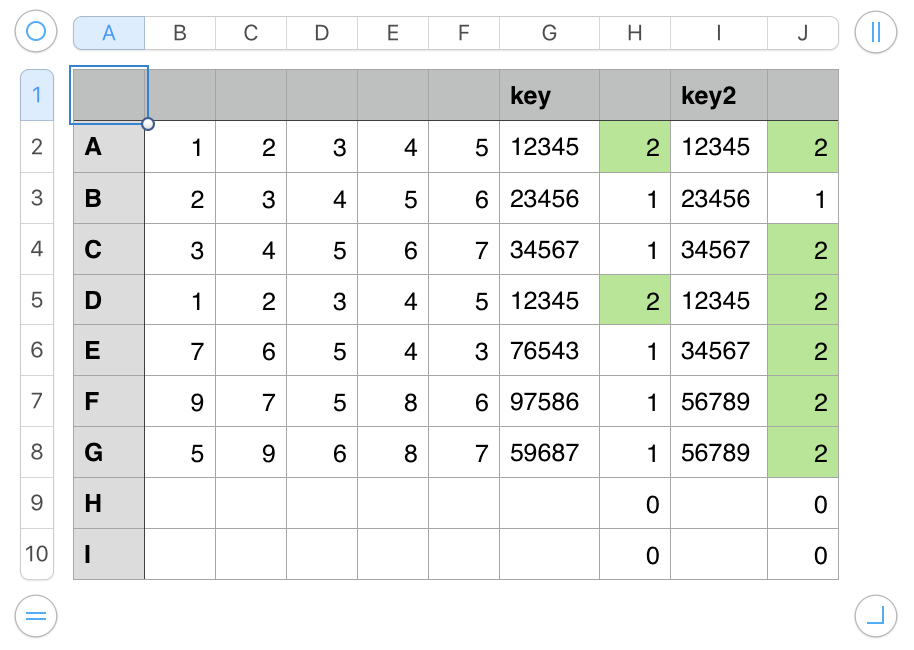
In the example, column H indicates only two rows, "A" and "D" are duplicates,
while column J indicates that every row except "B" contains the same numbers as one other row.
Both H and J use COUNTIF to check for duplicates in the 'key' column to their immediate left:
H2: COUNTIF(G,G2) J2: COUNTIF(I,I2)
Fill down to last row in table.
The Key formula in column G concatenates the contents of the cells in its row of columns B to F, into a text string including all the digits in the order they appear in the columns.
G2: B&C&D&E&F
The Key formula in column I reads all the numbers in its row of columns B to F, then returns them in order from smallest to least small, concatenating those results into a single text string of the numbers in ascending order.
I2:
IF(COUNT(B2:F2)<5,"",SMALL(B2:F2,1)&SMALL(B2:F2,2)&SMALL(B2:F2,3)&SMALL(B2:F2,4)&SMALL(B2:F2,5))
The sort and concatenation are done by the part of the formula in bold. The rest is a switch that prevents the calculation from happening until there are five entries in the five cells in columns B to F on that row.
Regards,
Barry

