How can I exclude Gmail draft emails when searching in Mail?

Mail on my MacBook syncs with my Gmail account.


Using Mail today, I noticed when searching for emails from a particular person, that the results also included draft emails that Gmail seems to generate (i.e. Gmail seems to automatically save as you type an email, thus generating these draft emails).


Is there a way to exclude these "Gmail drafts" from the search results in Mail?


macOS Sierra 10.12.6

Mail 10.3 (3273)


Thanks

Posted on Jan 17, 2018 8:06 PM

Reply
Question marked as Top-ranking reply

Posted on Jan 18, 2018 3:20 PM

Hi another_steve,

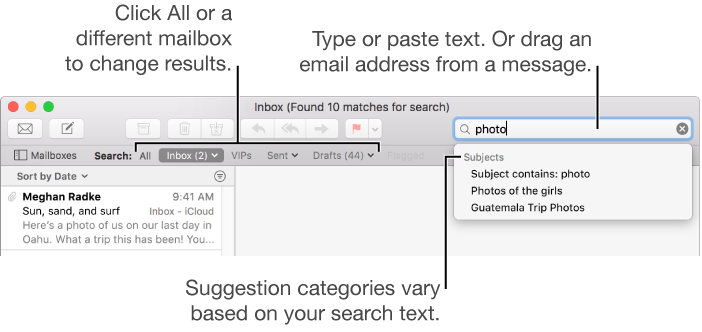
Thanks for reaching out in Apple Support Communities. I understand that you're searching for mail from a certain contact but when you search you're seeing draft emails that Gmail has saved appearing as well. I know it's important to be able to search for mail quickly and efficiently; I'd like to help. It sounds like when you're searching Mail is looking at all messages for your Gmail account. You can select to search just the Inbox for your Gmail account and this should only show results from mail received in your Inbox:

User uploaded file

Tip: If you know you want to search in specific mailboxes, select them in the Mail sidebar before you start.


You can also use filters such as "From" when searching by using these steps:

Search using Mail suggestions and filters

  1. Start typing your search phrase, then choose one of the suggestions Mail provides.

    Mail creates a search filter in the search field and lists the matching messages it found in the selected mailbox.

  2. To refine the results, do any of the following:


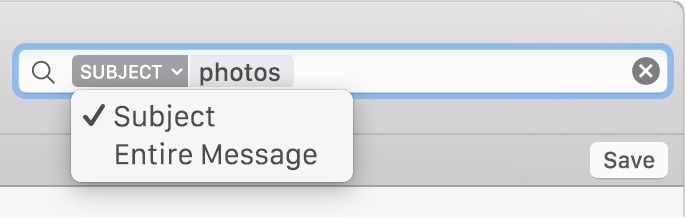
    Change search filters: If a search filter contains an arrow, you can click it to change the filter. For example, you can change a filter to search for messages to or from a certain person, or search subject lines or entire messages.

    User uploaded file

You can also check out more information regarding methods you can use to search Mail for messages here: Mail for macOS Sierra: Search for messages in Mail


Best Regards.
2 replies
Question marked as Top-ranking reply

Jan 18, 2018 3:20 PM in response to another_steve

Hi another_steve,

Thanks for reaching out in Apple Support Communities. I understand that you're searching for mail from a certain contact but when you search you're seeing draft emails that Gmail has saved appearing as well. I know it's important to be able to search for mail quickly and efficiently; I'd like to help. It sounds like when you're searching Mail is looking at all messages for your Gmail account. You can select to search just the Inbox for your Gmail account and this should only show results from mail received in your Inbox:

User uploaded file

Tip: If you know you want to search in specific mailboxes, select them in the Mail sidebar before you start.


You can also use filters such as "From" when searching by using these steps:

Search using Mail suggestions and filters

  1. Start typing your search phrase, then choose one of the suggestions Mail provides.

    Mail creates a search filter in the search field and lists the matching messages it found in the selected mailbox.

  2. To refine the results, do any of the following:


    Change search filters: If a search filter contains an arrow, you can click it to change the filter. For example, you can change a filter to search for messages to or from a certain person, or search subject lines or entire messages.

    User uploaded file

You can also check out more information regarding methods you can use to search Mail for messages here: Mail for macOS Sierra: Search for messages in Mail


Best Regards.

Jan 18, 2018 7:34 PM in response to sterling r

Thanks for your message sterling r, particularly the link Mail for macOS Sierra: Search for messages in Mail, I learnt a lot!


If I search for the recipient's name, e.g. "Uncle Bob", rather than "from Uncle Bob", the results include messages which I outlined in my original post. However, I notice I am unable to find the exact same message when I log into Gmail via my browser, which makes me suspect there is some sort of caching issue.

This thread has been closed by the system or the community team. You may vote for any posts you find helpful, or search the Community for additional answers.

How can I exclude Gmail draft emails when searching in Mail?

Welcome to Apple Support Community
A forum where Apple customers help each other with their products. Get started with your Apple Account.