
how to cancel apple music subscription

How to cancel apple subscription

Posted on Jan 21, 2018 11:54 PM

Reply
Question marked as Top-ranking reply

Posted on Jan 21, 2018 11:59 PM

Hi keabird, please see the following:


Cancel your subscription

You can cancel Apple Music on your iPhone, iPad or iPod touch; your Mac or PC; or your Apple TV.

If you cancel during your trial period, you'll continue to have access to the entire Apple Music catalog until the date that you would have been billed for the full price.

Your subscription might renew if you don't cancel more than 24 hours before your renewal date.

On your iPhone, iPad, or iPod touch

To view your subscription, tap this link: View my subscription. Or follow these steps:

  1. Open the Music app, then tap For You.
  2. Tap the profile icon User uploaded file or your photo in the upper-right corner.
  3. Scroll to the bottom of your profile page and tap View Account. If you haven't set up an Apple Music profile, skip to step 4.
  4. Tap View Apple ID. You might be asked to authenticate your Apple ID.
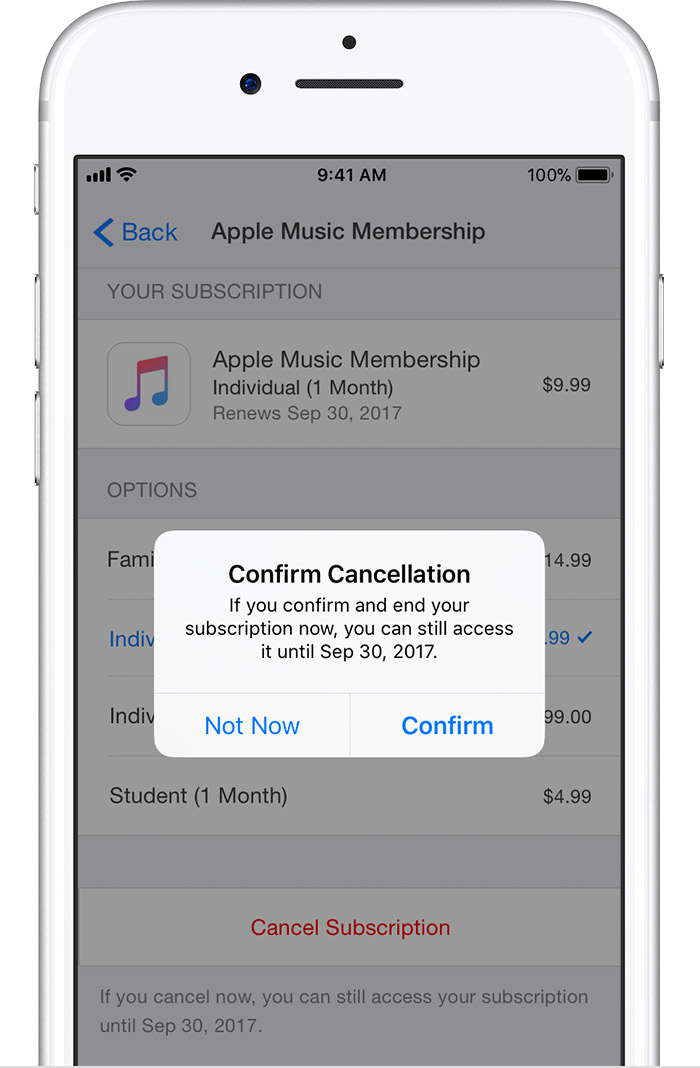
  5. Scroll to Subscriptions and tap it, then tap Apple Music. If you don't have any other subscriptions, you'll go straight to Apple Music.
  6. Tap Cancel Subscription, then tap Confirm. After you cancel, your subscription will stop at the end of the current billing cycle.User uploaded file

Carrier-bundled subscriptions are managed through the carrier. Contact your carrier to cancel.

1 reply
Question marked as Top-ranking reply

Jan 21, 2018 11:59 PM in response to Keabird2018

Hi keabird, please see the following:


Cancel your subscription

You can cancel Apple Music on your iPhone, iPad or iPod touch; your Mac or PC; or your Apple TV.

If you cancel during your trial period, you'll continue to have access to the entire Apple Music catalog until the date that you would have been billed for the full price.

Your subscription might renew if you don't cancel more than 24 hours before your renewal date.

On your iPhone, iPad, or iPod touch

To view your subscription, tap this link: View my subscription. Or follow these steps:

  1. Open the Music app, then tap For You.
  2. Tap the profile icon User uploaded file or your photo in the upper-right corner.
  3. Scroll to the bottom of your profile page and tap View Account. If you haven't set up an Apple Music profile, skip to step 4.
  4. Tap View Apple ID. You might be asked to authenticate your Apple ID.
  5. Scroll to Subscriptions and tap it, then tap Apple Music. If you don't have any other subscriptions, you'll go straight to Apple Music.
  6. Tap Cancel Subscription, then tap Confirm. After you cancel, your subscription will stop at the end of the current billing cycle.User uploaded file

Carrier-bundled subscriptions are managed through the carrier. Contact your carrier to cancel.

This thread has been closed by the system or the community team. You may vote for any posts you find helpful, or search the Community for additional answers.

how to cancel apple music subscription

Welcome to Apple Support Community
A forum where Apple customers help each other with their products. Get started with your Apple Account.