iPhone 8plus - freezing

Are there any known issues with iOS 11.2.5? Every since this last update my phone freezes to the point that I have to do a hard reboot. At first I thought it might have been an issue with my apps but it’s happened while using the calculator, Facebook, during phone calls, using my contacts...it’s beginning to frustrate me. Any help or suggestions is greatly appreciated!

Posted on Feb 6, 2018 7:52 PM

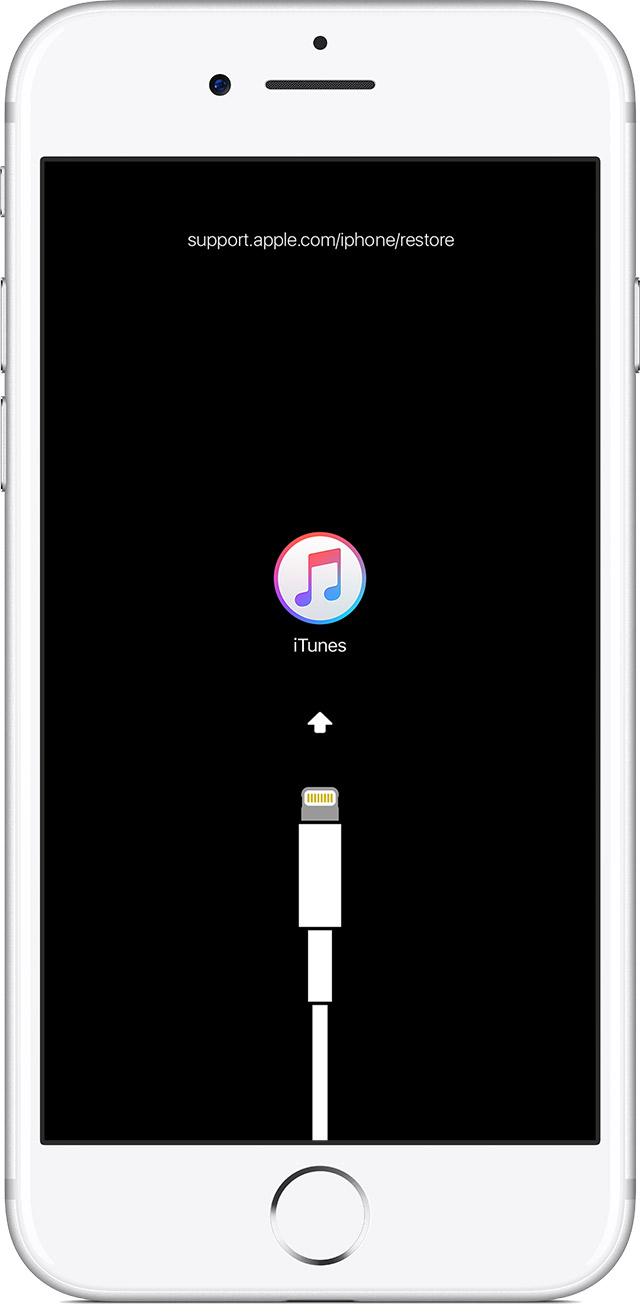
Reply
Question marked as Top-ranking reply

Posted on Feb 7, 2018 12:47 AM

Hi there,

It appears your last software update may have not gone through properly, which is a fairly common occurrence due to cellular and wifi interruptions that occur unbeknownst to us during the update process and/or other disruptions while updating, such as incoming or outgoing data, calls, or General use of the device during an update.


Try to update in recovery mode using the latest version of iTunes to help resolve the issue. If it should persist, contact Apple support:


  1. Connect your device to a computer and open iTunes. If you don't have a computer, try to borrow one, or go to an Apple Store or Apple Authorized Service Provider for help.
  2. While your device is connected, force it to restart.
    • On an iPhone X, iPhone 8, or iPhone 8 Plus: Press and quickly release the Volume Up button. Press and quickly release the Volume Down button. Then, press and hold the Side button until you see the recovery-mode screen.
    • On an iPhone 7 or iPhone 7 Plus: Press and hold the Side and Volume Down buttons at the same time. Keep holding them until you see the recovery-mode screen.
    • On an iPhone 6s and earlier, iPad, or iPod touch: Press and hold both the Home and the Top (or Side) buttons at the same time. Keep holding them until you see the recovery-mode screen.
  3. Don't release the buttons when you see the Apple logo. Keep holding until you see the recovery mode screen.User uploaded file
  4. When you get the option to restore or update, choose Update. iTunes will try to reinstall iOS without erasing your data.User uploaded file

iTunes will download the software for your device. If it takes more than 15 minutes, your device will exit recovery mode and you'll need to repeat steps 2 and 3.


2 replies
Question marked as Top-ranking reply

Feb 7, 2018 12:47 AM in response to Mrsaclawson

Hi there,

It appears your last software update may have not gone through properly, which is a fairly common occurrence due to cellular and wifi interruptions that occur unbeknownst to us during the update process and/or other disruptions while updating, such as incoming or outgoing data, calls, or General use of the device during an update.


Try to update in recovery mode using the latest version of iTunes to help resolve the issue. If it should persist, contact Apple support:


  1. Connect your device to a computer and open iTunes. If you don't have a computer, try to borrow one, or go to an Apple Store or Apple Authorized Service Provider for help.
  2. While your device is connected, force it to restart.
    • On an iPhone X, iPhone 8, or iPhone 8 Plus: Press and quickly release the Volume Up button. Press and quickly release the Volume Down button. Then, press and hold the Side button until you see the recovery-mode screen.
    • On an iPhone 7 or iPhone 7 Plus: Press and hold the Side and Volume Down buttons at the same time. Keep holding them until you see the recovery-mode screen.
    • On an iPhone 6s and earlier, iPad, or iPod touch: Press and hold both the Home and the Top (or Side) buttons at the same time. Keep holding them until you see the recovery-mode screen.
  3. Don't release the buttons when you see the Apple logo. Keep holding until you see the recovery mode screen.User uploaded file
  4. When you get the option to restore or update, choose Update. iTunes will try to reinstall iOS without erasing your data.User uploaded file

iTunes will download the software for your device. If it takes more than 15 minutes, your device will exit recovery mode and you'll need to repeat steps 2 and 3.

This thread has been closed by the system or the community team. You may vote for any posts you find helpful, or search the Community for additional answers.

iPhone 8plus - freezing

Welcome to Apple Support Community
A forum where Apple customers help each other with their products. Get started with your Apple Account.