
The function "Type accented characters" doesn't work anymore for me since I installed High Sierra 10.13.3. I didn't change anything in the settings... Any ideas?
The following function worked previously for me, but since the latest update to High Sierra 10.13.3 it doesn't work anymore 😟
Thanks for the help!
Type accented characters
To type an accented or alternate version of a character, hold a key down until its alternate characters are displayed.
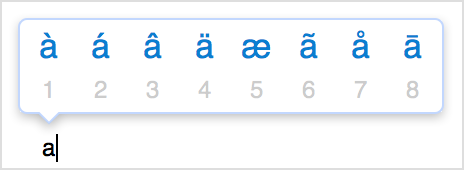
To choose one of the characters displayed, type the number that appears under the character, or click the character you want to use. If you decide you don't want to type an accented character after holding a key, type another character, or press the escape (esc) key.
If no additional characters are available for the key you're holding, the pop-over menu doesn't appear. The menu also doesn't appear when the Key Repeat slider is set to Off in the Keyboard pane of System Preferences.
macOS High Sierra (10.13.3)
