Heart rate monitor on watch is taking a long time to get readings now.

Lately, I have noticed a decrease in efficiency of my heart rate monitor.


It is consistently waiting over a minute to show new readings (in the past, it was within 4-10 seconds usually when I have it in constant monitoring mode). When I stand up, my watch is taking a minute to several minutes sometimes to locate or update the heart rate. I have confirmed this by looking into the health app and confirming that there are no readings.


This is very problematic for me as I have been using this to monitor a heart rate issue, so I am VERY certain of the changes that have taken place. I thought it might correct with a new 'update', but I have had 2 updates since I noticed this starting to happen, and it is not any better now.


Answers to possible questions you might wonder:

1. Am I using it in constinual monitor mode: yes (I know it doesn't take readings as often in 'normal' mode and I am CERTAIN it is in continual mode when I am watching this.


2. Do I have most recent updates: Yes, I have been watching for them in hopes that it would help correct the situation.


3. Is it delayed only when first starting continual mode:: Yes and no. It is taking much longer to get the first readings when I start continual mode now. But even when I leave it in continual mode (except for frequent batter charging because of leaving it in this mode) it is STILL not taking frequent readings. I will lift my arm to look at reading and it will display a reading from 20 secs ago and never change before light goes out. I will lift again and the time is still just increasing with no change in reading. In the past, it was usually only a few seconds, maybe sometimes 10 secs.... Now, It will go over a minute without displaying a reading.


4. Is it getting readings and just not displaying them on the watch: I thought this might have been the case, so I checked all the readings in the health app and watched the time I started the monitor on continuous mode and compared it to the readings in the health app. There a definitely times that there is over a minute of NO readings when starting the mode and a gap in reading when I stand up and walk around (when I notice the gap on my watch from walking around, I have held my arm very still to make sure it wasn't caused by motion. Even with no movement at all, it still doesn't create a fast reading, so I know it's not the motion of walking).


Those are the questions I came up with and have already checked into. If you have any others, I will gladly try them because I really need these readings to monitor a health situation.


Thanks

Posted on Feb 9, 2018 1:56 AM

Reply

Similar questions

10 replies

Feb 9, 2018 4:10 PM in response to tricia38

Hello tricia38,

Thanks for the information. Since the Apple Watch has all of the most recent updates, you have restarted a couple times, and the watch is fit correctly, you may want to make a fresh start. During the unpairing process, it creates a backup of the Apple Watch. Setup the Apple Watch as new and see if the issue persists. You can Also restore the Apple Watch from the backup.


Disconnect your devices

  1. Keep your Apple Watch and iPhone close together as you unpair them.
  2. Open the Apple Watch app on your iPhone.
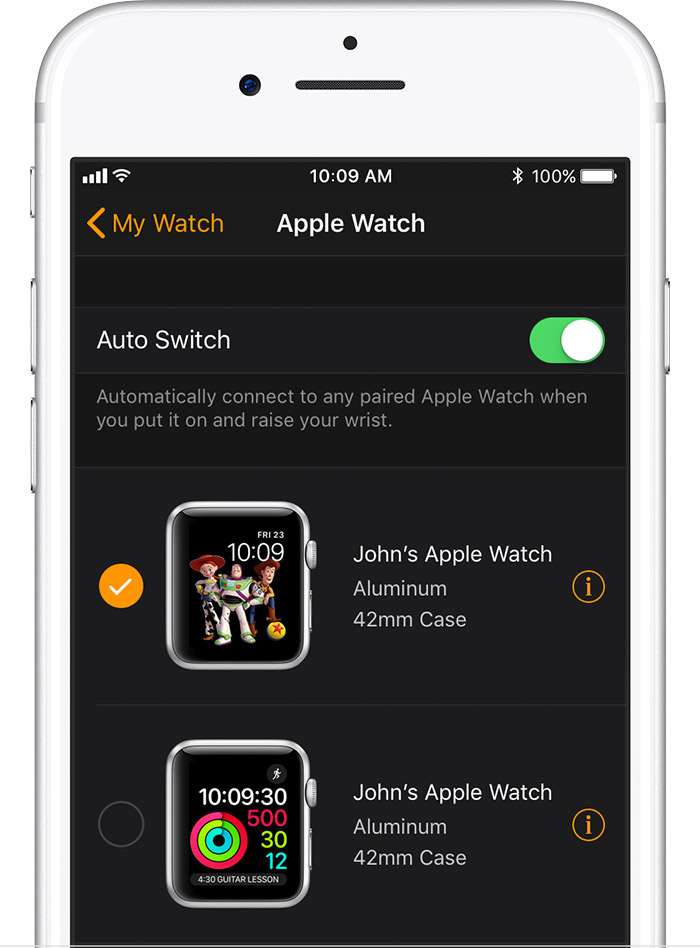
  3. Go to the My Watch tab and tap your watch at the top of the screen.
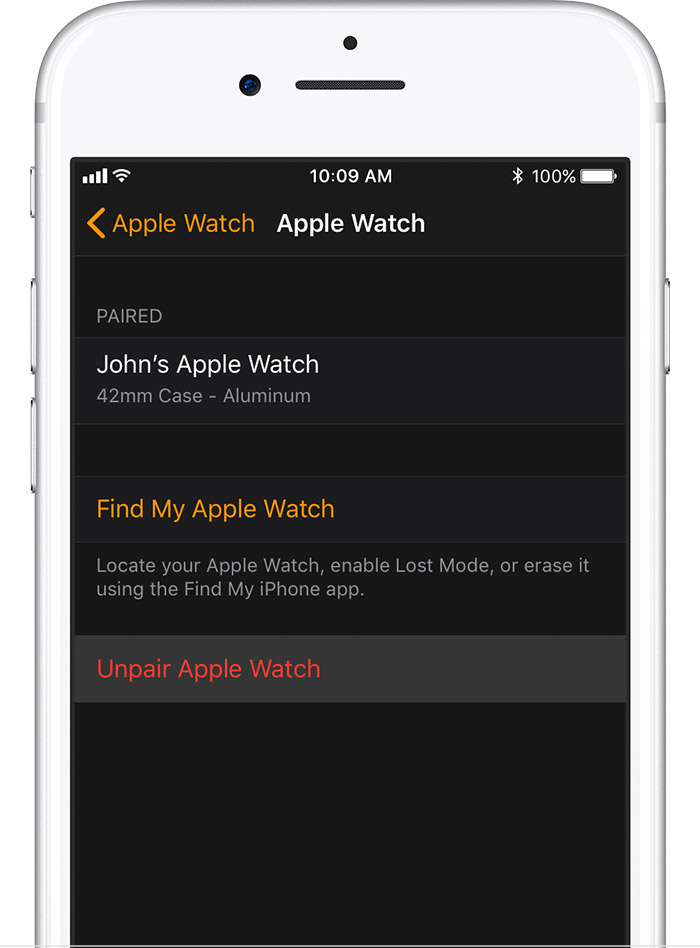
  4. Tap User uploaded file next to the watch that you want to unpair.
    User uploaded file
  5. Tap Unpair Apple Watch.
    User uploaded file
  6. For Apple Watch Series 3 (GPS + Cellular), choose to keep or remove your cellular plan.
    • If you want to pair your Apple Watch and iPhone again, keep your plan.
    • If you don't want to pair your Apple Watch and iPhone again, remove your plan. If you aren't going to pair with a different watch or iPhone, you might need to contact your carrier to cancel your cellular subscription.
  7. Tap again to confirm. You might need to enter your Apple ID password to disable Activation Lock. Before erasing all content and settings on your Apple Watch, your iPhone creates a new backup of your Apple Watch. You can use the backup to restore a new Apple Watch. After your Apple Watch unpairs, you'll see the Start Pairing message.
  8. Use these steps to set up your Apple Watch again.

Unpair your Apple Watch and iPhone


Have a nice day.

Feb 9, 2018 2:11 PM in response to tricia38

Hey tricia38,

If I understand correctly, you updated watchOS and now it takes a while for it to display your heart rate. Since you have installed a few updates, one thing you may want to try is restarting the Apple Watch. Also, there is some additional information about how the Apple Watch takes the readings.


Restart your Apple Watch

  1. Press and hold the side button until you see the Power Off slider.
  2. Drag the slider to turn off your device.
  3. After your watch turns off, press and hold the side button again until you see the Apple logo.

If your Apple Watch is charging, take it off the charger first. When your watch is charging, you can't restart it.

How to restart your Apple Watch


For best results

Start with a good fit. Even under ideal conditions, Apple Watch may not be able to get a reliable heart rate reading every time for everybody. And for a small percentage of users, various factors may make it impossible to get any heart rate reading at all. But there are things you can do to help Apple Watch get the most consistent and best heart rate readings possible. Learn what else affects your reading.

Your heart rate. What it means, and where on Apple Watch you’ll find it.

Thank you for using Apple Support Communities. Have a good one.

Feb 9, 2018 3:45 PM in response to CarlAVII

Thank you for the attempt to help here. I must have forgotten to say that I have already reset and even did it again last night because the watch actually locked up on me and wouldn't go past the apple screen.


This isn't going to be about the 'fit' or it's ability to read me because, as I mentioned, it used to work great. That is how I know there is something wrong now. Because I watch it closely due to heart issues, I am VERY familiar with how it operates. I even ordered a different band that is a little more stretchy then that original and uses velcro, so I get a good snuck fit.


It might have begun after an update, but if it did, I waited through at least 3 updates before coming here because I thought maybe the problem was because of an update and that a future update would correct it.


I would sure love help with this though, I rely on this feature greatly.

Feb 12, 2018 3:31 PM in response to sterling r

Thank you so much for the suggestion. I DID do exactly as you displayed above and it didn't fix the issue. I have waited and watched the watch for the last couple of days and it is still taking long amounts of time in relation to the heart rate. I have noticed that it is at it's worst now whenever my heart rate jumps, if I stand or walk around. It is NOT from movement causing it to be unable to read because it use to do GREAT taking readings even if I was cleaning house and moving my arms around. Plus, I will stop moving and stand perfectly still and it STILL takes over a minute sometimes for it to begin taking readings again.


I have taken some video of what it is doing. If this had been that way from the beginning, I would have just purchased some other type of device because I would have assumed the apple watch wouldn't work for my needs. But it was doing a wonderful job until just recently and these 'high' heart rate readings are the most important part. So, for it to be 'stopping' taking readings when it goes high, I can no longer see how high my heart rate is actually getting.


I am sure open to any other ideas and if interested and if it is possible, I can provide the videos. Here is a picture at least where you can see that at one point, it was waiting over 4 minutes before it got a reading again. I had NOT been doing anything strenuous or making many movements, just walking around the house. I became short of breath and wanted to see where the heart rate was at that moment (I keep the watch in continual mode, so I had NOT just turned continual mode on.). User uploaded file

Feb 12, 2018 3:47 PM in response to mario49

Thank you for your help. I did try the method suggested and am still having the issue. I explained more and attached a photo in the reply to the comment above.


I would sure appreciate any help because I really need this aspect of my watch to function properly as this is the main reason I purchased the Iwatch and moved from Samsung to Apple for my cellular phone. I need to maintain a watch on heart rate and how high it goes (I know this is NOT a medical device, but until recently, it was performing just as I needed.) I have no idea what might have happened to cause this issue, but I sure hope there is a solution.


Thank you again for your time and assistance.

This thread has been closed by the system or the community team. You may vote for any posts you find helpful, or search the Community for additional answers.

Heart rate monitor on watch is taking a long time to get readings now.

Welcome to Apple Support Community
A forum where Apple customers help each other with their products. Get started with your Apple Account.