See this article Bookmark your favorite webpages in Safari on Mac - Apple Support
Note: Safari uses iCloud to keep your bookmarks the same on all your Mac computers and iOS devices that have Safari turned on in iCloud preferences. With iCloud, your bookmarks and Reading List are archived automatically, and you can restore them from an earlier version at any time.
In safari bookmark side bar hold shift key , and select the desired number of book marks , take cursor on top menu bar > edit and click on delete , they will be deleted in one stroke .
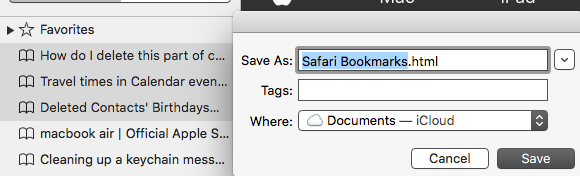
To export bookmarks , you have to select them , take cursor on top menu bar > file > export bookmarks and you have to decide to which location they should get saved in finder > iCloud Drive > documents or can create a new folder and add bookmarks in it .Click on drop down arrow of where as in screen shot and choose the location .And regarding re sync the new ones and delete the old ones see this article iCloud: Restore your contacts, calendars and reminders, or bookmarks